# io.Connect Browser 4.0
Source: https://docs.interop.io/browser/getting-started/changelog/4-0/index.html
## io.Connect Browser 4.0
*Release date: 24.06.2025*
Versions of all main and additional libraries of **io.Connect Browser** for the current release:
| Library | Version |
|---------|---------|
| [`@interopio/browser`](https://www.npmjs.com/package/@interopio/browser) | 4.0 |
| [`@interopio/browser-platform`](https://www.npmjs.com/package/@interopio/browser-platform) | 4.0 |
| [`@interopio/browser-worker`](https://www.npmjs.com/package/@interopio/browser-worker) | 4.0 |
| [`@interopio/cli`](https://www.npmjs.com/package/@interopio/cli) | 4.0 |
| [`@interopio/fdc3`](https://www.npmjs.com/package/@interopio/fdc3) | 2.6 |
| [`@interopio/home-ui-react`](https://www.npmjs.com/package/@interopio/home-ui-react) | 2.0 |
| [`@interopio/intent-resolver-ui`](https://www.npmjs.com/package/@interopio/intent-resolver-ui) | 1.0 |
| [`@interopio/modals-api`](https://www.npmjs.com/package/@interopio/modals-api) | 1.0 |
| [`@interopio/modals-ui`](https://www.npmjs.com/package/@interopio/modals-ui) | 1.0 |
| [`@interopio/ng`](https://www.npmjs.com/package/@interopio/ng) | 5.5 |
| [`@interopio/react-hooks`](https://www.npmjs.com/package/@interopio/react-hooks) | 4.0 |
| [`@interopio/search-api`](https://www.npmjs.com/package/@interopio/search-api) | 3.0 |
| [`@interopio/theme`](https://www.npmjs.com/package/@interopio/theme) | 3.0 |
| [`@interopio/widget`](https://www.npmjs.com/package/@interopio/widget) | 3.0 |
| [`@interopio/workspaces-api`](https://www.npmjs.com/package/@interopio/workspaces-api) | 4.0 |
| [`@interopio/workspaces-ui-react`](https://www.npmjs.com/package/@interopio/workspaces-ui-react) | 4.0 |
| [`@interopio/workspaces-ui-web-components`](https://www.npmjs.com/package/@interopio/workspaces-ui-web-components) | 2.0 |
## Breaking Changes
> ⚠️ *Note that each breaking change is listed under all libraries it affects.*
- The process of generating license keys for **io.Connect Browser** has been altered and licenses generated before 8 November 2024 are no longer supported. The encryption of the new license keys provides significantly improved security. All new license keys are now bound to a specific client origin which will prevent running the platform from another origin in case a license key has been stolen from a client. To update your existing license key, contact us at `sales@interop.io`.
- The io.Connect [Home App](https://docs.interop.io/browser/capabilities/home-app/overview/index.md) and the system apps of **io.Connect Browser** ([Workspaces App](https://docs.interop.io/browser/capabilities/windows/workspaces/workspaces-app/index.md), [Intent Resolver](https://docs.interop.io/browser/capabilities/data-sharing/intents/overview/index.md#intent_resolver), and [widget](https://docs.interop.io/browser/capabilities/widget/index.md)) have been redesigned with the goal of improving the UI and providing smoother user experience, which necessitated introducing breaking changes in the following libraries.
> ⚠️ *Note that the legacy implementations of the system apps of **io.Connect Browser** (Workspaces App, Intent Resolver, and widget) are still supported and will work in the latest version of **io.Connect Browser**.*
> ### @interopio/browser
>
> - The [`publish()`](https://docs.interop.io/browser/reference/javascript/channels/api/index.md#API-publish) method of the [Channels API](https://docs.interop.io/browser/capabilities/data-sharing/channels/index.md) now won't throw an error when the current window is joined to multiple Channels, but it's restricted from publishing data to one or more of the joined Channels. The data is now populated in each Channel where possible.
> - Deprecated the `intents` property of the configuration object for initializing the `@interopio/browser` library that was previously used for configuring the legacy Intent Resolver.
> ### @interopio/home-ui-react
>
> The [Home App](https://docs.interop.io/browser/capabilities/home-app/overview/index.md) has been redesigned in order to enhance the user experience and improve the UI.
>
> #### Home App Config
>
> The function passed to the `getIOConnectConfig` property of the `config` object for the `` component now accepts as an argument an object with `type` and `user` properties instead of an object describing the logged in user. The `type` property holds a string value indicating the type of the [authentication](https://docs.interop.io/browser/capabilities/home-app/library-features/index.md#using_the_components-authentication) process used for the Home App (i.e., the value of the `type` property of the `login` object in the Home App configuration) and the `user` property is an object describing the logged in user.
>
> The `user` object can be used to extract the necessary authentication details for initializing the Main app (e.g., if your Main app is [connected to **io.Manager**](https://docs.interop.io/browser/capabilities/manager/index.md)) and also to provide user details to be displayed in the [Profile panel](https://docs.interop.io/browser/capabilities/home-app/overview/index.md#using_the_home_app-profile_panel) of the Home App:
>
> ```javascript
> import { IOConnectHome } from "@interopio/home-ui-react";
> import IOWorkspaces from "@interopio/workspaces-api";
> import IOModals from "@interopio/modals-api";
> import "@interopio/workspaces-ui-react/dist/styles/workspaces.css";
> import "@interopio/home-ui-react/src/index.css";
>
> const getConfig = ({ type, user }) => {
> // Extracting the user details.
> const { id, username, password, firstName, lastName, email } = user;
>
> // Platform configuration.
> const platformConfig = {
> browserPlatform: {
> factory: IOBrowserPlatform,
> config: {
> // Required license key.
> licenseKey: "my-license-key",
> // Workspaces App configuration.
> workspaces: {
> src: "/",
> isFrame: true
> },
> // Modal windows are required for the Launchpad.
> modals: {
> sources: {
> bundle: "https://my-modals/modals-bundle.js",
> styles: ["https://my-modals/styles.css", "https://example.com/custom-styles.css"],
> fonts: ["https://my-modals/fonts.css"]
> }
> },
> browser: {
> // Enabling the Workspaces and Modals APIs.
> libraries: [IOWorkspaces, IOModals],
> // Enabling the Main app to use modal windows.
> modals: {
> alerts: {
> enabled: true
> },
> dialogs: {
> enabled: true
> }
> }
> },
> // Connection to io.Manager using Basic authentication.
> manager: {
> url: "https://my-io-manager.com:4242/api",
> auth: {
> basic: {
> // Extracted user details from the `user` object.
> username,
> password
> }
> },
> critical: true
> },
> // User details that will be displayed in the Profile panel.
> user: {
> id,
> username,
> firstName,
> lastName,
> email
> }
> }
> }
> };
>
> return platformConfig;
> };
>
> // Configuration for the `` component.
> const config = {
> // Retrieve the platform configuration.
> getIOConnectConfig: getConfig,
> // Login settings.
> login: {
> type: "simple",
> onLogin: async (username, password) => {
> // Custom validation logic.
> const { firstName, lastName, email } = await validateUser(username, password);
> const user = {
> id: username,
> username,
> password,
> firstName,
> lastName,
> email
> };
>
> return user;
> }
> }
> };
>
> const App = () => ;
>
> export default App;
> ```
>
> > ⚠️ *Note that enabling the [Modals API](https://docs.interop.io/browser/capabilities/windows/modals/modals-api/index.md) and configuring the [modal windows](https://docs.interop.io/browser/capabilities/windows/modals/setup/index.md) is mandatory for using the Launchpad.*
>
> #### Home App UI
>
> - The [Notification Panel](https://docs.interop.io/browser/capabilities/home-app/overview/index.md#using_the_home_app-notification_panel) is now located in the Home App header area instead of inside the Launchpad. The notification badge was removed from the Launchpad.
> - The User panel that used to be in the Launchpad was deprecated and is now replaced by the [Profile panel](https://docs.interop.io/browser/capabilities/home-app/overview/index.md#using_the_home_app-profile_panel) located in the system dropdown menu in the Home App header area.
> - Removed the "More" button from the Launchpad sections.
>
> #### Home App Components
>
> - Deprecated the `HeaderLogoArea` property of the `workspaces` object inside the `config` object for the `` component. To customize the Launchpad button, use the `LogoComponent` property of the `components` object inside the `workspaces` object instead.
> - Deprecated the `NotificationsPanel` and `UserPanel` properties of the `launchpad` object inside the `config` object for the `` component.
> - Deprecated the `Sections` property of the `launchpad` object inside the `config` object for the `` component. You can now use the `sections` property which accepts an array of objects describing the components for the default and any custom sections to be displayed in the Launchpad.
> - Deprecated the `iconName`, `iconSource`, `displayCount`, and `showAllItems` properties of the `config` object for the `` component for creating custom sections in the Launchpad.
> - The `isCollapsible` property of the `config` object for the `` component now defaults to `true`.
> - The following components are no longer exported by the library: ``, ``, ``, ``, ``, ``, ``, ``, ``, ``.
> ### @interopio/intents-resolver-api
>
> The [`@interopio/intents-resolver-api`](https://www.npmjs.com/package/@interopio/intents-resolver-api) library has been deprecated in **io.Connect Browser** in favor of the [`@interopio/intent-resolver-ui`](https://www.npmjs.com/package/@interopio/intent-resolver-ui) library.
> ### @interopio/intents-resolver-ui-react
>
> The [`@interopio/intents-resolver-ui-react`](https://www.npmjs.com/package/@interopio/intents-resolver-ui-react) library has been deprecated in **io.Connect Browser** in favor of the [`@interopio/intent-resolver-ui`](https://www.npmjs.com/package/@interopio/intent-resolver-ui) library.
> ### @interopio/widget
>
> The io.Connect [widget](https://docs.interop.io/browser/capabilities/widget/index.md) is now embedded in the client DOM instead of a standalone app.
>
> Due to the implications from using the shadow DOM for the embedded io.Connect widget, it's now required to provide the widget fonts in the [Main app](https://docs.interop.io/browser/developers/browser-platform/overview/index.md) configuration. Otherwise, the widget icons won't be displayed. The widget fonts are distributed with the [`@interopio/widget`](https://www.npmjs.com/package/@interopio/widget) library.
>
> To supply the fonts, use the `fonts` property of the `sources` object under the `widget` top-level key in the configuration object for initializing the [`@interopio/browser-platform`](https://www.npmjs.com/package/@interopio/browser-platform) library:
>
> ```javascript
> import IOBrowserPlatform from "@interopio/browser-platform";
>
> const config = {
> licenseKey: "my-license-key",
> widget: {
> // It's required to specify the locations of the widget bundle, styles, and fonts.
> sources: {
> bundle: "https://my-widget/widget-bundle.js",
> styles: ["https://my-widget/styles.css", "https://example.com/custom-styles.css"],
> fonts: ["https://my-widget/fonts.css"]
> }
> }
> };
>
> const { io } = await IOBrowserPlatform(config);
> ```
> ### @interopio/workspaces-ui-react
>
> > ⚠️ *Note that the following changes will be breaking for you only if you upgrade to version 4.0 or later of the [`@interopio/workspaces-ui-react`](https://www.npmjs.com/package/@interopio/workspaces-ui-react) library and:*
> >
> > - You have a custom Workspaces App in which you are using any of the affected default components provided by the `@interopio/workspaces-ui-react` library. In this case, your app won't build when you upgrade to the latest version of the library.
> > - You are using the default build of the Workspaces App and you have only customized it with CSS. In this case, your styles won't be applied when you upgrade to the latest version of the `@interopio/workspaces-ui-react` library.
> >
> > This is due to the fact that some legacy components have been deprecated, the HTML structure of others has been modified, and a new system with [CSS variables](#new_features-interopiotheme) has been introduced for styling the Workspaces App. If you have completely customized your Workspaces App (entirely replaced the affected default components with your own custom components), you shouldn't experience any issues when migrating to the latest version of the `@interopio/workspaces-ui-react` library.
> >
> > If you don't upgrade the `@interopio/workspaces-ui-react` library, your Workspaces App will still work in newer versions of **io.Connect Browser**.
>
> The following breaking changes have been made to the [`@interopio/workspaces-ui-react`](https://www.npmjs.com/package/@interopio/workspaces-ui-react) library:
>
> - The `` component has been renamed to `` and the legacy `` (version 1) has been removed.
> - The "Add Apps" button ("+" button) in the Workspace window group header has been moved to the left of the header, after the window tabs.
> - The legacy Glue42 CSS files have been removed.
> - The legacy `` component has been removed.
> - The legacy "Save Workspace" system popup has been removed. The "Save Workspace" popup has been replaced by a dialog that's part of the `` component and can be customized by customizing that component.
> - Changed the CSS classes for the `` component, for the background of an empty Workspace, and for the `` component.
> - Changed the tab sizing strategy.
> - Completely restructured the HTML and CSS of the "Add Apps" popup.
> - Completely restructured the HTML and CSS of the "Add Workspace" popup.
## Deprecated Platform Apps
> ### Intent Resolver UI
>
> The legacy Intent Resolver UI app that operates as a standalone window has been deprecated in **io.Connect Browser** in favor of a new Intent Resolver UI app that uses the new [`@interopio/intent-resolver-ui`](https://www.npmjs.com/package/@interopio/intent-resolver-ui) library and that operates embedded in the client DOM.
## New Features
> ⚠️ *Note that each new feature is listed under all libraries it affects.*
> ### @interopio/browser
>
> The following features are now available in the [`@interopio/browser`](https://www.npmjs.com/package/@interopio/browser) library:
>
> #### Intent Resolver Configuration
>
> To [enable the new Intent Resolver](https://docs.interop.io/browser/capabilities/data-sharing/intents/overview/index.md#intent_resolver-browser_clients) introduced with the [`@interopio/intent-resolver-ui`](https://www.npmjs.com/package/@interopio/intent-resolver-ui) library, use the `intentResolver` property of the optional configuration object for initializing the [`@interopio/browser`](https://www.npmjs.com/package/@interopio/browser) library:
>
> ```javascript
> import IOBrowser from "@interopio/browser";
>
> const options = {
> intentResolver: {
> // Enabling the Intent Resolver for the current Browser Client app.
> // It's required to specify this to be able to use the Intent Resolver.
> enable: true
> }
> };
>
> const io = await IOBrowser(options);
> ```
>
> > ⚠️ *Note that the `intents` property of the configuration object for initializing the `@interopio/browser` library that was previously used for configuring the legacy Intent Resolver has been deprecated.*
>
> #### Modals API
>
> Introduced a new [Modals API](https://docs.interop.io/browser/capabilities/windows/modals/setup/index.md) which you can use to display modal windows (alerts and dialogs) in **io.Connect Browser**.
>
> #### Clearing Channel Context Data
>
> To [clear the context data](https://docs.interop.io/browser/capabilities/data-sharing/channels/index.md#clearing_chanel_context_data) of the current Channel, use the [`clearChannelData()`](https://docs.interop.io/browser/reference/javascript/channels/api/index.md#API-clearChannelData) method:
>
> ```javascript
> await io.channels.clearChannelData();
> ```
>
> The `data` property of the [`ChannelContext`](https://docs.interop.io/browser/reference/javascript/channels/channelcontext/index.md) object will be set to an empty object.
>
> To clear the context data of a specific Channel, pass the Channel name as an argument:
>
> ```javascript
> await io.channels.clearChannelData("Red");
> ```
>
> #### Updating Specific Properties in Channel Contexts
>
> The Channels API now offers the [`setPath()`](https://docs.interop.io/browser/reference/javascript/channels/api/index.md#API-setPath) and [`setPaths()`](https://docs.interop.io/browser/reference/javascript/channels/api/index.md#API-setPaths) methods for [updating specific properties in a Channel context](https://docs.interop.io/browser/capabilities/data-sharing/channels/index.md#updating_specific_properties). They accept a [`PathValue`](https://docs.interop.io/browser/reference/javascript/shared%20contexts/pathvalue/index.md) object or an array of `PathValue` objects respectively as a first required argument. As a second optional argument, you can pass the name of a Channel whose context to update. If a Channel name isn't specified, the context of the current Channel will be updated. The paths to update must be specified as dot-separated strings (e.g., `"prop1.prop2"`). If the path doesn't exist, it will be created.
>
> The following example demonstrates updating a property in the context of the current Channel:
>
> ```javascript
> const update = {
> path: "text.color",
> value: "grey"
> };
>
> await io.channels.setPath(update);
>
> // Assuming the Channel context data has this shape:
> // { backgroundColor: "red" }, it will be updated as follows:
> // { backgroundColor: "red", text: { color: "grey" } }
> ```
>
> The following example demonstrates updating two properties in the context of a specified Channel:
>
> ```javascript
> const channelName = "Red";
> const updates = [
> { path: "table.cells", value: { width: 50, height: 30 } },
> { path: "text.color", value: "white" }
> ];
>
> await io.channels.setPaths(updates, channelName);
>
> // Assuming the Channel context data has this shape:
> // { backgroundColor: "red", text: { color: "grey" } }, it will be updated as follows:
> //
> // {
> // backgroundColor: "red",
> // text: {
> // color: "white"
> // },
> // table: {
> // cells: {
> // width: 50,
> // height: 30
> // }
> // }
> // }
> ```
>
> #### Adding FDC3 User Channels via the io.Connect API
>
> The [`add()`](https://docs.interop.io/browser/reference/javascript/channels/api/index.md#API-add) method of the [Channels API](https://docs.interop.io/browser/capabilities/data-sharing/channels/index.md) has been extended to be able to add FDC3 User Channels dynamically. To add an FDC3 User Channel, use the `fdc3` property of the `meta` object in the [`ChannelDefinition`](https://docs.interop.io/browser/reference/javascript/channels/channeldefinition/index.md) object passed as an argument to the `add()` method:
>
> ```javascript
> // io.Connect Channel definition.
> const channelDefinition = {
> // It's required to specify a name and color for the Channel
> // when adding Channels via the io.Connect API.
> name: "Black",
> meta: {
> color: "black",
> // FDC3 User Channel definition.
> fdc3: {
> // It's required to provide an ID for the FDC3 User Channel.
> id: "fdc3.channel.9"
> }
> }
> };
>
> const channel = await io.channels.add(channelDefinition);
> ```
>
> #### Current Global Layout
>
> To retrieve the currently restored Global Layout, use the [`getCurrentLayout()`](https://docs.interop.io/browser/reference/javascript/layouts/api/index.md#API-getCurrentLayout) method:
>
> ```javascript
> const currentLayout = await io.layouts.getCurrentLayout();
> ```
>
> #### Default Global Layout Changed
>
> To get notified when the [default Global Layout](https://docs.interop.io/browser/capabilities/windows/layouts/layouts-api/index.md#default_global_layout) has been changed, use the [`onDefaultGlobalChanged()`](https://docs.interop.io/browser/reference/javascript/layouts/api/index.md#API-onDefaultGlobalChanged) method and provide a callback for handling the event. The callback will receive as an argument an object with a `name` property holding the name of the newly selected default Global Layout. If the event was fired because the default Global Layout was cleared, the argument will be `undefined`:
>
> ```javascript
> const handler = (layout) => {
> if (layout) {
> console.log(`The default Global Layout was changed to "${layout.name}".`);
> } else {
> console.log ("The default Global Layout was cleared.");
> };
> };
>
> const unsubscribe = io.layouts.onDefaultGlobalChanged(handler);
> ```
>
> #### Layout Renamed Event
>
> The callback passed to the [`onRenamed()`](https://docs.interop.io/browser/reference/javascript/layouts/api/index.md#API-onRenamed) method now accepts as a second argument an object with a `name` property holding the previous name of the renamed Layout:
>
> ```javascript
> const handler = (currentLayout, previousLayout) => {
> console.log (`Layout "${previousLayout.name}" was renamed to "${currentLayout.name}".`)
> };
>
> const unsubscribe = io.layouts.onRenamed(handler);
> ```
>
> #### Layout Restored Event
>
> To get notified when a Layout is restored, use the [`onRestored()`](https://docs.interop.io/browser/reference/javascript/layouts/api/index.md#API-onRestored) method:
>
> ```javascript
> io.layouts.onRestored(console.log);
> ```
>
> #### Notification Badge
>
> To enable or disable showing a notification badge on the Notification Panel icon of the [Home App](https://docs.interop.io/browser/capabilities/home-app/overview/index.md), use the `showNotificationBadge` property of the [`Configuration`](https://docs.interop.io/browser/reference/javascript/notifications/configuration/index.md) object passed as an argument to the [`configure()`](https://docs.interop.io/browser/reference/javascript/notifications/api/index.md#API-configure) method of the [Notifications API](https://docs.interop.io/browser/capabilities/notifications/notifications-api/index.md):
>
> ```javascript
> const config = { showNotificationBadge: false };
>
> await io.notifications.configure(config);
> ```
>
> #### Active Notifications Changed Event
>
> Added an [`onCounterChanged()`](https://docs.interop.io/browser/reference/javascript/notifications/api/index.md#API-onCounterChanged) method to the [Notifications API](https://docs.interop.io/browser/capabilities/notifications/notifications-api/index.md) as an alias for the [`onActiveCountChanged()`](https://docs.interop.io/browser/reference/javascript/notifications/api/index.md#API-onActiveCountChanged) method to achieve compatibility with **io.Connect Desktop**.
> ### @interopio/browser-platform
>
> The following features are now available in the [`@interopio/browser-platform`](https://www.npmjs.com/package/@interopio/browser-platform) library:
>
> #### Intent Resolver Configuration
>
> To [configure the new Intent Resolver](https://docs.interop.io/browser/capabilities/data-sharing/intents/overview/index.md#intent_resolver-main_app) introduced with the [`@interopio/intent-resolver-ui`](https://www.npmjs.com/package/@interopio/intent-resolver-ui) library, use the `intentResolver` property in the configuration object for initializing the Main app:
>
> ```javascript
> import IOBrowserPlatform from "@interopio/browser-platform"
>
> const config = {
> licenseKey: "my-license-key",
> // Settings for the Intent Resolver.
> intentResolver: {
> sources: {
> // It's required to specify the locations of the bundle and styles for the Intent Resolver.
> bundle: "https://my-intent-resolver/modals-bundle.js",
> styles: ["https://my-intent-resolver/styles.css", "https://example.com/custom-styles.css"],
> // It's required to specify the locations of the fonts when using the default Intent Resolver.
> fonts: ["https://my-intent-resolver/fonts.css"]
> }
> },
> browser: {
> // Enabling the Main app to use the Intent Resolver.
> intentResolver: {
> enable: true
> }
> }
> };
>
> const { io } = await IOBrowserPlatform(config);
> ```
>
> #### Remote Stores for Layouts & App Preferences
>
> You can now configure your [Main app](https://docs.interop.io/browser/developers/browser-platform/overview/index.md) to manage [Layouts](https://docs.interop.io/browser/capabilities/windows/layouts/setup/index.md) by using a REST store or [**io.Manager**](https://docs.interop.io/manager/overview/index.md), and to manage [App Preferences](https://docs.interop.io/browser/capabilities/app-preferences/index.md) by using a REST store.
>
> The following example demonstrates how to instruct the platform to use a [remote store for Layouts](https://docs.interop.io/browser/capabilities/windows/layouts/setup/index.md#layout_stores-rest):
>
> ```javascript
> import IOBrowserPlatform from "@interopio/browser-platform";
>
> const config = {
> licenseKey: "my-license-key",
> layouts: {
> mode: "rest",
> // Settings for the REST store.
> rest: {
> url: "https://my-remote-store/layouts"
> }
> }
> };
>
> const { io } = await IOBrowserPlatform(config);
> ```
>
> The following example demonstrates how to instruct the platform to use a [remote store for App Preferences](https://docs.interop.io/browser/capabilities/app-preferences/index.md#app_preferences_stores-rest):
>
> ```javascript
> import IOBrowserPlatform from "@interopio/browser-platform";
>
> const config = {
> licenseKey: "my-license-key",
> applicationPreferences: {
> store: {
> type: "rest",
> // Settings for the REST store.
> rest: {
> url: "https://my-remote-store/app-preferences"
> }
> }
> }
> };
>
> const { io } = await IOBrowserPlatform(config);
> ```
>
> #### Modals API
>
> Introduced a new [Modals API](https://docs.interop.io/browser/capabilities/windows/modals/setup/index.md) which you can use to display modal windows (alerts and dialogs) in **io.Connect Browser**.
>
> #### Clearing Channel Context Data
>
> Added the [`clearChannelData()`](https://docs.interop.io/browser/reference/javascript/channels/api/index.md#API-clearChannelData) method to the Channels API for [clearing the context data](https://docs.interop.io/browser/capabilities/data-sharing/channels/index.md#clearing_chanel_context_data) of a Channel.
>
> #### Updating Specific Properties in Channel Contexts
>
> Added the [`setPath()`](https://docs.interop.io/browser/reference/javascript/channels/api/index.md#API-setPath) and [`setPaths()`](https://docs.interop.io/browser/reference/javascript/channels/api/index.md#API-setPaths) methods to the Channels API for [updating specific properties in a Channel context](https://docs.interop.io/browser/capabilities/data-sharing/channels/index.md#updating_specific_properties).
>
> #### Current Global Layout
>
> Added the [`getCurrentLayout()`](https://docs.interop.io/browser/reference/javascript/layouts/api/index.md#API-getCurrentLayout) method to the Layouts API for [retrieving the currently restored Global Layout](https://docs.interop.io/browser/capabilities/windows/layouts/layouts-api/index.md#layout_operations-current_global_layout).
>
> #### Default Global Layout Changed
>
> Added the [`onDefaultGlobalChanged()`](https://docs.interop.io/browser/reference/javascript/layouts/api/index.md#API-onDefaultGlobalChanged) method to the Layouts API for which you can use to get notified when the [default Global Layout](https://docs.interop.io/browser/capabilities/windows/layouts/layouts-api/index.md#default_global_layout) has been changed.
>
> #### Layout Renamed Event
>
> The callback passed to the [`onRenamed()`](https://docs.interop.io/browser/reference/javascript/layouts/api/index.md#API-onRenamed) method now accepts as a second argument an object with a `name` property holding the previous name of the renamed Layout.
>
> #### Layout Restored Event
>
> Added the [`onRestored()`](https://docs.interop.io/browser/reference/javascript/layouts/api/index.md#API-onRestored) method to the Layouts API which you can use to get notified when a [Layout is restored](https://docs.interop.io/browser/capabilities/windows/layouts/layouts-api/index.md#events-restored).
>
> #### Adding FDC3 User Channels via the io.Connect API
>
> The [`add()`](https://docs.interop.io/browser/reference/javascript/channels/api/index.md#API-add) method of the Channels API has been extended to be able to [add FDC3 User Channels](https://docs.interop.io/browser/getting-started/fdc3-compliance/index.md#channels-using_fdc3_contexts_in_nonfdc3_apps-adding_fdc3_user_channels) dynamically.
>
> #### Notification Badge
>
> Added a `showNotificationBadge` property to the [`Configuration`](https://docs.interop.io/browser/reference/javascript/notifications/configuration/index.md) object passed as an argument to the [`configure()`](https://docs.interop.io/browser/reference/javascript/notifications/api/index.md#API-configure) method of the Notifications API. Use this property to enable or disable showing a notification badge on the Notification Panel icon of the Home App.
>
> #### Active Notifications Changed Event
>
> Added an [`onCounterChanged()`](https://docs.interop.io/browser/reference/javascript/notifications/api/index.md#API-onCounterChanged) method to the [Notifications API](https://docs.interop.io/browser/capabilities/notifications/notifications-api/index.md) as an alias for the [`onActiveCountChanged()`](https://docs.interop.io/browser/reference/javascript/notifications/api/index.md#API-onActiveCountChanged) method to achieve compatibility with **io.Connect Desktop**.
> ### @interopio/fdc3
>
> - Added support for version 2.2 of the FDC3 standard.
>
> - Added support for the [FDC3 Web Connection Protocol](https://fdc3.finos.org/docs/api/specs/webConnectionProtocol) which allows FDC3 client apps to use the [`getAgent()`](https://fdc3.finos.org/docs/api/ref/GetAgent) method to acquire a `DesktopAgent` instance.
> ### @interopio/home-ui-react
>
> - The Layouts panel has been redesigned.
>
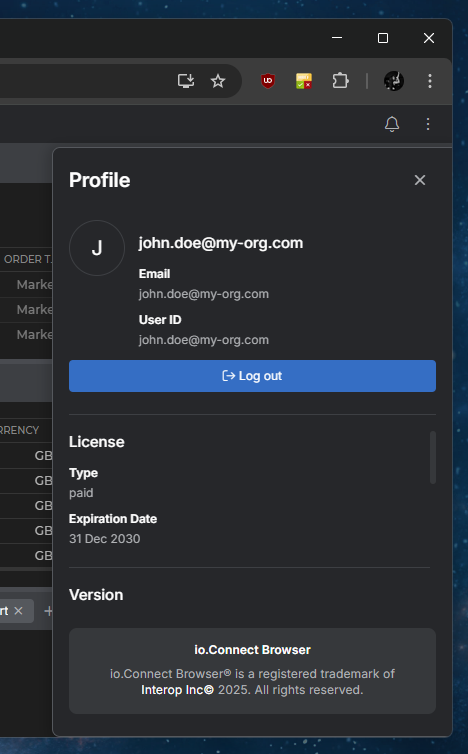
> - A system dropdown menu was added to the Home App header containing a [Profile panel](https://docs.interop.io/browser/capabilities/home-app/overview/index.md#using_the_home_app-profile_panel), a [Notification Settings panel](https://docs.interop.io/browser/capabilities/home-app/overview/index.md#using_the_home_app-notification_settings), and a [Platform Preferences panel](https://docs.interop.io/browser/capabilities/home-app/overview/index.md#using_the_home_app-platform_preferences_panel).
>
> 
>
> - Added [modal windows](https://docs.interop.io/browser/capabilities/windows/modals/setup/index.md) which are mandatory for using the Launchpad.
> - Added a "Create Workspace" button in the "Workspaces" section of the Launchpad which creates an empty Workspace in a new browser window.
> - Added a `settings` property in the `config` object for the `` component which can be used to provide general [platform settings](https://docs.interop.io/browser/capabilities/home-app/library-features/index.md#using_the_components-platform_settings) for the Home App.
> - Added an `IOInitErrorScreen` property in the `components` object inside the `config` object for the `` component which can be used to customize the [error screen](https://docs.interop.io/browser/capabilities/home-app/library-features/index.md#using_the_components-error_screen) displayed in case of failure to initialize the Home App.
> - Added a `settings` property in the `launchpad` object inside the `config` object for the `` component which can be used to provide [settings](https://docs.interop.io/browser/capabilities/home-app/library-features/index.md#using_the_components-launchpad-settings) for the Launchpad.
> - Added `header` and `sections` properties in the `components` object under the `launchpad` property of the `config` object for the `` component. Use these properties to customize the Launchpad [header components and sections](https://docs.interop.io/browser/capabilities/home-app/library-features/index.md#using_the_components-launchpad-components).
> - Added an `isFolderCollapsible` property to the components for the [default sections](https://docs.interop.io/browser/capabilities/home-app/library-features/index.md#using_the_components-launchpad-default_sections) of the Launchpad.
> - Added `openInstances`, `tooltip`, and `className` properties in the object describing a [custom section item](https://docs.interop.io/browser/capabilities/home-app/library-features/index.md#using_the_components-launchpad-custom_sections) in the Launchpad.
> - Added `icon`, `iconSrc`, and `separatorAfter` properties in the object describing a [custom context menu item](https://docs.interop.io/browser/capabilities/home-app/library-features/index.md#using_the_components-launchpad-custom_sections) in a custom Launchpad section item.
> - The Home App can now [run in **io.Connect Desktop**](https://docs.interop.io/browser/capabilities/home-app/library-features/index.md#running_in_ioconnect_desktop) provided that auto injection of the [`@interopio/desktop`](https://www.npmjs.com/package/@interopio/desktop) library is disabled. If the Home App is configured to run in **io.Connect Desktop**, the [setup flow](https://docs.interop.io/browser/capabilities/home-app/library-features/index.md#using_the_components-setup_flow) for requesting browser permissions will be skipped.
> ### @interopio/intent-resolver-ui
>
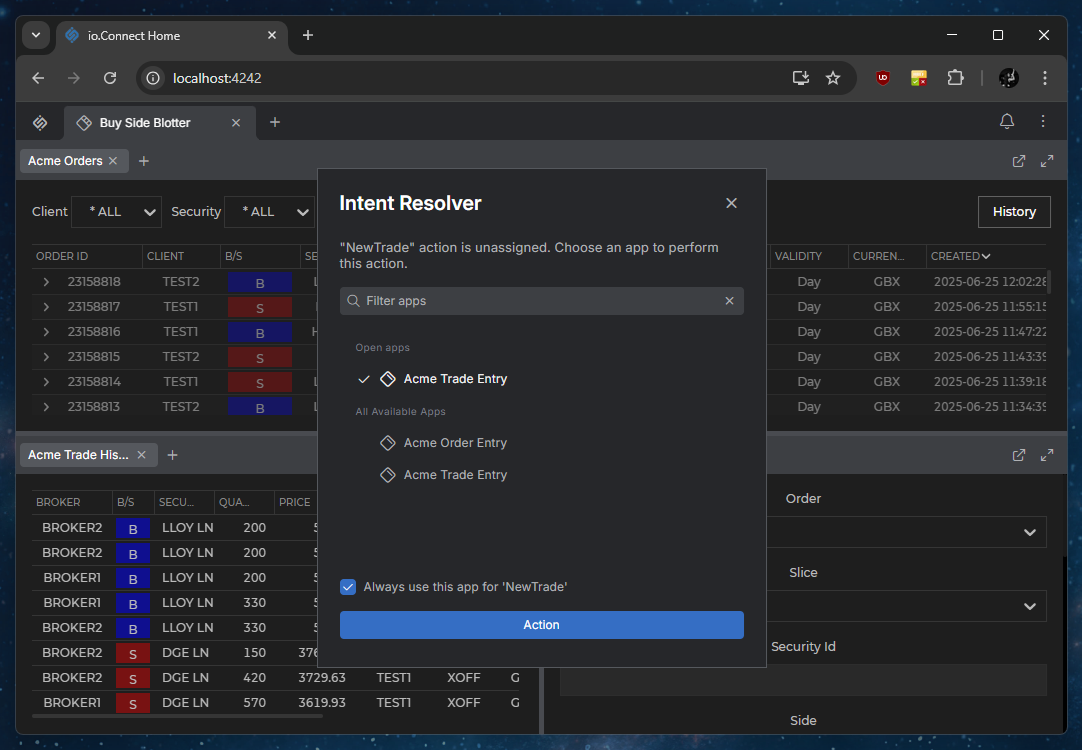
> Implemented the [`@interopio/intent-resolver-ui`](https://www.npmjs.com/package/@interopio/intent-resolver-ui) library that provides support for an [Intent Resolver UI](https://docs.interop.io/browser/capabilities/data-sharing/intents/overview/index.md#intent_resolver) app embedded in the client DOM.
>
> 
>
> The library also enables you to provide your own [custom Intent Resolver](https://docs.interop.io/browser/capabilities/data-sharing/intents/overview/index.md#extending_the_intent_resolver) as a React component.
>
> > ⚠️ *Note that, as described in the [breaking changes](#breaking_changes) section, the [`@interopio/intents-resolver-api`](https://www.npmjs.com/package/@interopio/intents-resolver-api) and [`@interopio/intents-resolver-ui-react`](https://www.npmjs.com/package/@interopio/intents-resolver-ui-react) libraries have been deprecated in **io.Connect Browser**. The legacy implementations of the Intent Resolver app are still supported and will work in the latest versions of **io.Connect Browser**.*
> ### @interopio/modals-api
>
> **io.Connect Browser** now supports a set of predefined modal windows (alerts and dialogs), which you can use in your interop-enabled apps via the [`@interopio/modals-api`](https://www.npmjs.com/package/@interopio/modals-api) library.
>
> The [Modals API](https://docs.interop.io/browser/capabilities/windows/modals/setup/index.md) enables you to show alerts and dialogs in **io.Connect Browser** from your interop-enabled apps.
>
> To be able to use modal windows in your project, you must configure the [Main app](https://docs.interop.io/browser/developers/browser-platform/overview/index.md) of your project and each [Browser Client](https://docs.interop.io/browser/developers/browser-client/overview/index.md) in which you want to use the Modals API.
>
> In your Main app, use the `modals` property of the configuration object for initializing the [`@interopio/browser-platform`](https://www.npmjs.com/package/@interopio/browser-platform) library to define the sources of the modal windows to be used by the platform. Enable the Modals API by passing the `IOModals()` factory function to the `libraries` array of the `browser` object used for the internal initialization of the [`@interopio/browser`](https://www.npmjs.com/package/@interopio/browser) library:
>
> ```javascript
> import IOBrowserPlatform from "@interopio/browser-platform";
> import IOModals from "@interopio/modals-api";
>
> const config = {
> licenseKey: "my-license-key",
> // Settings for the modal windows to be used in the platform.
> modals: {
> sources: {
> // It's required to specify the locations of the bundle and styles for the modal windows.
> // You can use the resources provided by the `@interopio/modals-ui` library
> // or provide your own custom library that implements the `@interopio/modals-ui` API.
> bundle: "https://my-modals/modals-bundle.js",
> styles: ["https://my-modals/styles.css", "https://example.com/custom-styles.css"],
> // It's required to specify the fonts when using the default modal windows
> // provided by the `@interopio/modals-ui` library.
> fonts: ["https://my-modals/fonts.css"]
> }
> },
> browser: {
> // Enabling the Modals API.
> libraries: [IOModals],
> // Enabling the Main app to use modal windows.
> modals: {
> alerts: {
> enabled: true
> },
> dialogs: {
> enabled: true
> }
> }
> }
> };
>
> const { io } = await IOBrowserPlatform(config);
>
> // Now you can access the Modals API via `io.modals`.
> ```
>
> In your Browser Client apps, initialize the [`@interopio/browser`](https://www.npmjs.com/package/@interopio/browser) library enabling the Modals API:
>
> ```javascript
> import IOBrowser from "@interopio/desktop";
> import IOModals from "@interopio/modals-api";
>
> // Initializing the Modals API.
> const config = {
> libraries: [IOModals],
> // Enabling the Browser Client to use modal windows.
> modals: {
> alerts: {
> enabled: true
> },
> dialogs: {
> enabled: true
> }
> }
> };
>
> const io = await IOBrowser(config);
>
> // Now you can access the Modals API via `io.modals`.
> ```
>
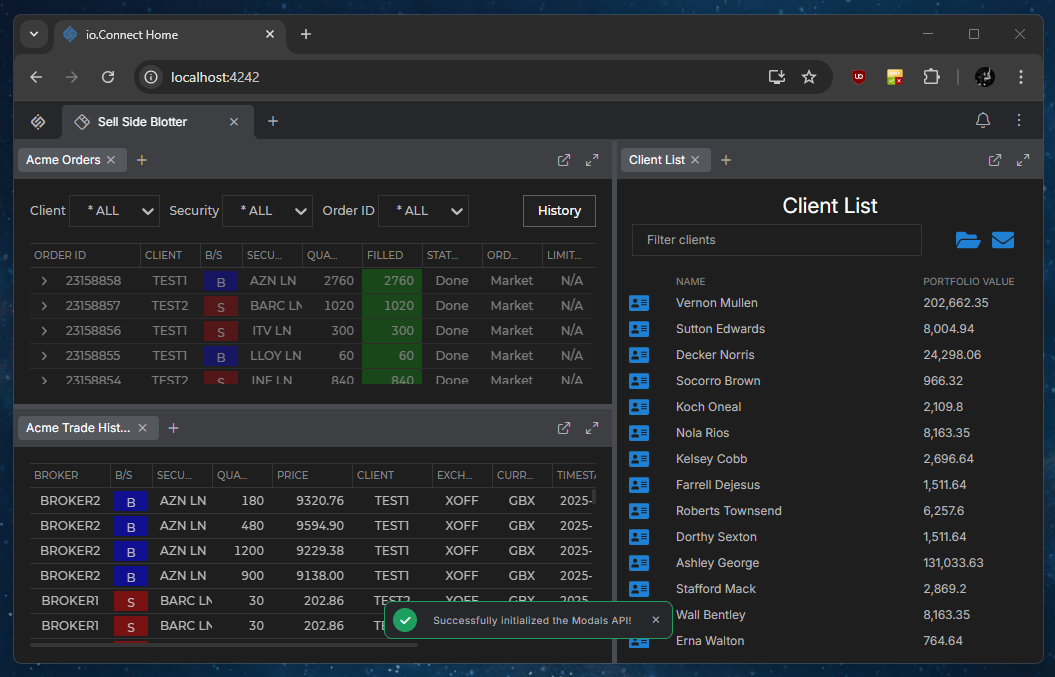
> The Alerts API is accessible via the `io.modals.alerts` object. To display an alert window, use the [`request()`](https://docs.interop.io/browser/reference/javascript/modals/alertsapi/index.md#AlertsAPI-request) method and provide an [`AlertRequestConfig`](https://docs.interop.io/browser/reference/javascript/modals/alertrequestconfig/index.md) object as a required argument:
>
> ```javascript
> const alertOptions = {
> variant: "success",
> text: "Successfully initialized the Modals API!"
> };
>
> // Displaying an alert.
> await io.modals.alerts.request(alertOptions);
> ```
>
> 
>
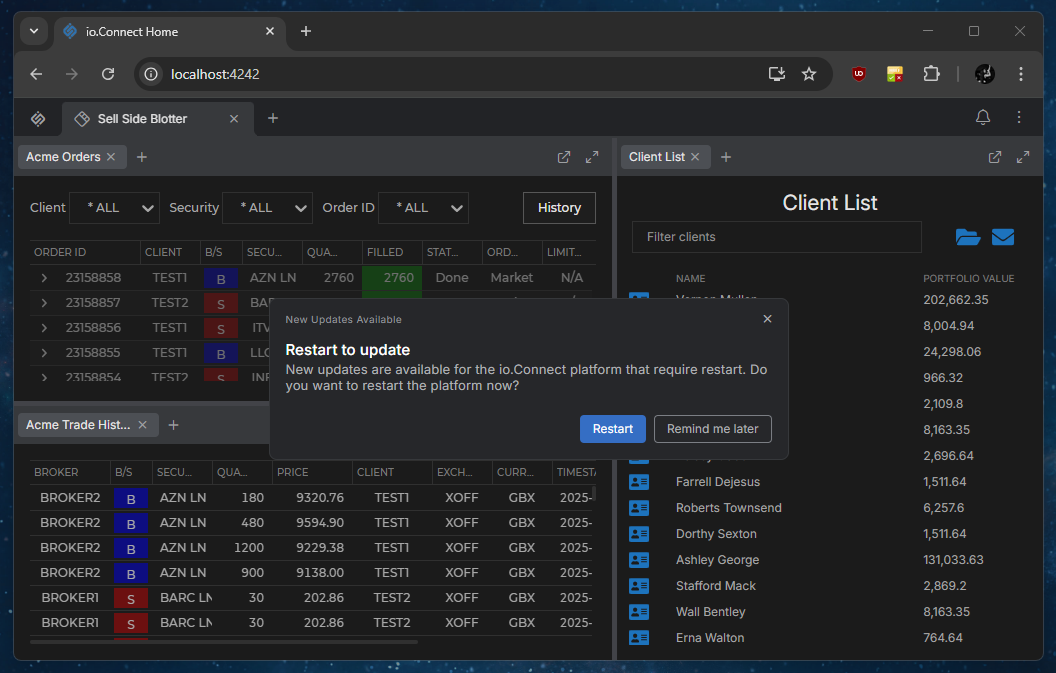
> The Dialogs API is accessible via the `io.modals.dialogs` object. To display a dialog window, use the [`request()`](https://docs.interop.io/browser/reference/javascript/modals/dialogsapi/index.md#DialogsAPI-request) method and provide an [`DialogRequestConfig`](https://docs.interop.io/browser/reference/javascript/modals/dialogrequestconfig/index.md) object as a required argument:
>
> ```javascript
> const dialogOptions = {
> templateName: "noInputsConfirmationDialog",
> variables: {
> title: "New Updates Available",
> heading: "Restart to update",
> text: "New updates are available for the io.Connect platform that require restart. Do you want to restart the platform now?",
> actionButtons: [
> { variant: "primary", text: "Restart", id: "restart" },
> { variant: "outline", text: "Remind me later", id: "remind-later" }
> ]
> }
> };
>
> // Displaying a dialog.
> const response = await io.modals.dialogs.request(dialogOptions);
> ```
>
> 
> ### @interopio/modals-ui
>
> The [`@interopio/modals-ui`](https://www.npmjs.com/package/@interopio/modals-ui) library provides the bundle, styles, and fonts for the set of predefined alerts and dialogs used in **io.Connect Browser** via the newly introduced [Modals API](https://docs.interop.io/browser/capabilities/windows/modals/setup/index.md).
>
> You can use the available library resources when configuring the usage of modal windows in your [Main app](https://docs.interop.io/browser/developers/browser-platform/overview/index.md), and you can also decorate the library or create your own modal windows library that implements the [`@interopio/modals-ui`](https://www.npmjs.com/package/@interopio/modals-ui) API in order to use your own [custom alerts and dialogs](https://docs.interop.io/browser/capabilities/windows/modals/setup/index.md#extending_the_modal_windows).
> ### @interopio/theme
>
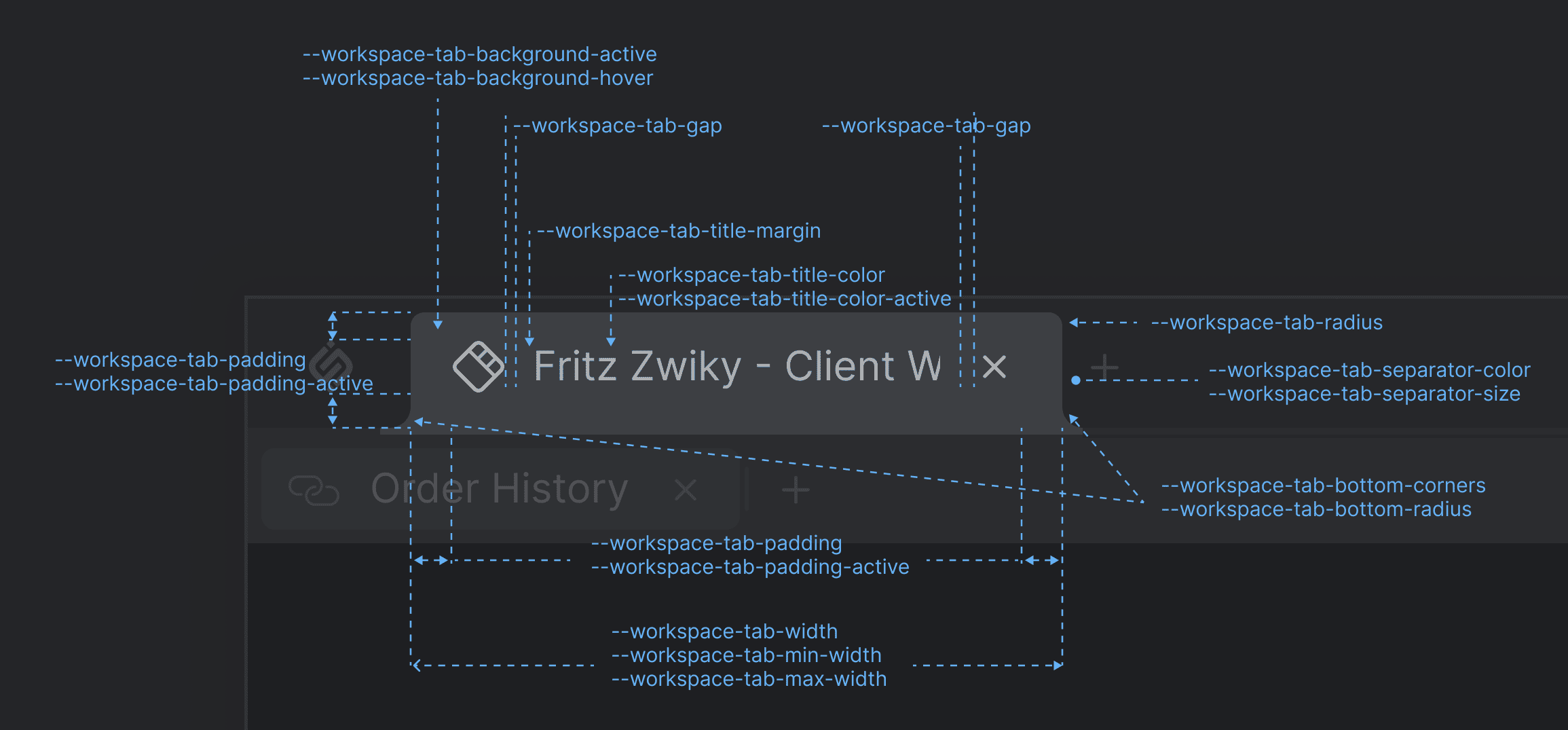
> **io.Connect Browser** and all its default system web apps (Home App, Workspaces App, Launchpad, and more) use the io.Connect styles provided by the [`@interopio/theme`](https://www.npmjs.com/package/@interopio/theme) package. You can use the [CSS variables](https://docs.interop.io/browser/developers/platform-styles/index.md) provided by the io.Connect themes to customize the system apps of your platform.
>
> The following image demonstrates the available CSS variables for customizing the Workspace tab of the Workspaces App:
>
> 
## Improvements & Bug Fixes
> ⚠️ *Note that each improvement or bug fix is listed under all libraries it affects.*
> ### @interopio/browser
>
> - The callback passed to the [`subscribe()`](https://docs.interop.io/browser/reference/javascript/channels/api/index.md#API-subscribe) method of the [Channels API](https://docs.interop.io/browser/capabilities/data-sharing/channels/index.md) is now invoked when a new Channel is joined even if there isn't any data in the Channel context.
> - Improved the Intent request internal decoder.
> - Improved the widget types.
> - Removed the `@finos/fdc3` dependency.
> ### @interopio/browser-platform
>
> - The callback passed to the [`subscribe()`](https://docs.interop.io/browser/reference/javascript/channels/api/index.md#API-subscribe) method of the [Channels API](https://docs.interop.io/browser/capabilities/data-sharing/channels/index.md) is now invoked when a new Channel is joined even if there isn't any data in the Channel context.
> - Shared contexts are no longer re-announced to apps that have retrieved a context but aren't subscribed for updates to the context on reconnection to the io.Connect Gateway.
> - Improved typing and internal handling of Interop method invocations.
> - Improved the mechanism for handling Layouts.
> - Improvements related to handling plugins.
> ### @interopio/fdc3
>
> - Improved the Intent request internal decoder.
> - Fixed an issue related to the callback invocation when subscribed to a specific FDC3 context type.
> ### @interopio/home-ui-react
>
> - Launchpad button is now hidden automatically if the Home App instance isn't a Main app.
> - Improved the behavior for closing the Launchpad.
> - Added a tooltip to the Launchpad button.
> - Improved the mechanism for storing preferences and the app state after user interaction.
> - Improved the search bar functionality and styles.
> - Removed obsolete assets from the library.
> ### @interopio/theme
>
> - Moved to using CSS variables.
> - CSS improvements for the system apps of the Home App.
> ### @interopio/workspaces-ui-react
>
> - Improved the dragging behavior of Workspace tabs.
> - Fixed an issue with disappearing Workspace content.