# io.Connect Browser 4.1
Source: https://docs.interop.io/browser/getting-started/changelog/4-1/index.html
## io.Connect Browser 4.1
*Release date: 16.09.2025*
Versions of all main and additional libraries of **io.Connect Browser** for the current release:
| Library | Version |
|---------|---------|
| [`@interopio/browser`](https://www.npmjs.com/package/@interopio/browser) | 4.1 |
| [`@interopio/browser-platform`](https://www.npmjs.com/package/@interopio/browser-platform) | 4.1 |
| [`@interopio/browser-worker`](https://www.npmjs.com/package/@interopio/browser-worker) | 4.1 |
| [`@interopio/cli`](https://www.npmjs.com/package/@interopio/cli) | 4.1 |
| [`@interopio/fdc3`](https://www.npmjs.com/package/@interopio/fdc3) | 2.7 |
| [`@interopio/home-ui-react`](https://www.npmjs.com/package/@interopio/home-ui-react) | 2.1 |
| [`@interopio/intent-resolver-ui`](https://www.npmjs.com/package/@interopio/intent-resolver-ui) | 1.1 |
| [`@interopio/modals-api`](https://www.npmjs.com/package/@interopio/modals-api) | 1.1 |
| [`@interopio/modals-ui`](https://www.npmjs.com/package/@interopio/modals-ui) | 1.1 |
| [`@interopio/ng`](https://www.npmjs.com/package/@interopio/ng) | 6.0 |
| [`@interopio/react-hooks`](https://www.npmjs.com/package/@interopio/react-hooks) | 4.1 |
| [`@interopio/search-api`](https://www.npmjs.com/package/@interopio/search-api) | 3.1 |
| [`@interopio/theme`](https://www.npmjs.com/package/@interopio/theme) | 3.1 |
| [`@interopio/widget`](https://www.npmjs.com/package/@interopio/widget) | 3.1 |
| [`@interopio/workspaces-api`](https://www.npmjs.com/package/@interopio/workspaces-api) | 4.1 |
| [`@interopio/workspaces-ui-react`](https://www.npmjs.com/package/@interopio/workspaces-ui-react) | 4.1 |
| [`@interopio/workspaces-ui-web-components`](https://www.npmjs.com/package/@interopio/workspaces-ui-web-components) | 2.1 |
## Breaking Changes
> ⚠️ *Note that each breaking change is listed under all libraries it affects.*
> ### @interopio/widget
>
> - The compact mode for the io.Connect widget has been deprecated.
> - The `mode` property of the [`WidgetConfig`](https://docs.interop.io/browser/reference/javascript/io.connect%20browser/widgetconfig/index.md) object has been deprecated and the `WidgetMode` interface has been removed from the library types.
> - The `"top"`, `"bottom"`, `"left"`, and `"right"` members of the [`WidgetPosition`](https://docs.interop.io/browser/reference/javascript/io.connect%20browser/widgetposition/index.md) enumeration have been deprecated and replaced with `"top-left"`, `"top-center"`, `"top-right"`, `"center-left"`, `"center-right"`, `"bottom-left"`, `"bottom-center"`, and `"bottom-right"`.
> - The default value for the `position` property of the `WidgetConfig` object has been changed to `"bottom-center"` instead of `"bottom"`.
## New Features
> ⚠️ *Note that each new feature is listed under all libraries it affects.*
> ### @interopio/browser
>
> The following features are now available in the [`@interopio/browser`](https://www.npmjs.com/package/@interopio/browser) library:
>
> #### Refreshing Windows
>
> To refresh a window, use the [`refresh()`](https://docs.interop.io/browser/reference/javascript/windows/webwindow/index.md#WebWindow-refresh) method of a [`WebWindow`](https://docs.interop.io/browser/reference/javascript/windows/webwindow/index.md) instance:
>
> ```javascript
> await myWindow.refresh();
> ```
>
> #### Zooming
>
> You can now use the [`zoomIn()`](https://docs.interop.io/browser/reference/javascript/windows/webwindow/index.md#WebWindow-zoomIn), [`zoomOut()`](https://docs.interop.io/browser/reference/javascript/windows/webwindow/index.md#WebWindow-zoomOut), [`setZoomFactor()`](https://docs.interop.io/browser/reference/javascript/windows/webwindow/index.md#WebWindow-setZoomFactor), and [`onZoomFactorChanged()`](https://docs.interop.io/browser/reference/javascript/windows/webwindow/index.md#WebWindow-onZoomFactorChanged) methods of a [`WebWindow`](https://docs.interop.io/browser/reference/javascript/windows/webwindow/index.md) instance to control window zooming programmatically:
>
> ```javascript
> // Retrieves the current zoom factor.
> const zoomFactor = myWindow.zoomFactor;
>
> // Increase the zoom factor by one step.
> await myWindow.zoomIn();
>
> // Decrease the zoom factor by one step.
> await myWindow.zoomOut();
>
> // Set a specific zoom factor.
> await myWindow.setZoomFactor(150);
>
> // Get notified when the zoom factor changes.
> myWindow.onZoomFactorChanged(console.log);
> ```
> ### @interopio/browser-platform
>
> The following features are now available in the [`@interopio/browser-platform`](https://www.npmjs.com/package/@interopio/browser-platform) library:
>
> #### Request Headers for Publishing OpenTelemetry Signals
>
> To specify headers to be added to all HTTP requests sent by **io.Connect Browser** when publishing [OpenTelemetry signals](https://docs.interop.io/browser/capabilities/insights/index.md), use the `headers` property of the `otel` object in the configuration object for initializing the `@interopio/browser-platform` library. To specify headers to be added to the HTTP requests sent by **io.Connect Browser** when publishing metrics, use the `headers` property of the `metrics` object under the `otel` top-level key:
>
> ```javascript
> import IOBrowserPlatform from "@interopio/browser-platform";
>
> const config = {
> licenseKey: "my-license-key",
> otel: {
> // Headers that will be sent with every request for publishing OpenTelemetry signals.
> headers: {
> "Custom-Header": "custom-header-value"
> },
> metrics: {
> url: "https://my-metrics-collector.com/metrics",
> // Headers that will be sent with every request for publishing metrics.
> headers: {
> "Custom-Metrics-Header": "custom-header-value"
> }
> }
> }
> };
>
> const { io } = await IOBrowserPlatform(config);
> ```
>
> #### Additional OpenTelemetry Attributes
>
> To specify additional resource attributes to be added to all published [OpenTelemetry signals](https://docs.interop.io/browser/capabilities/insights/index.md), use the `additionalResourceAttributes` property of the `otel` object in the configuration object for initializing the `@interopio/browser-platform` library. To specify additional entity-level attributes to be added to all published OpenTelemetry signals, use the `getAdditionalAttributes` property of the `otel` object and provide a function that returns an object with key/value pairs describing the attribute names and values. The `additionalResourceAttributes` and `getAdditionalAttributes` properties are also available under the `metrics` property of the `otel` object:
>
> ```javascript
> import IOBrowserPlatform from "@interopio/browser-platform";
>
> const config = {
> licenseKey: "my-license-key",
> otel: {
> // Resource attributes to be added to all published OpenTelemetry signals.
> additionalResourceAttributes: {
> "resourceAttribute": "custom-value"
> },
> // Entity-level attributes to be added to all published OpenTelemetry signals.
> getAdditionalAttributes: () => { return { "attribute": "custom-value" } },
> metrics: {
> url: "https://my-metrics-collector.com/metrics",
> // Resource attributes to be added to all published metrics.
> additionalResourceAttributes: {
> "resourceAttribute": "custom-value"
> },
> // Entity-level attributes to be added to all published metrics.
> getAdditionalAttributes: () => { return { "attribute": "custom-value" } }
> }
> }
> };
>
> const { io } = await IOBrowserPlatform(config);
> ```
>
> #### Caching of App Definitions, Layouts & App Preferences
>
> It's now possible to instruct **io.Connect Browser** to cache [app definitions](https://docs.interop.io/browser/capabilities/app-management/index.md#app_definitions-remote), [Layouts](https://docs.interop.io/browser/capabilities/windows/layouts/setup/index.md#layout_stores-rest), and [app preferences](https://docs.interop.io/browser/capabilities/app-preferences/index.md#app_preferences_stores-rest) fetched from remote stores. The data will be cached by using the `IndexedDB` API of the browser and will be cached per user if you provide any [user details](https://docs.interop.io/browser/developers/browser-platform/setup/index.md#user_details). You can also specify whether the platform should wait for an initial response from the remote store before continuing its initialization.
>
> The following example demonstrates how to enable caching of Layouts:
>
> ```javascript
> import IOBrowserPlatform from "@interopio/browser-platform";
>
> const config = {
> licenseKey: "my-license-key",
> layouts: {
> mode: "rest",
> rest: {
> url: "https://my-remote-store/layouts",
> cache: {
> // Enabling caching of Layouts. Caching data from remote stores is disabled by default.
> enabled: true
> },
> // It's required to set this when caching is enabled in order to instruct the platform
> // at what interval to poll the remote store for updates.
> // If not set, the platform will fetch the Layout definitions only once on startup.
> pollingInterval: 30000,
> // If `true` (default) the platform will wait for an initial response
> // from the remote store before continuing with its initialization.
> waitInitialResponse: true
> }
> },
> // Providing user details so that the platform can cache the data per user.
> user: {
> id: "user-id"
> }
> };
>
> const { io } = await IOBrowserPlatform(config);
> ```
>
> #### Refreshing Windows
>
> - You can now use the [`refresh()`](https://docs.interop.io/browser/reference/javascript/windows/webwindow/index.md#WebWindow-refresh) method of a [`WebWindow`](https://docs.interop.io/browser/reference/javascript/windows/webwindow/index.md) instance to refresh a window.
>
> #### Zooming
>
> - You can now use the [`zoomIn()`](https://docs.interop.io/browser/reference/javascript/windows/webwindow/index.md#WebWindow-zoomIn), [`zoomOut()`](https://docs.interop.io/browser/reference/javascript/windows/webwindow/index.md#WebWindow-zoomOut), [`setZoomFactor()`](https://docs.interop.io/browser/reference/javascript/windows/webwindow/index.md#WebWindow-setZoomFactor), and [`onZoomFactorChanged()`](https://docs.interop.io/browser/reference/javascript/windows/webwindow/index.md#WebWindow-onZoomFactorChanged) methods of a [`WebWindow`](https://docs.interop.io/browser/reference/javascript/windows/webwindow/index.md) instance to control window zooming programmatically.
> ### @interopio/home-ui-react
>
> The `` component now contains the ``, ``, and `` child components and has the following structure:
>
> ```javascript
>
>
>
>
>
>
> ```
>
> The `` component accepts the same properties as the `` component and can be used independently of the `` component. Using the `` component instead of the `` component may be useful if your custom Launchpad implementation requires you to have separate components for the Launchpad header and body.
>
> > ⚠️ *Note that if you want to use the `` and `` components, they must be wrapped in the `` component in order to function properly. This is due to the fact that the `` component contains all required providers for passing information down to the `` and `` components.*
>
> | Component | Description |
> |-----------|-------------|
> | `` | Component containing the `` and `` components. Accepts the same properties as the `` component and can be used instead of it. |
> | `` | Component containing the header area of the Launchpad (search bar and pin icon). |
> | `` | Component containing the body of the Launchpad (the list of Launchpad sections and the search results section). |
> ### @interopio/ng
>
> - Version 5.0 and later of the [`@interopio/ng`](https://www.npmjs.com/package/@interopio/ng) library has been verified to offer full support for all Angular versions up to 20, both with standalone components and modules.
> - Version 6.0 and later of the `@interopio/ng` library has been verified to offer full support for Angular versions 19 and 20, both with standalone components and modules. Angular versions up to 18 haven't been verified to work with `@interopio/ng` version 6.0 and won't be supported as Angular support for these versions has either ended or will end soon.
>
> Version 6.0 and later of the `@interopio/ng` library is specifically designed to support both standalone components and modules. It also provides the `provideIoConnect()` function for configuring and initializing the `@interopio/ng` library in Angular apps that use standalone components. The `provideIoConnect()` function accepts an `IOConnectNgSettings` object as an optional argument.
>
> > ⚠️ *Note that the `provideIoConnect()` function is available only in version 6.0 and later of the `@interopio/ng` library.*
>
> The following examples demonstrate using the `provideIoConnect()` function for configuring and initializing the `@interopio/ng` library in an Angular [Main app](https://docs.interop.io/browser/developers/browser-platform/overview/index.md) that uses standalone components.
>
> In `app.config.ts` of the Main app:
>
> ```typescript
> import { ApplicationConfig } from "@angular/core";
> import { provideIoConnect } from "@interopio/ng";
> import IOBrowserPlatform, { IOConnectBrowserPlatform } from "@interopio/browser-platform";
>
> // Browser platform configuration.
> const config: IOConnectBrowserPlatform.Config = {
> licenseKey: "my-license-key"
> };
>
> export const appConfig: ApplicationConfig = {
> providers: [
> // Configuring and initializing the Main app.
> provideIoConnect({
> browserPlatform: {
> factory: IOBrowserPlatform,
> config
> }
> })
> ]
> };
> ```
>
> In `main.ts` of the Main app:
>
> ```typescript
> import { bootstrapApplication } from "@angular/platform-browser";
> import { appConfig } from "./app/app.config";
> import { App } from "./app/app";
>
> bootstrapApplication(App, appConfig);
> ```
>
> The following examples demonstrate using the `provideIoConnect()` function for configuring and initializing the `@interopio/ng` library in an Angular [Browser Client](https://docs.interop.io/browser/developers/browser-client/overview/index.md) app that uses standalone components.
>
> In `app.config.ts` of the Browser Client app:
>
> ```typescript
> import { ApplicationConfig } from "@angular/core";
> import { provideIoConnect } from "@interopio/ng";
> import IOBrowser, { IOConnectBrowser } from "@interopio/browser";
>
> const config: IOConnectBrowser.Config = {
> // Optional Browser Client configuration.
> };
>
> export const appConfig: ApplicationConfig = {
> providers: [
> // Configuring and initializing the Browser Client.
> provideIoConnect({
> browser: {
> factory: IOBrowser,
> config
> }
> })
> ]
> };
> ```
>
> In `main.ts` of the Browser Client app:
>
> ```typescript
> import { bootstrapApplication } from "@angular/platform-browser";
> import { appConfig } from "./app/app.config";
> import { App } from "./app/app";
>
> bootstrapApplication(App, appConfig);
> ```
> ### @interopio/theme
>
> Added CSS variables for [customizing the styles](https://docs.interop.io/browser/developers/platform-styles/index.md) of the following **io.Connect Browser** apps and UI components:
>
> #### Notifications
>
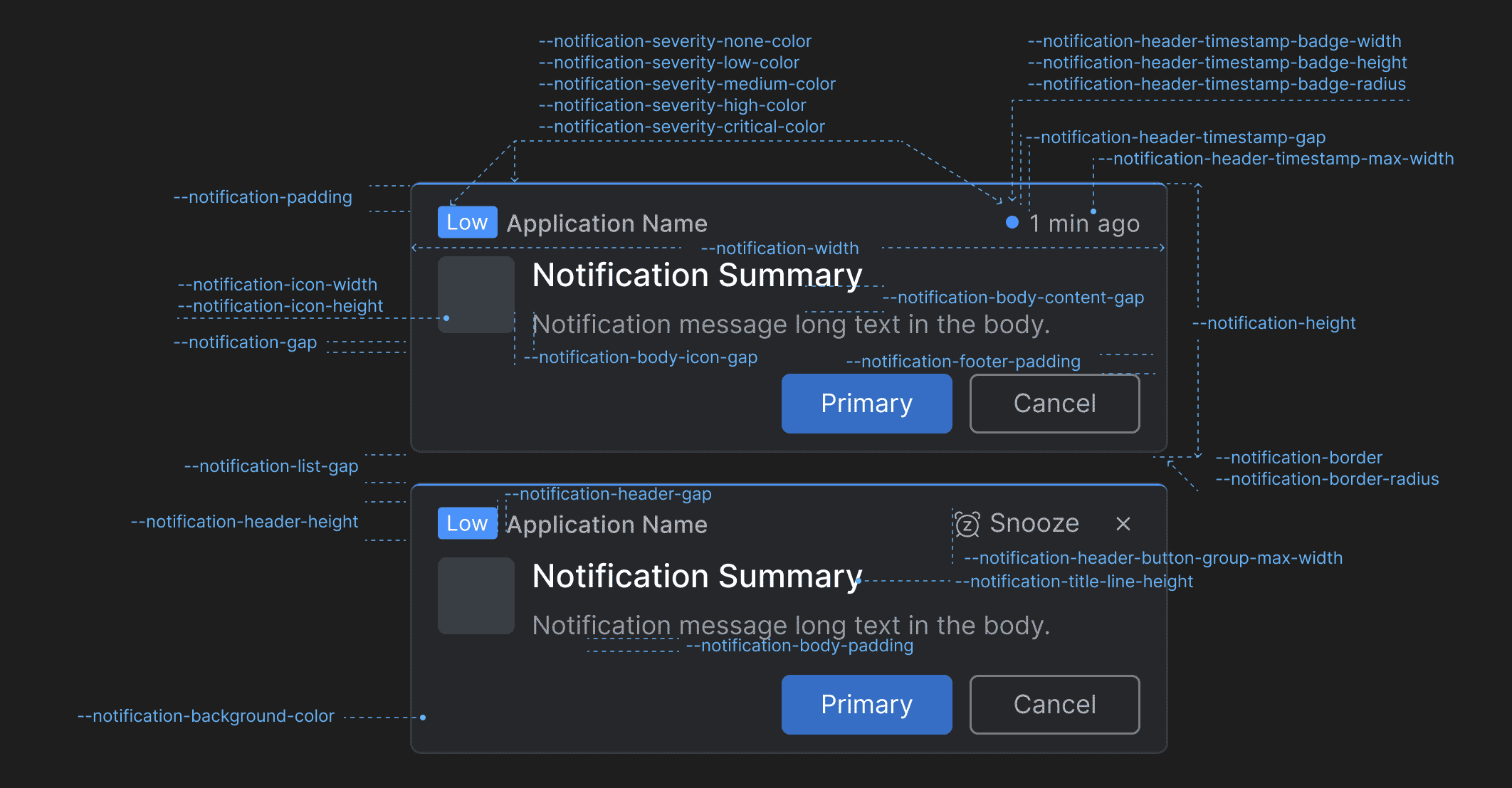
> Use the following CSS variables for customizing the styles of the **io.Connect Browser** [notifications](https://docs.interop.io/browser/developers/platform-styles/index.md#notifications-notification):
>
> 
>
> | Variable | Description |
> |----------|-------------|
> | `--notification-background-color` | Background color for the notifications. |
> | `--notification-body-content-gap` | Gap between the title and the text in the notification body content. |
> | `--notification-body-icon-gap` | Gap between the notification icon and the notification body content. |
> | `--notification-body-padding` | Padding for the notification body. |
> | `--notification-border` | Border for the notifications. |
> | `--notification-border-radius` | Border radius for the notifications. |
> | `--notification-footer-padding` | Padding for the notification footer. |
> | `--notification-gap` | Gap between the header, the body, and the footer of the notifications. |
> | `--notification-header-button-group-max-width` | Maximum width for the action buttons ("Snooze", "Close") in the notification header. |
> | `--notification-header-gap` | Gap between elements in the notification header. |
> | `--notification-header-height` | Height for the notification header. |
> | `--notification-header-timestamp-badge-height` | Height for the timestamp badge in the notification header. |
> | `--notification-header-timestamp-badge-radius` | Border radius for the timestamp badge in the notification header. |
> | `--notification-header-timestamp-badge-width` | Width for the timestamp badge in the notification header. |
> | `--notification-header-timestamp-gap` | Gap between the timestamp badge and the timestamp in the notification header. |
> | `--notification-header-timestamp-max-width` | Maximum width for the timestamp in the notification header. |
> | `--notification-height` | Height for the notifications. |
> | `--notification-icon-height` | Height for the icon displayed in the notification. |
> | `--notification-icon-width` | Width for the icon displayed in the notification. |
> | `--notification-padding` | Padding for the notifications. |
> | `--notification-severity-critical-color` | Color for notifications with severity "Critical". |
> | `--notification-severity-high-color` | Color for notifications with severity "High". |
> | `--notification-severity-low-color` | Color for notifications with severity "Low". |
> | `--notification-severity-medium-color` | Color for notifications with severity "Medium". |
> | `--notification-severity-none-color` | Color for notifications with severity "None". |
> | `--notification-title-line-height` | Line height for the title in the notification. |
> | `--notification-width` | Width for the notifications. |
>
> #### Notification Panel
>
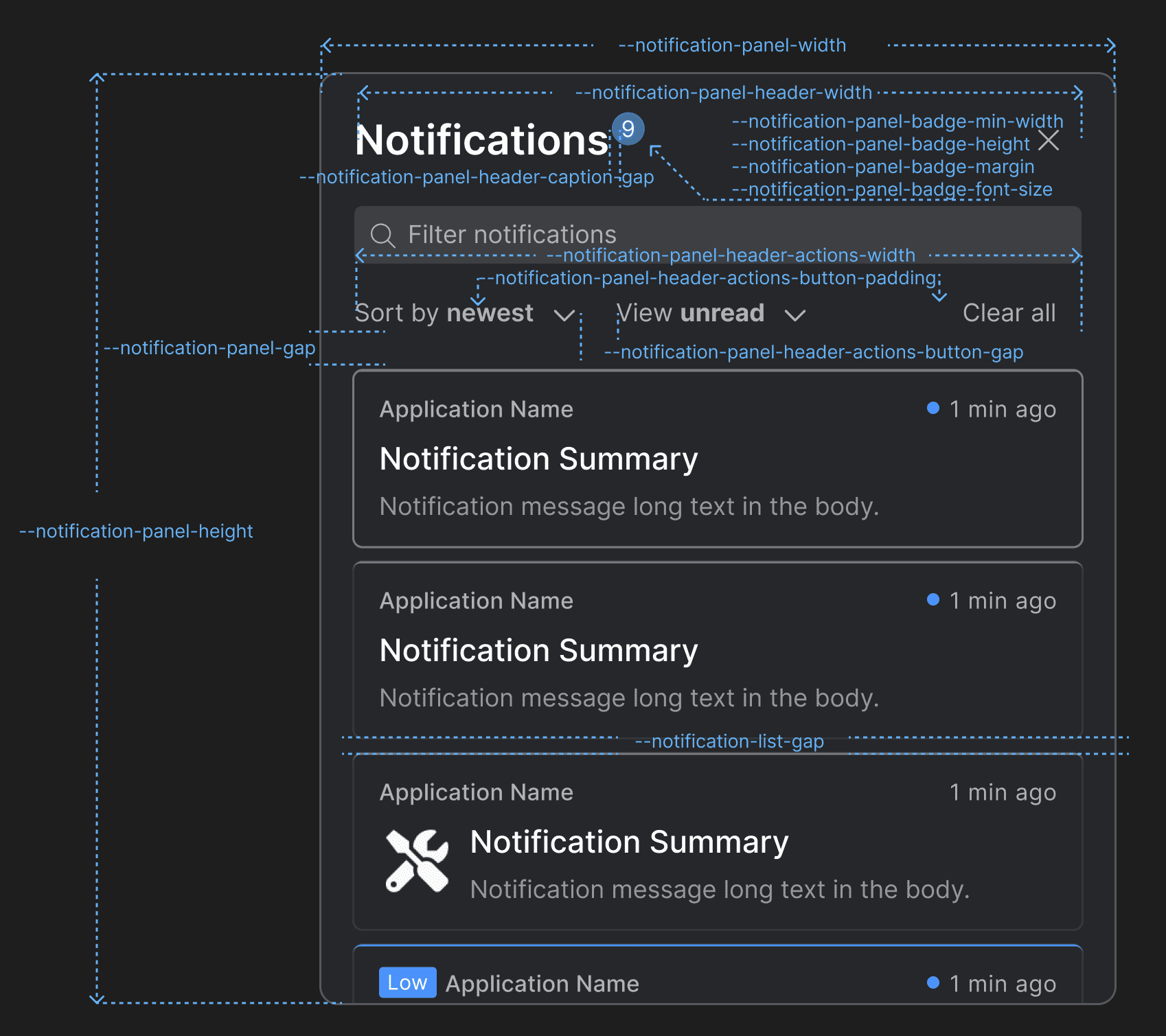
> Use the following CSS variables for customizing the styles of the [Notification Panel](https://docs.interop.io/browser/developers/platform-styles/index.md#notifications-notification_panel):
>
> 
>
> | Variable | Description |
> |----------|-------------|
> | `--notification-list-gap` | Gap between notifications in the notification list of the Notification Panel and the toasts wrapper. |
> | `--notification-panel-badge-font-size` | Font size for the Notification Panel badge. |
> | `--notification-panel-badge-height` | Height for the Notification Panel badge. |
> | `--notification-panel-badge-margin` | Margin for the Notification Panel badge. |
> | `--notification-panel-badge-min-width` | Minimum width for the Notification Panel badge. |
> | `--notification-panel-gap` | Gap between the header and the body of the Notification Panel. |
> | `--notification-panel-header-actions-button-gap` | Gap between the "Sort by" and "View" dropdowns in the Notification Panel header. |
> | `--notification-panel-header-actions-button-padding` | Padding for the action buttons in the Notification Panel header. |
> | `--notification-panel-header-actions-width` | Width for the element that contains action buttons in the Notification Panel header. |
> | `--notification-panel-header-caption-gap` | Gap between the caption, the badge, and the system buttons in the Notification Panel header. |
> | `--notification-panel-header-search-gap` | Gap between the search bar and the search results. |
> | `--notification-panel-header-search-width` | Width for the search bar in the Notification Panel header. |
> | `--notification-panel-header-width` | Width for the Notification Panel header. |
> | `--notification-panel-height` | Height for the Notification Panel. |
> | `--notification-panel-width` | Width for the Notification Panel. |
>
> #### Notification Settings
>
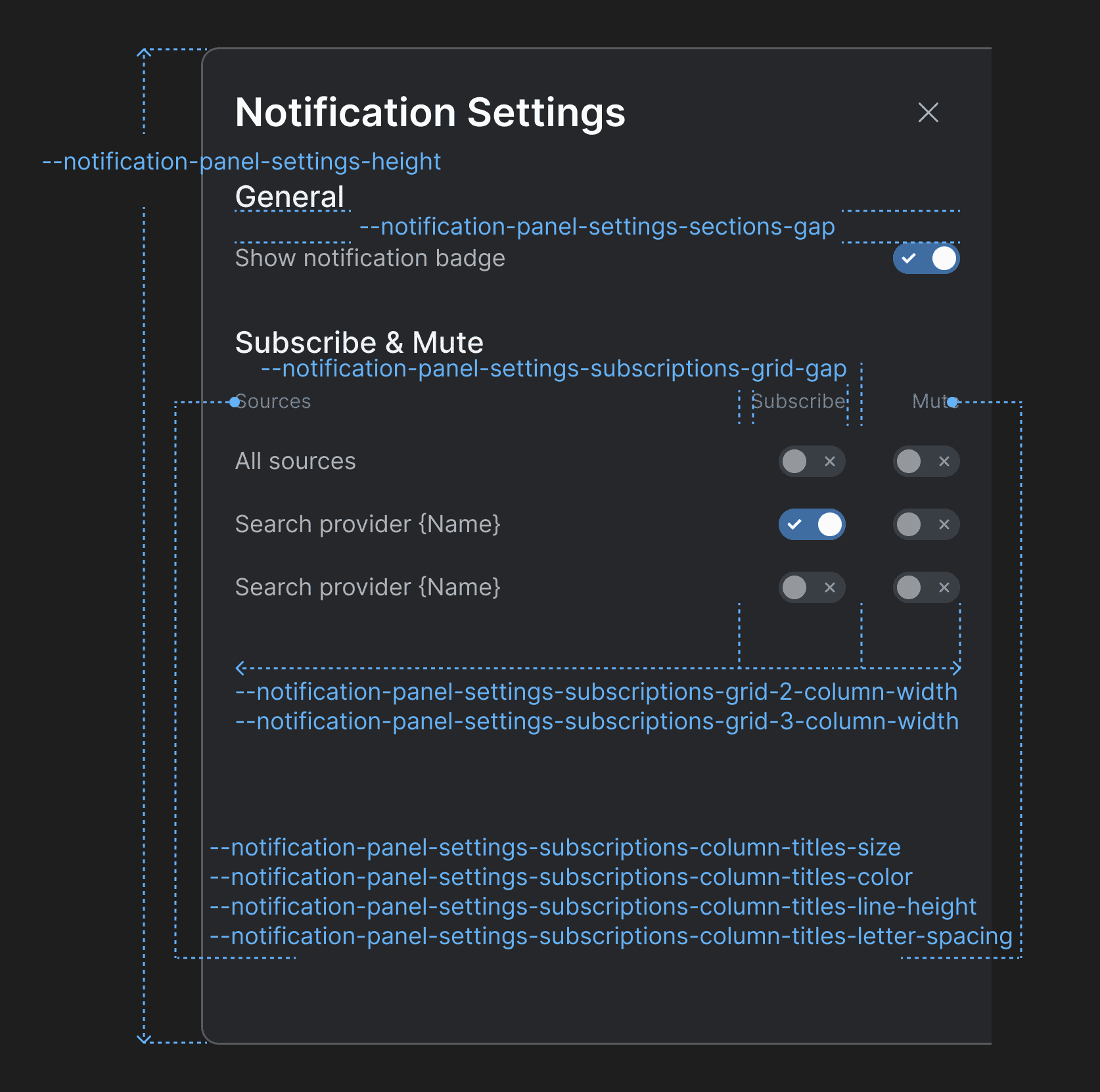
> Use the following CSS variables for customizing the styles of the [Notification Settings](https://docs.interop.io/browser/developers/platform-styles/index.md#notifications-notification_settings) panel:
>
> 
>
> | Variable | Description |
> |----------|-------------|
> | `--notification-panel-settings-height` | Height for the Notification Settings panel. |
> | `--notification-panel-settings-sections-gap` | Gap between the sections in the Notification Settings panel. |
> | `--notification-panel-settings-subscriptions-column-titles-color` | Color for the column titles of the "Subscribe & Mute" section. |
> | `--notification-panel-settings-subscriptions-column-titles-letter-spacing` | Letter spacing for the column titles of the "Subscribe & Mute" section. |
> | `--notification-panel-settings-subscriptions-column-titles-line-height` | Line height for the column titles of the "Subscribe & Mute" section. |
> | `--notification-panel-settings-subscriptions-column-titles-size` | Font size for the column titles of the "Subscribe & Mute" section. |
> | `--notification-panel-settings-subscriptions-grid-2-column-width` | Column width for a grid layout with two columns in the "Subscribe & Mute" section. |
> | `--notification-panel-settings-subscriptions-grid-3-column-width` | Column width for a grid layout with three columns in the "Subscribe & Mute" section. |
> | `--notification-panel-settings-subscriptions-grid-gap` | Gap between the columns of the grid layout in the "Subscribe & Mute" section. |
>
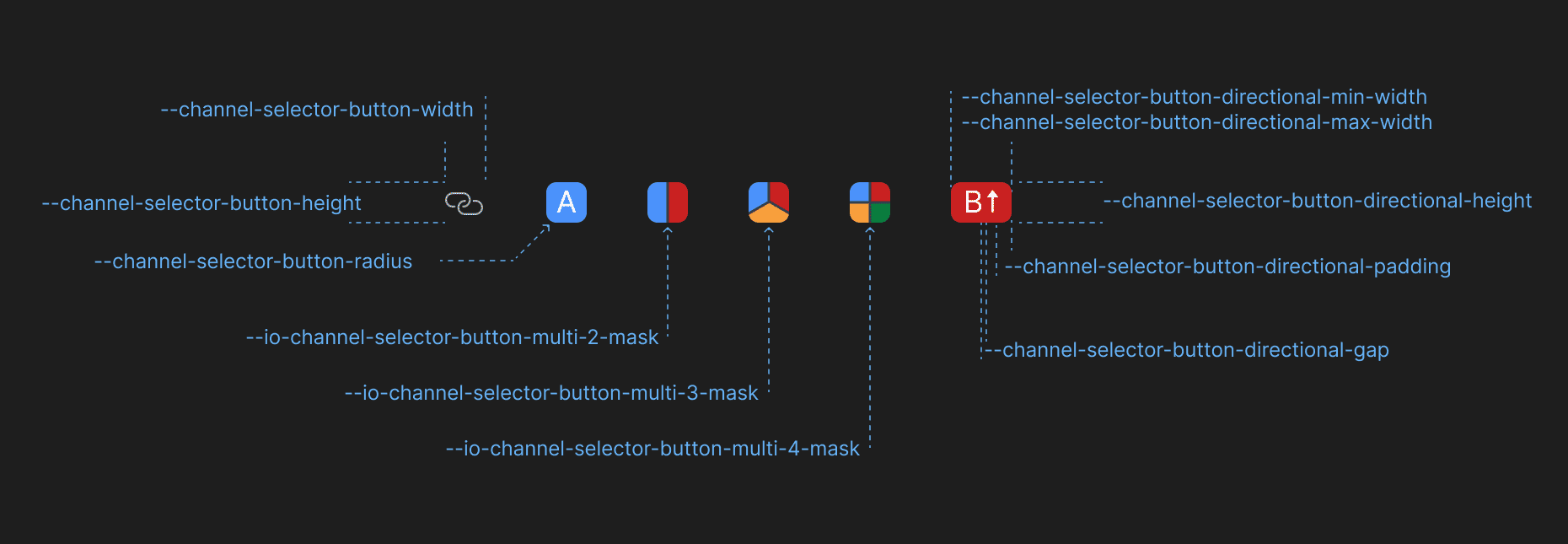
> #### Channel Selector
>
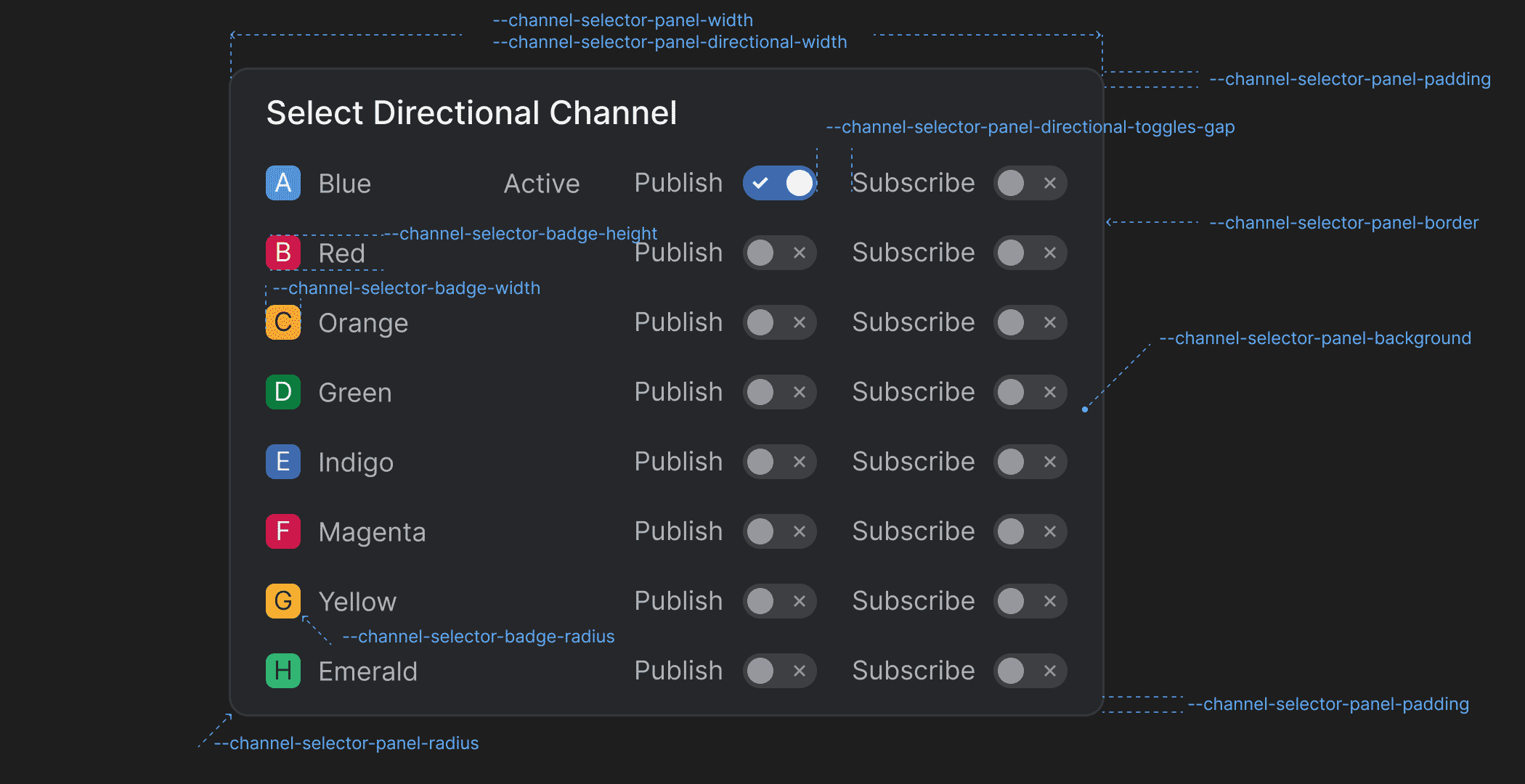
> Use the following CSS variables for customizing the styles of the [Channel Selector](https://docs.interop.io/browser/developers/platform-styles/index.md#channel_selector):
>
> 
>
> 
>
> | Variable | Description |
> |----------|-------------|
> | `--channel-selector-badge-height` | Height for the Channel Selector badge displayed in the Channel Selector panel. |
> | `--channel-selector-badge-radius` | Border radius for the Channel Selector badge displayed in the Channel Selector panel. |
> | `--channel-selector-badge-width` | Width for the Channel Selector badge displayed in the Channel Selector panel. |
> | `--channel-selector-button-directional-gap` | Gap between Channel letter and the Channel direction icon in the Channel Selector button when using directional Channels. |
> | `--channel-selector-button-directional-height` | Height for the Channel Selector button when using directional Channels. |
> | `--channel-selector-button-directional-max-width` | Maximum width for the Channel Selector button when using directional Channels. |
> | `--channel-selector-button-directional-min-width` | Minimum width for the Channel Selector button when using directional Channels. |
> | `--channel-selector-button-directional-padding` | Padding for the Channel Selector button when using directional Channels. |
> | `--channel-selector-button-height` | Height for the Channel Selector button. |
> | `--channel-selector-button-radius` | Border radius for the Channel Selector button. |
> | `--channel-selector-button-width` | Width for the Channel Selector button. |
> | `--channel-selector-panel-background` | Background color for the Channel Selector panel. |
> | `--channel-selector-panel-border` | Border for the Channel Selector panel. |
> | `--channel-selector-panel-directional-toggles-gap` | Gap between the direction labels and the respective toggles in the Channel Selector panel when using directional Channels. |
> | `--channel-selector-panel-directional-width` | Width for the Channel Selector panel when using directional Channels. |
> | `--channel-selector-panel-padding` | Padding for the Channel Selector panel. |
> | `--channel-selector-panel-radius` | Border radius for the Channel Selector panel. |
> | `--channel-selector-panel-title-background-hover` | Background color for the title of the Channel Selector panel when hovered. |
> | `--channel-selector-panel-width` | Width for the Channel Selector panel. |
> | `--io-channel-selector-button-multi-2-mask` | Mask for the Channel Selector button if two Channels are selected when using multiple Channels. |
> | `--io-channel-selector-button-multi-3-mask` | Mask for the Channel Selector button if three Channels are selected when using multiple Channels. |
> | `--io-channel-selector-button-multi-4-mask` | Mask for the Channel Selector button if four Channels are selected when using multiple Channels. |
>
> #### Intent Resolver
>
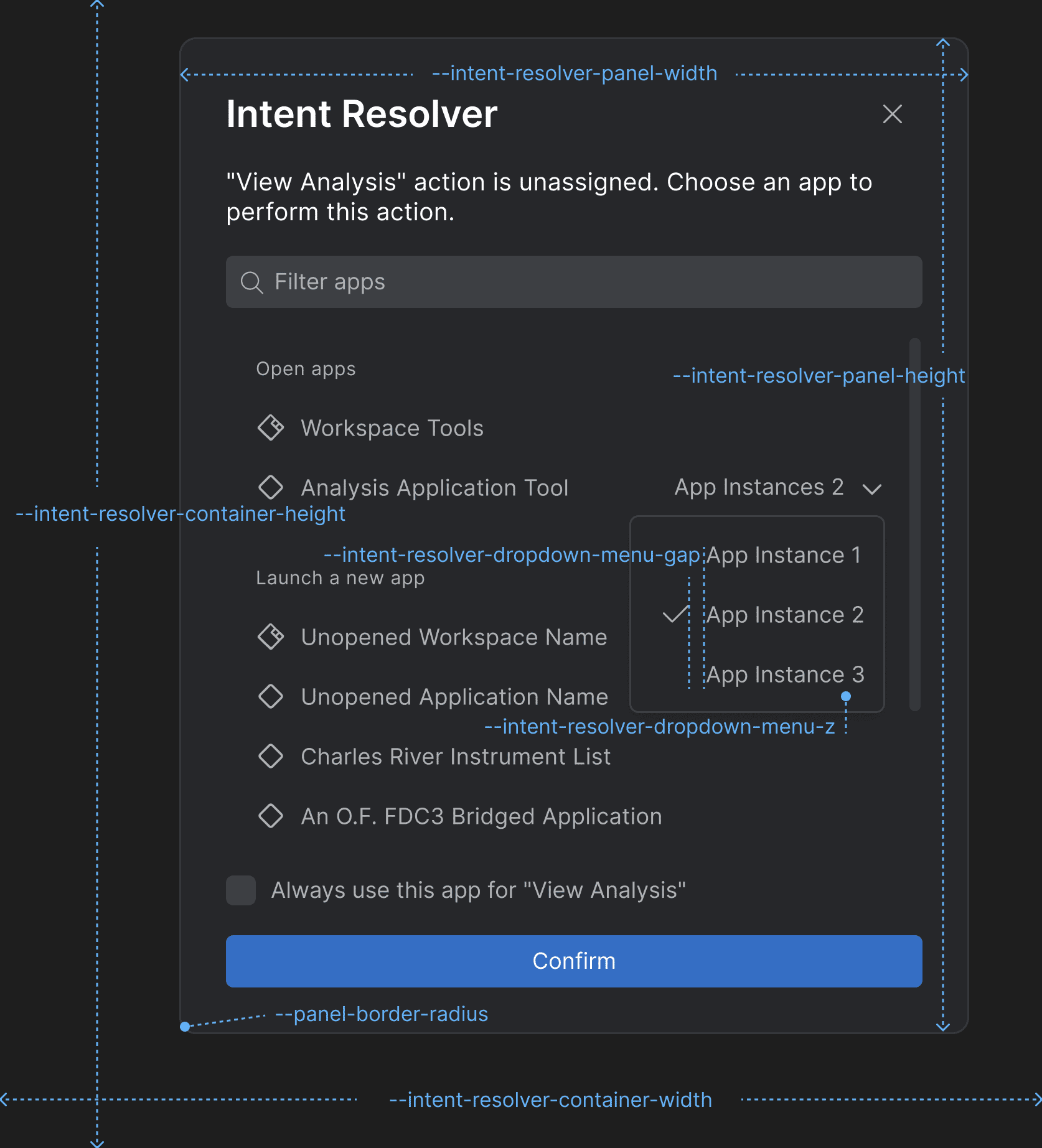
> Use the following CSS variables for customizing the styles of the [Intent Resolver](https://docs.interop.io/browser/developers/platform-styles/index.md#intent_resolver):
>
> 
>
> | Variable | Description |
> |----------|-------------|
> | `--intent-resolver-dropdown-menu-gap` | Gap between the items in the dropdown menu of the Intent Resolver panel for selecting an app instance. |
> | `--intent-resolver-dropdown-menu-z` | Z-order for the dropdown menu of the Intent Resolver for selecting an app instance. |
> | `--intent-resolver-panel-border-radius` | Border radius for the Intent Resolver panel. |
> | `--intent-resolver-panel-height` | Height for the Intent Resolver panel. |
> | `--intent-resolver-panel-padding` | Padding for the Intent Resolver panel. |
> | `--intent-resolver-panel-width` | Width for the Intent Resolver panel. |
>
> #### Platform Preferences Panel
>
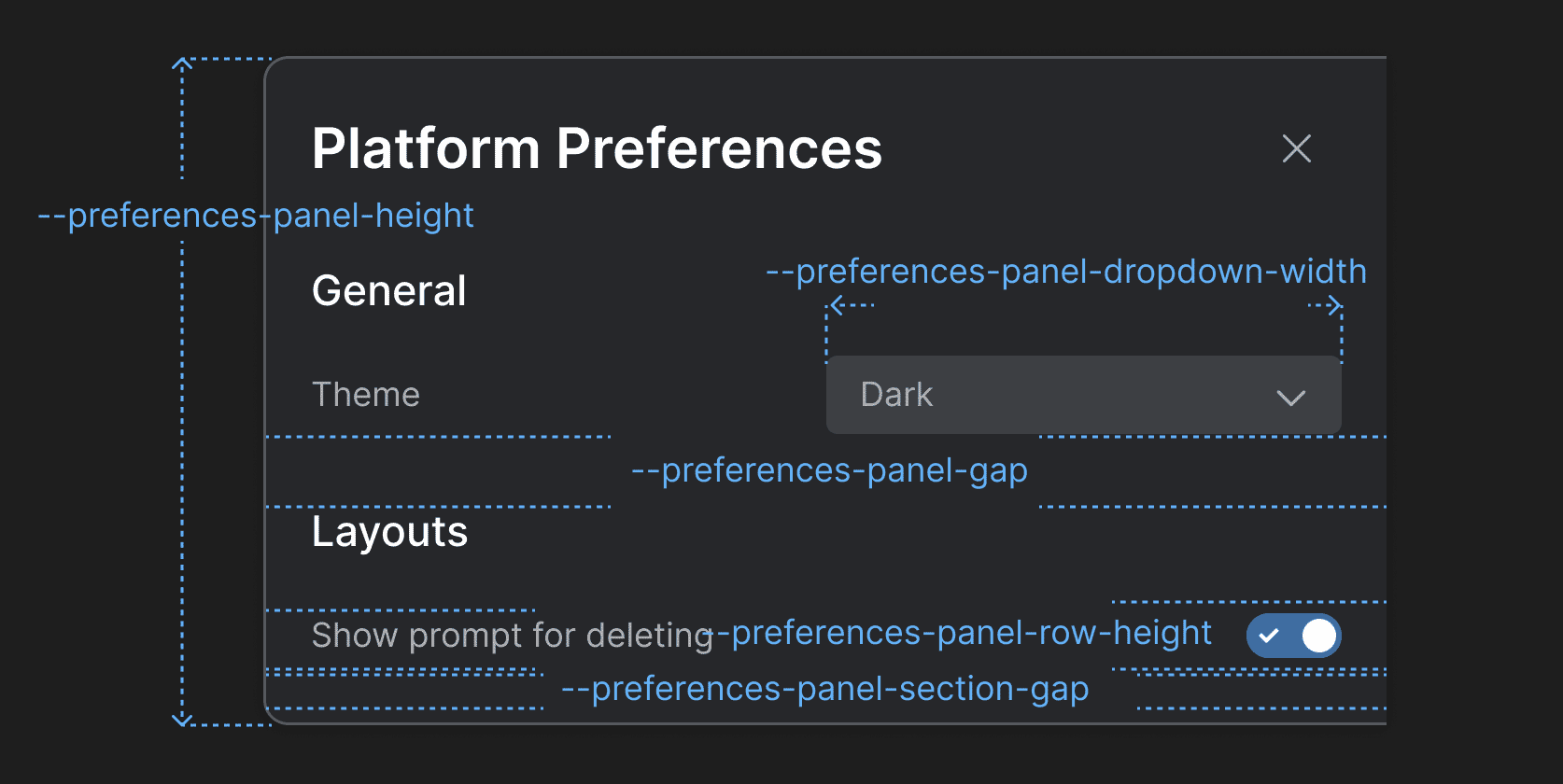
> Use the following CSS variables for customizing the styles of the [Platform Preferences panel](https://docs.interop.io/browser/developers/platform-styles/index.md#platform_preferences_panel):
>
> 
>
> | Variable | Description |
> |----------|-------------|
> | `--preferences-panel-dropdown-width` | Width for the dropdowns menus in the Platform Preferences panel. |
> | `--preferences-panel-gap` | Gap between the header and the body of the Platform Preferences panel. |
> | `--preferences-panel-height` | Height for the Platform Preferences panel. |
> | `--preferences-panel-row-height` | Height for each row in the sections of the Platform Preferences panel. |
> | `--preferences-panel-section-gap` | Gap between the items in each section of the Platform Preferences panel. |
>
> #### Profile Panel
>
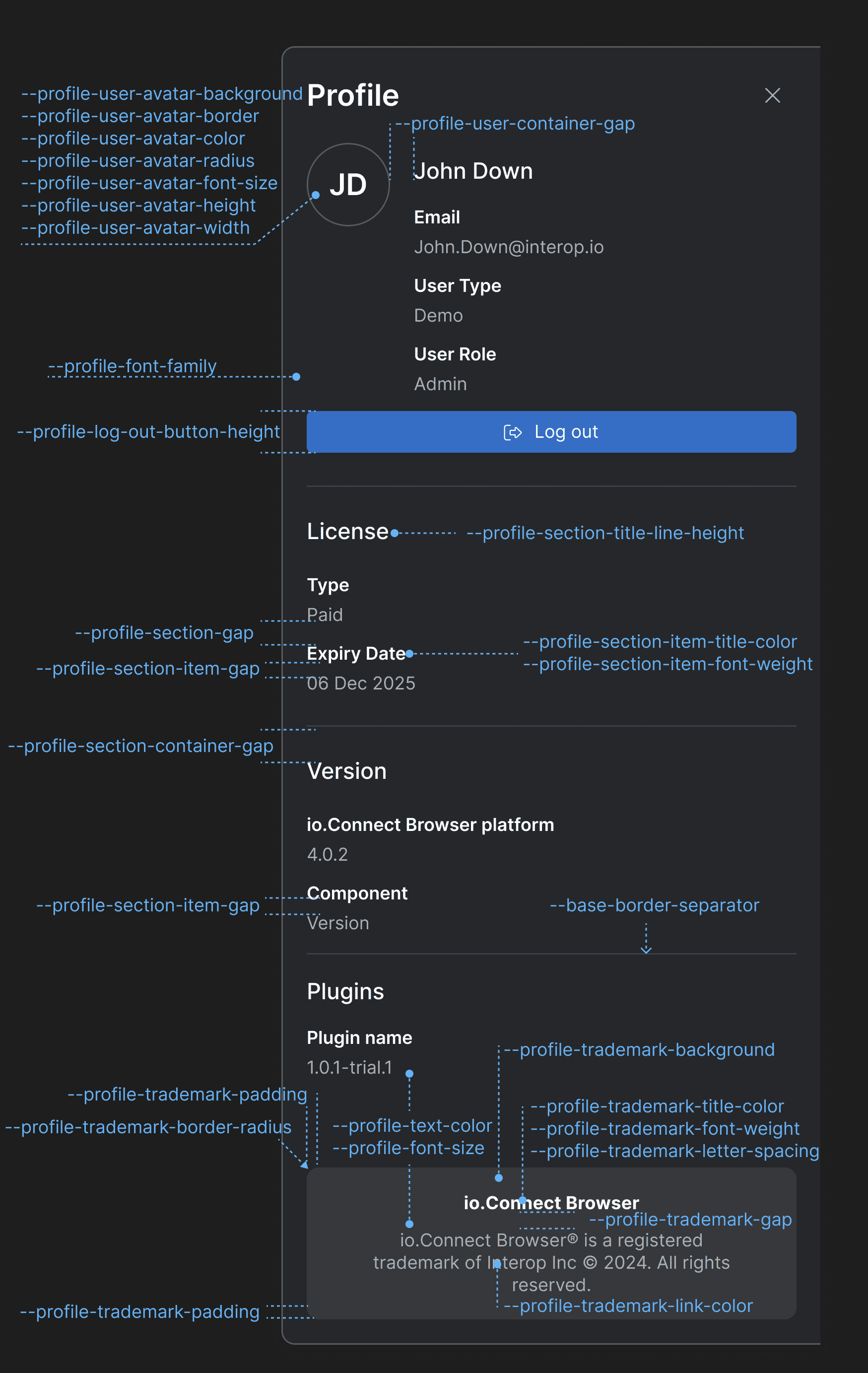
> Use the following CSS variables for customizing the styles of the [Profile panel](https://docs.interop.io/browser/developers/platform-styles/index.md#profile_panel):
>
> 
>
> | Variable | Description |
> |----------|-------------|
> | `--profile-font-family` | Font family for the Profile panel. |
> | `--profile-font-size` | Font size for the Profile panel. |
> | `--profile-log-out-button-height` | Height of the "Log out" button. |
> | `--profile-section-container-gap` | Gap between sections in the Profile panel. |
> | `--profile-section-gap` | Gap between the items in each section of the Profile panel. |
> | `--profile-section-item-gap` | Gap between the title and the value of a section item. |
> | `--profile-section-item-title-color` | Color for the title of a section item. |
> | `--profile-section-item-title-font-weight` | Font weight for the title of a section item. |
> | `--profile-section-title-line-height` | Line height for the titles of the Profile panel sections. |
> | `--profile-text-color` | Text color for the Profile panel. |
> | `--profile-trademark-background` | Background color for the trademark section. |
> | `--profile-trademark-border-radius` | Border radius for the trademark section. |
> | `--profile-trademark-gap` | Gap between the title and the text of the trademark section. |
> | `--profile-trademark-letter-spacing` | Letter spacing for title and the text of the trademark section. |
> | `--profile-trademark-link-color` | Color for the link in the trademark section. |
> | `--profile-trademark-padding` | Padding for the trademark section. |
> | `--profile-trademark-title-color` | Color for the title of the trademark section. |
> | `--profile-trademark-title-font-weight` | Font weight for the title of the trademark section. |
> | `--profile-user-avatar-background` | Background color for the user avatar. |
> | `--profile-user-avatar-border` | Border for the user avatar. |
> | `--profile-user-avatar-color` | Color for the user avatar initials. |
> | `--profile-user-avatar-font-size` | Font size for the user avatar initials. |
> | `--profile-user-avatar-height` | Height for the user avatar. |
> | `--profile-user-avatar-radius` | Border radius for the user avatar. |
> | `--profile-user-avatar-width` | Width for the user avatar. |
> | `--profile-user-container-gap` | Gap between the user avatar and the user info section. |
> ### @interopio/widget
>
> - Placeholders indicating the available docking positions for the io.Connect [widget](https://docs.interop.io/browser/capabilities/widget/index.md) will now appear within the window when the user moves the widget manually.
> - Additional docking positions are now available for the widget - `"top-left"`, `"top-center"`, `"top-right"`, `"center-left"`, `"center-right"`, `"bottom-left"`, `"bottom-center"`, and `"bottom-right"`.
> - **io.Connect Browser** will now remember the last docked position for the widget (per app) and will load the widget in the same position during the next user session. This setting is configurable and can be changed by using the newly added `restoreLastKnownPosition` property of the [`WidgetConfig`](https://docs.interop.io/browser/reference/javascript/io.connect%20browser/widgetconfig/index.md) object passed in the configuration object for initializing the [`@interopio/browser`](https://www.npmjs.com/package/@interopio/browser) library in [Browser Client](https://docs.interop.io/browser/developers/browser-client/overview/index.md) apps:
>
> ```javascript
> import IOBrowser from "@interopio/browser";
>
> const options = {
> widget: {
> enable: true,
> restoreLastKnownPosition: false
> }
> };
>
> const io = await IOBrowser(options);
> ```
>
> - You can now use `TAB` and `SHIFT + TAB` to move through the buttons of the widget. Use `ENTER` or `SPACE` to open or close the widget context menu. Click outside the widget context menu or use `ESC` to close it.
> - The widget now supports directional multiple Channels:
>
> 
## Improvements & Bug Fixes
> ⚠️ *Note that each improvement or bug fix is listed under all libraries it affects.*
> ### @interopio/browser
>
> - Improved lifecycle management of Browser Client apps.
> - Improved preserving Channels on Layout save and restore.
> - Fixed an issue related to the platform closing when a Global Layout is restored.
> ### @interopio/browser-platform
>
> - Improved lifecycle management of Browser Client apps.
> - Improved preserving Channels on Layout save and restore.
> - Fixed an issue related to the platform closing when a Global Layout is restored.
> ### @interopio/home-ui-react
>
> - Improved handling of hidden apps in Launchpad.
> ### @interopio/intent-resolver-ui-react
>
> - Fixed an issue related to disappearing texts in the Intent Resolver.
> ### @interopio/ng
>
> - Migrated to TypeScript 5.8.2 as required by Angular 20.
> - Updated Node.js to 20.19 as required by Angular 20.
> ### @interopio/widget
>
> - Browser Clients with selected Channels will join the respective Channels and set correctly any Channel restrictions when they are brought back into a Workspace after having been ejected from it.
> ### @interopio/workspaces-ui-react
>
> - Removed `react/jsx-runtime` from the package.
> - Optimized the operation for closing Workspaces by avoiding unnecessary snapshots of Workspaces.