
General Overview
What Is io.Bridge?
io.Bridge is a distributed server-side app that provides connectivity between the io.Connect platforms (io.Connect Desktop and io.Connect Browser), your interop-enabled apps running on different machines, and third-party apps for which you are using Application Adapters (Microsoft Office apps, Bloomberg, Fidessa, Salesforce, and more).
io.Bridge comes with a configurable embedded io.Connect Gateway which can be used as an alternative deployment option to the embedded io.Connect Gateway that is distributed by default with the io.Connect platforms.
The io.Bridge service can be hosted in a third-party cloud environment (e.g., AWS), in a local cloud (on-premise deployment), and can also be run locally on the user machine.
The cloud-based deployment of io.Bridge is intended for simultaneous multi-user support - i.e., multiple users utilizing a shared instance of io.Bridge. Contextual data isn't shared between the users.
io.Bridge is horizontally scalable in order to be able to handle varying load amounts. This enables io.Bridge to support high-availability deployments. The io.Connect Gateway connections and data traffic are load-balanced in-memory across the io.Bridge cluster. The cluster is composed of multiple io.Bridge node instances. Each node is responsible for managing the connections between the io.Connect Gateways and synchronizing with all other io.Bridge nodes. The cluster can be scaled dynamically based on the load. When new nodes are added to the cluster, the load balancer automatically starts to distribute the load across the new nodes.
Why Use io.Bridge?
io.Bridge is an interoperability solution that can be applied in cases where certain technological or infrastructural limitations exist.
While the io.Connect Desktop platform supports interoperability between web, native, and third-party apps, the web-based io.Connect Browser platform can't by itself provide interoperability support for native apps or third-party that don't have web APIs. You can use the io.Bridge capabilities to surpass this limitation and connect your io.Connect Browser project with your interop-enabled native apps and other third-party apps.
It's not uncommon for enterprise users to have setups on multiple machines. For instance, a trader may be using in-house interop-enabled web and native apps powered by the io.Connect Desktop platform on one machine and one or more third-party trading apps like Bloomberg or Fidessa powered by the respective io.Connect Application Adapter on another machine. In this case, you can deploy io.Bridge to establish an interoperability connection between the io.Connect platform on one machine and the io.Connect Application Adapters on the other.
io.Bridge can also be deployed in the cloud to enable secure and scalable cross-machine interoperability without having to install additional software on the machines of your users. This setup can be used to provide a zero-install experience for io.Connect Browser users if you want to enable interoperability between io.Connect Browser, interop-enabled native apps, and third-party apps powered by the io.Connect Application Adapters.
Architecture
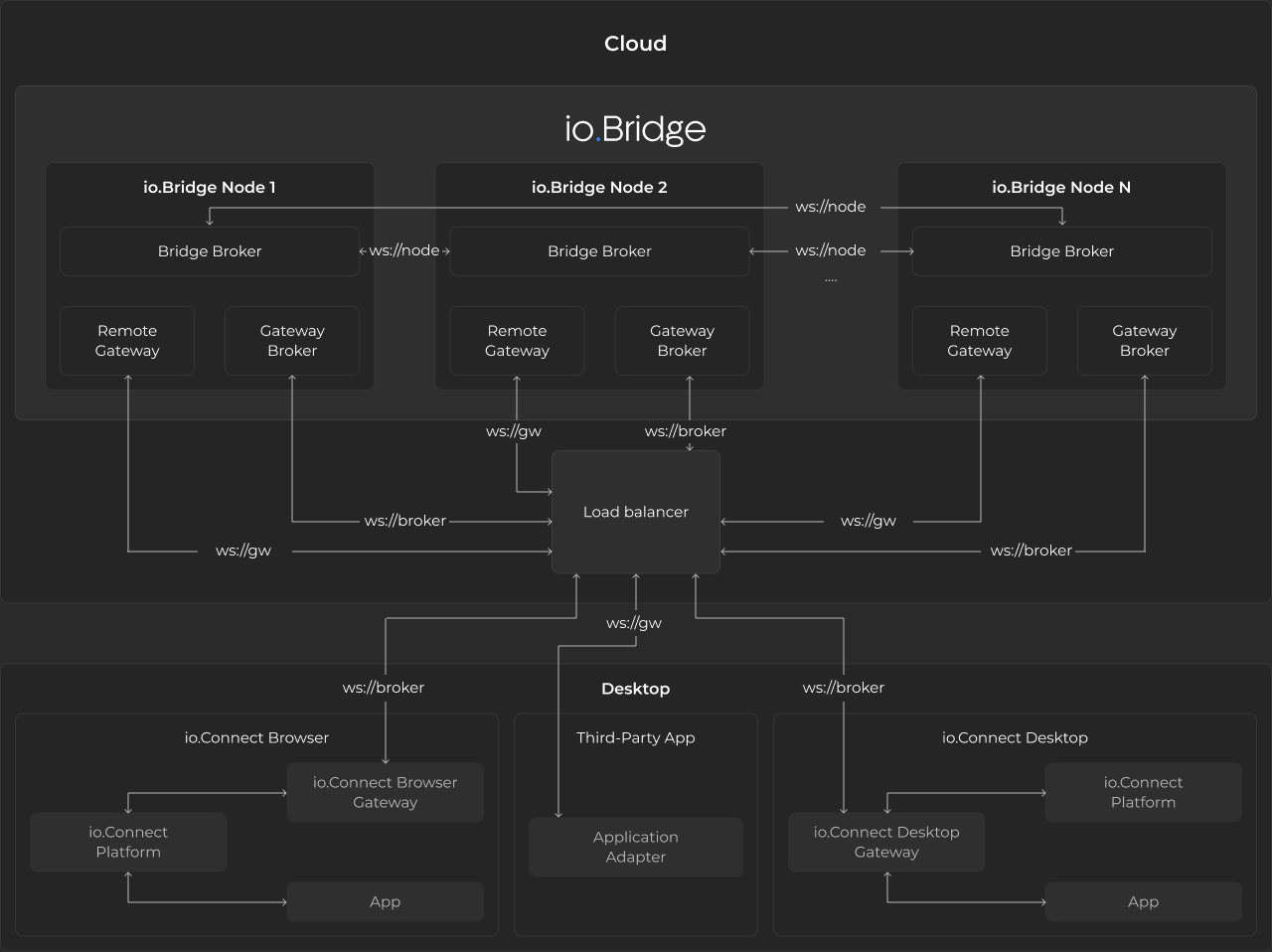
io.Bridge consists of the following components:
- Gateway Broker - a broker that manages the connections between the io.Connect Gateways;
- Remote Gateway - an io.Connect Gateway that provides connectivity between io.Connect Browser, interop-enabled native apps, and third-party apps powered by the io.Connect Application Adapters;
- Bridge Broker - a broker that manages the connection and the synchronization between the members (io.Bridge node instances) of the io.Bridge cluster;
Performance Testing
The performance tests validate that io.Bridge satisfies real-world customer workloads by simulating multi-platform, multi-device user interactions. The tests use Grafana K6 as a performance testing framework. Each user connects from two devices simultaneously (a persistent main workstation, referred to as a Stable User (SU), and a short-lived session from a temporary device, referred to as a Dynamic User (DU)) triggering the message flow via io.Bridge. Messages have varying lengths and randomized inter-message delays. The io.Bridge container starts with 422 MiB of memory and 0.025 virtual CPU (vCPU), with a maximum allocation of 2.4 GiB. The test configuration uses a custom Average Generator (AG), specified as AG(min, average, max), for randomized parameters, and a Message Generator (MG), specified as MG(min, average, max), for producing messages with varying lengths.
The following sections describe the results from executing two test scenarios with 500 and 800 Virtual Users (VU) respectively.
500 VU
Configuration
| Configuration Property | Value |
|---|---|
| Stages | 29m:509,80m:509,10m:509,1m:0 |
| Percent SU | 40 |
| SU Channels | AG(3, 5, 10) |
| SU waiting time between messages | AG(60, 150, 300) |
| DU messages per session | AG(3, 7, 10) |
| DU waiting time between messages | AG(30, 120, 180) |
| Additional characters in messages | MG(500, 1500, 15000) |
Results
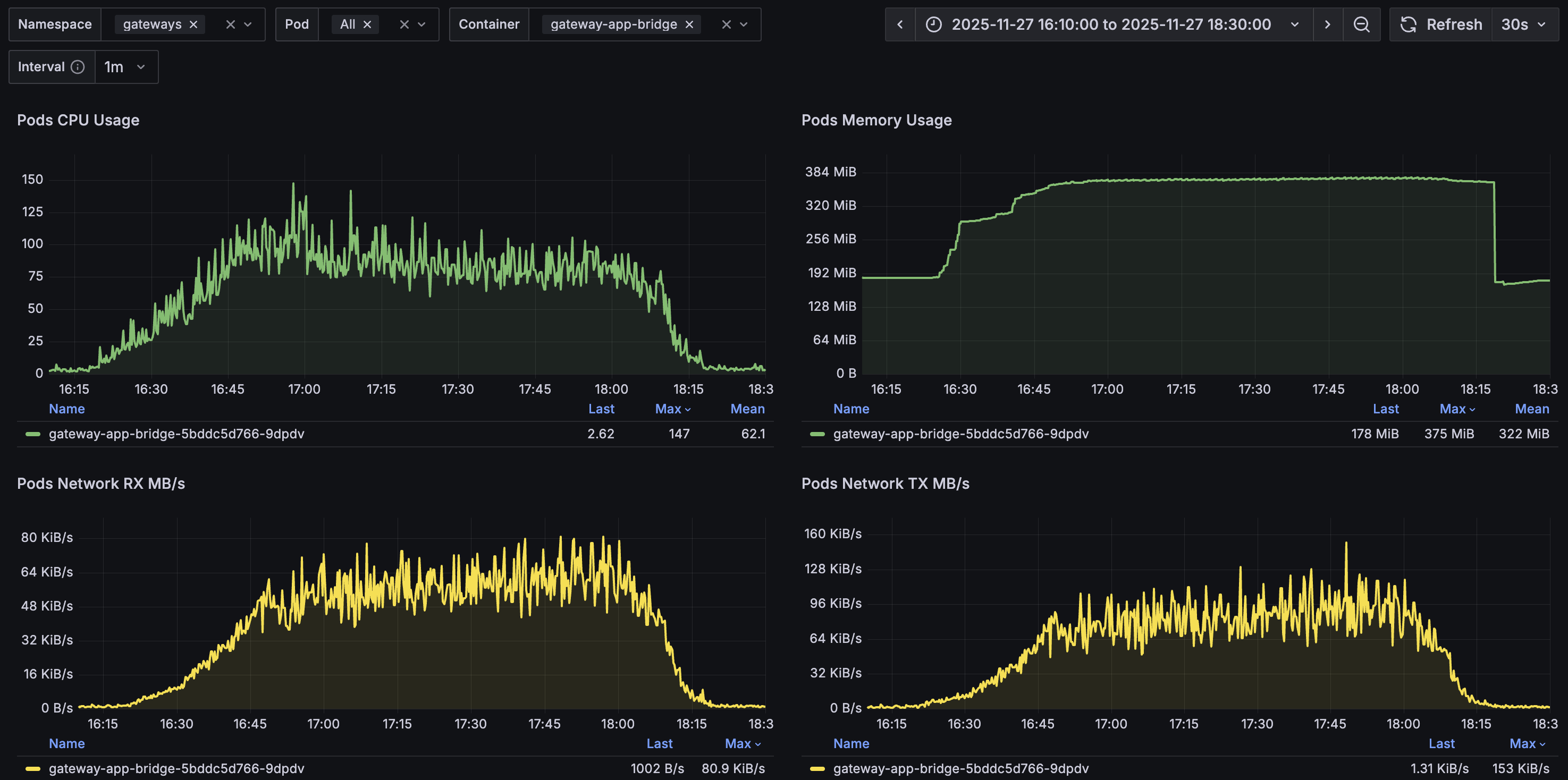
io.Bridge resource usage remained stable during the test and returned to pre-test levels after completion:
| Resource | Before | Starting Up | During | Teardown | After |
|---|---|---|---|---|---|
| vCPU | < 0.005 | max 0.119 | 0.119 - 0.147 | down to 0.017 | < 0.005 |
| Memory | 183 MiB | 359 MiB | 370 MiB | to 176 MiB | 178 MiB |
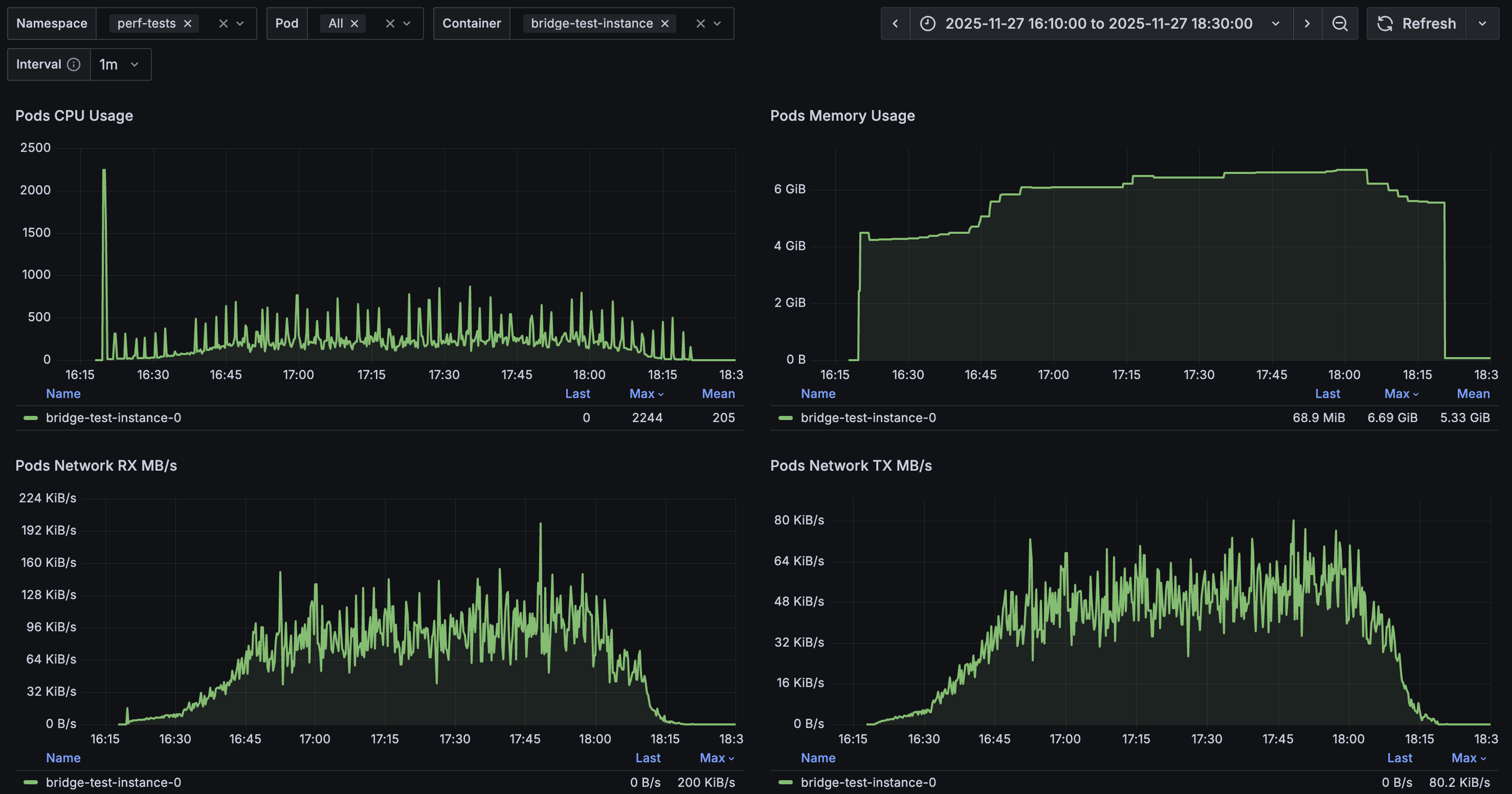
The test container CPU and memory usage were well within the allocated limits of 4 vCPU and 12 GiB:
Message performance metrics:
| Metric | Min | Median | Average | p(95) | p(99) | Max | Count |
|---|---|---|---|---|---|---|---|
| Messages from DU to DU duration | 9 ms | 12 ms | 12.97 ms | 20 ms | 30 ms | 261 ms | 10 355 |
| Messages from DU to SU duration | 11 ms | 16 ms | 25.98 ms | 65 ms | 111 ms | 9 715 ms | 3 493 |
| Messages from SU to DU duration | 10 ms | 14 ms | 27.82 ms | 76 ms | 131 ms | 390 ms | 3 485 |
| Messages sent by DU length | 500 | 740 | 1 494.19 | 5 025 | 8 015 | 12 588 | 10 717 |
| Messages sent by SU length | 500 | 748 | 1 503.40 | 5 092 | 8 187 | 13 172 | 8 518 |
| WebSocket connecting | 6 ms | 11 ms | 12.62 ms | 18 ms | 36 ms | 247 ms | 16 110 |
| WebSocket session duration | 9 ms | 17 ms | 355 616 ms | 1 283 086 ms | 5 991 511 ms | 7 023 300 ms | 16 108 |
800 VU
Configuration
| Configuration Property | Value |
|---|---|
| Stages | 29m:809,80m:809,10m:809,1m:0 |
| Percent SU | 40 |
| SU Channels | AG(3, 5, 10) |
| SU waiting time between messages | AG(60, 150, 300) |
| DU messages per session | AG(3, 7, 10) |
| DU waiting time between messages | AG(30, 120, 180) |
| Additional characters in messages | MG(500, 1500, 15000) |
Results
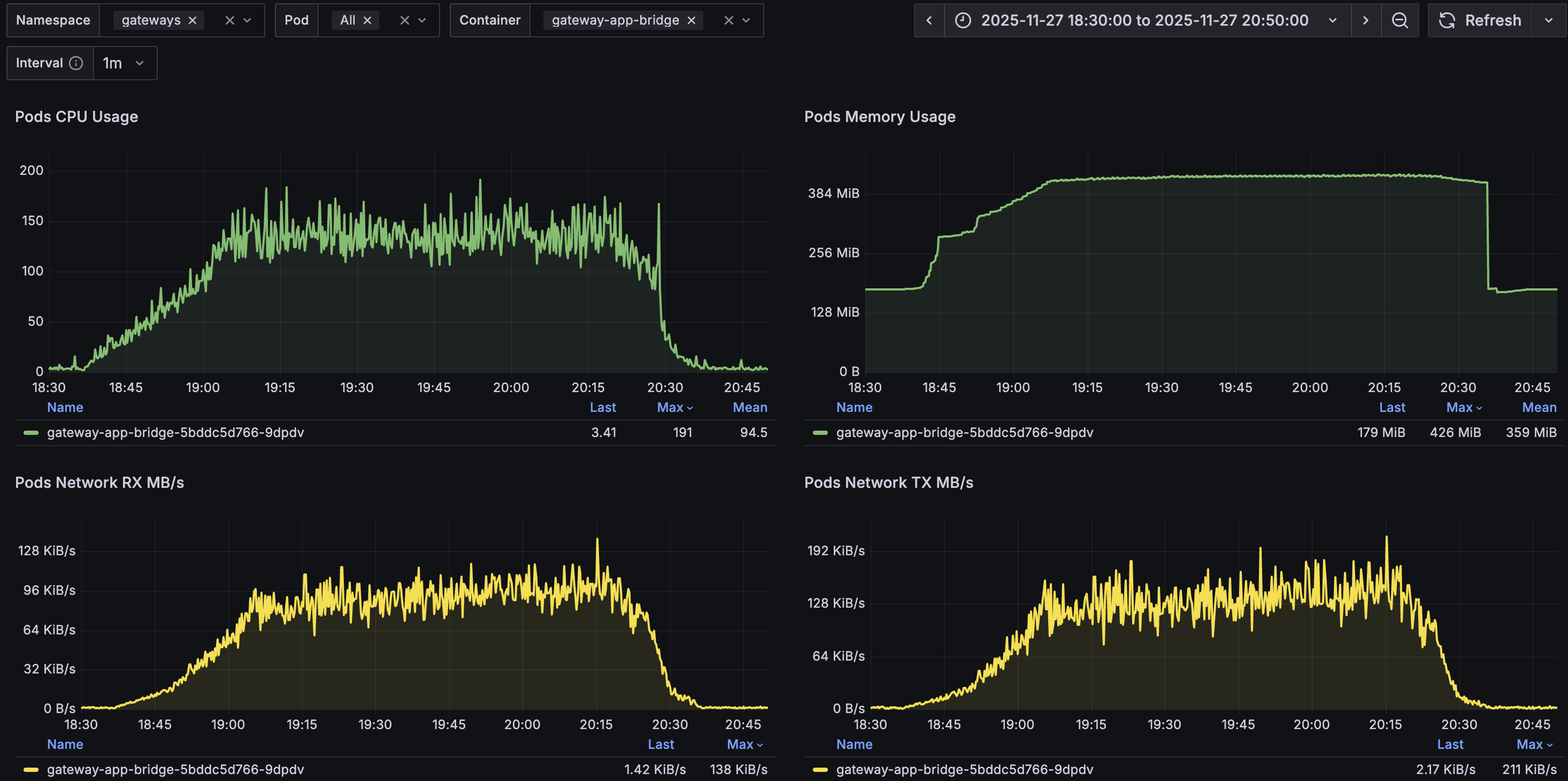
io.Bridge resource usage remained stable during the test and returned to pre-test levels after completion:
| Resource | Before | Starting Up | During | Teardown | After |
|---|---|---|---|---|---|
| vCPU | < 0.005 | max 0.121 | 0.121 - 0.191 | down to 0.017 | < 0.005 |
| Memory | 179 MiB | 414 MiB | 426 MiB | to 173 MiB | 179 MiB |
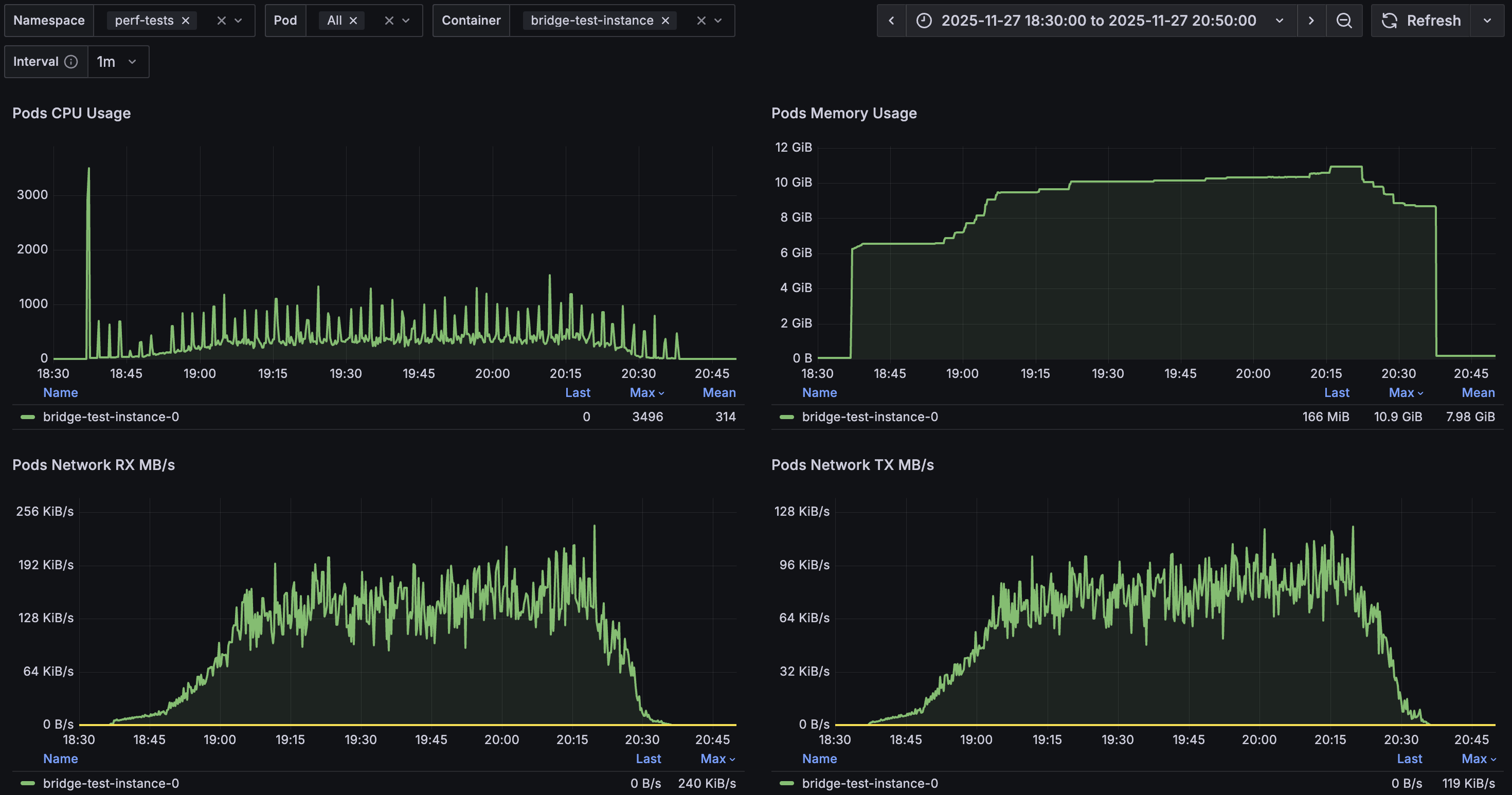
The test container CPU and memory usage were within limits, except for a brief 6-minute period where memory reached 10.9 GiB, slightly exceeding the 90% threshold (10.8 GiB) of the allocated 12 GiB:
Message performance metrics:
| Metric | Min | Median | Average | p(95) | p(99) | Max | Count |
|---|---|---|---|---|---|---|---|
| Messages from DU to DU duration | 9 ms | 12 ms | 13.5 ms | 22 ms | 43 ms | 211 ms | 16 701 |
| Messages from DU to SU duration | 10 ms | 16 ms | 23.79 ms | 68 ms | 111 ms | 749 ms | 6 095 |
| Messages from SU to DU duration | 9 ms | 14 ms | 28.64 ms | 79 ms | 127 ms | 319 ms | 5 599 |
| Messages sent by DU length | 500 | 744 | 1 502.38 | 5 139 | 8 038 | 12 644 | 17 045 |
| Messages sent by SU length | 500 | 748 | 1 516.21 | 5 136 | 8 269 | 13 000 | 13 479 |
| WebSocket connecting | 6 ms | 11 ms | 12.41 ms | 17 ms | 41 ms | 1 069 ms | 25 467 |
| WebSocket session duration | 9 ms | 17 ms | 357 778 ms | 1 284 117 ms | 6 158 442 ms | 7 001 346 ms | 25 466 |