
Microsoft Office
Overview
The Excel Adapter exposes a client API which your web apps can use to interoperate with Excel. The io.Connect Excel API provides convenient methods for manipulating Excel features (workbooks, tables, ranges, menus) and enables you to execute various operations in Excel - reading and writing data, subscribing for updates, creating menus dynamically, and more.
⚠️ Note that as version 2 of the Excel Adapter is still an experimental feature, the io.Connect Excel API is currently distributed together with the Excel Adapter bundle in the form of a standalone TypeScript file.
⚠️ Note that for your interop-enabled apps to be able to use the io.Connect Excel API, the Excel Adapter must be installed and Excel must be running.
Excel API Test App
You can use the Excel API testing app hosted at https://excel-playground.interop.io/ to explore the io.Connect Excel API. It provides a convenient way to invoke the exposed methods and get to know the data structures with which they work. It's possible to modify the arguments passed to the methods from the UI of the app and copy entire code snippets which you can then modify and test in the console of the app or in your own interop-enabled app:
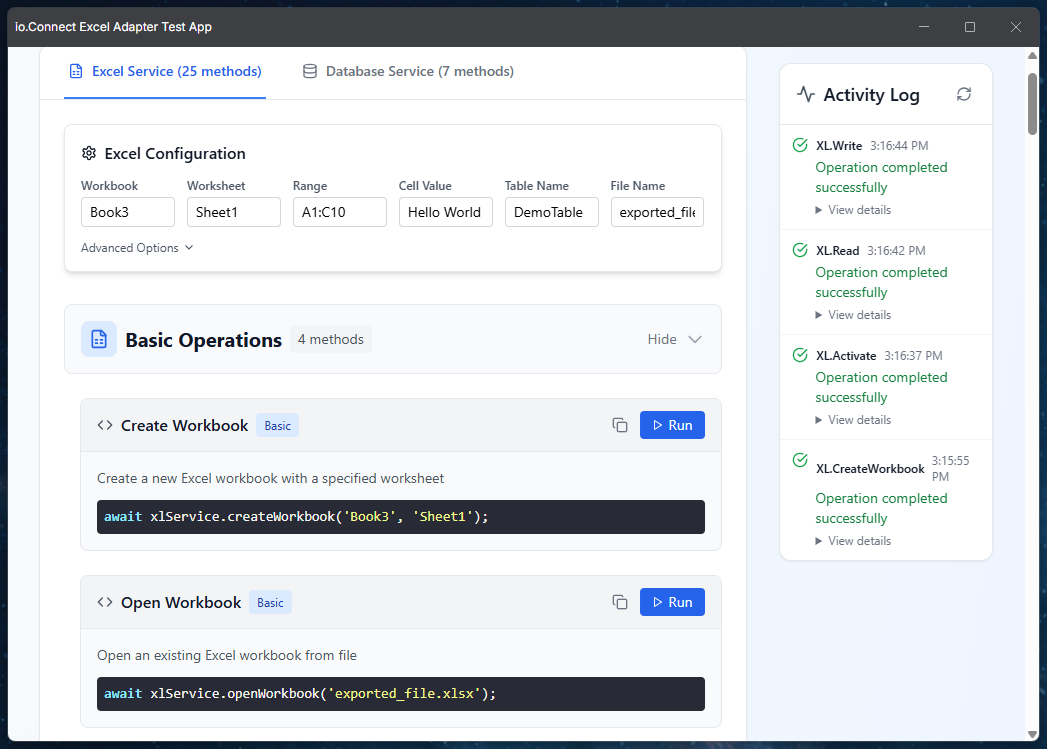
The fastest way to start using the Excel API testing app is to:
- Copy the app URL -
https://excel-playground.interop.io/. - Open the io.Connect Desktop tray menu by right-clicking on the io.Connect Desktop tray icon.
- Click on the "Open" menu item.
- Paste the URL into the text input field.
- Click the "Open" button to start the app in an io.Connect Window.
Another option is to create an app definition for the app and start it from the io.Connect launcher.
Excel Service Operations
The Excel Service API enables you to interoperate with Excel from your interop-enabled web app. The following sections provide examples of using the Excel Service API methods to interact with various Excel features from your app.
ℹ️ For more details about the Excel Service API methods and data structures, see the API Reference section.
Initialization
To initialize the Excel Service API, instantiate the IOConnectXLService class and pass the initialized API object of the @interopio/desktop library as a required argument:
import IODesktop from "@interopio/desktop";
import { IOConnectXLService } from "./io-excel-service";

// Initializing the `@interopio/desktop` library.
const io = await IODesktop();

// Initializing the Excel Service API.
const xl = new IOConnectXLService(io);

// Now the Excel Service API will be available via the `xl` object.
await xl.openWorkbook("my-workbook.xlsx");
By default, the Excel Service API uses the "IO.XL." prefix for the Interop methods registered by the Excel Adapter. If you have changed the prefix via the "IGlueExcelService-ns" property of the Excel Adapter settings, pass the new prefix as a second argument:
const xl = new IOConnectXLService(io, "MyCompany.XL.");Most methods accept a RangeInfo object specifying the workbook, worksheet, and range on which to perform the operation. If you don't specify a workbook or a worksheet, the active ones will be used.
Workbooks
The following sections describe the available operations related to manipulating Excel workbooks.
Create
To create an Excel workbook, use the createWorkbook() method. It accepts a name for the workbook file and a name for the worksheet to create as required arguments. Optionally, you can specify how save conflict resolutions should be handled by using the XLSaveConflictResolution enumeration:
import { XLSaveConflictResolution } from "./io-excel-service";

const workbookName = "My Workbook";
const sheetName = "My Sheet";
const conflictResolution = XLSaveConflictResolution.LocalSessionChanges;

await xl.createWorkbook(workbookName, sheetName, conflictResolution);
Open
To open an Excel workbook, use the openWorkbook() method and pass as a required argument a file name or a path to the Excel file to open:
const fileName = "my-workbook.xlsx";

await xl.openWorkbook(fileName);
Save
To save an Excel workbook, use the saveAs() method and pass as required arguments a RangeInfo object and a name with which to save the Excel file:
const range = { workbook: "Book1" };
const fileName = "my-workbook.xlsx";

await xl.saveAs(range, fileName);
List
To list all open workbooks, use the listWorkbooks() method. The data property of the result contains an array of objects describing the open workbooks:
const { data } = await xl.listWorkbooks();

data.forEach(({ name, path }) => console.log(`${name}: ${path}`));
ℹ️ For details on the properties of the returned
dataobject, see thelistWorkbooks()method.
Worksheets
The following sections describe the available operations related to manipulating Excel worksheets.
Create
To create a worksheet, use the createWorksheet() method. Optionally, pass the name of the workbook in which to create the worksheet and a name for the worksheet. If you don't specify a workbook, the worksheet will be created in the active workbook:
await xl.createWorksheet("Book1", "Prices");Rename
To rename a worksheet, use the renameWorksheet() method and pass as required arguments a RangeInfo object specifying the worksheet and a new name for it:
const range = { workbook: "Book1", worksheet: "Sheet1" };

await xl.renameWorksheet(range, "Summary");
List
To list the worksheets in a workbook, use the listWorksheets() method. If you don't specify a workbook, the worksheets of the active workbook will be listed. The data property of the result contains an array of objects describing the worksheets:
const { data } = await xl.listWorksheets("Book1");ℹ️ For details on the properties of the returned
dataobject, see thelistWorksheets()method.
Ranges
The following sections describe the available operations related to manipulating Excel ranges.
Activate
To select a range, use the activate() method. If you don't pass a RangeInfo object or don't specify a workbook in it, the Excel window will only be brought to the front:
const range = { workbook: "Book1", worksheet: "Sheet1", range: "A1:C10" };

await xl.activate(range);
Read
To read the values of a range, use the read() method. The data property of the result contains a single value if the range is a single cell, or a 2D array of values otherwise:
const range = { workbook: "Book1", worksheet: "Sheet1", range: "A1:C10" };

const { data } = await xl.read(range);
Write
To write values in a range, use the write() method. If you pass a single value, it will be written in each cell of the range. If you pass an array, its values will be written in the respective cells. Shorter rows of a 2D array are padded with empty cells:
// Writing the same value in all cells of the range.
await xl.write({ range: "A1:C3" }, 1);

// Writing a 2D array.
await xl.write({ range: "A5:B6" }, [[1, 2], [3, 4]]);
To resize the range automatically so that it fits the data, use the resizeOrientation property of the RangeInfo object. In this case, it's enough to specify only the top left cell of the range:
const rows = Array.from({ length: 50 }, (_, i) => [`Row ${i + 1}`, i]);

await xl.write({ range: "A1", resizeOrientation: "Vertical" }, rows);
Read & Write References
To read or write a range specified with an Excel reference (e.g., "Sheet1!A1:B5"), use the readRef() and writeRef() methods. The size of the range must match the size of the data you write:
const { data } = await xl.readRef("Sheet1!A1:B2");

await xl.writeRef("Sheet1!D1:E2", data);
Format
To apply a number format to a range, use the setRangeFormat() method and specify the format in the numberFormat property of the RangeInfo object:
const range = { workbook: "Book1", worksheet: "Sheet1", range: "B2:B10", numberFormat: "#,##0.00" };

await xl.setRangeFormat(range);
Styles
To set the background and text colors of a range, use the applyStyles() method. Colors can be specified as HTML color names (e.g., "red") or hexadecimal values (e.g., "#FF0000"). Use "none" to remove the background color:
const range = { workbook: "Book1", worksheet: "Sheet1", range: "A1:C1" };

await xl.applyStyles(range, "#1F4E79", "white");
Merge
To merge the cells of a range, use the merge() method. To merge the cells in each row of the range separately, pass true as a second argument. To unmerge cells, use the unmerge() method:
const range = { workbook: "Book1", worksheet: "Sheet1", range: "A1:C1" };

await xl.merge(range);
await xl.unmerge(range);
Sort
To sort a range, use the sortRange() method. Pass the position (1-based) of the column within the range by which to sort. Optionally, specify whether to sort in descending order and whether the range has a header row:
const range = { workbook: "Book1", worksheet: "Sheet1", range: "A1:C10" };

// Sorting by the second column in descending order.
await xl.sortRange(range, 2, true, true);
Find & Replace
To find the first cell containing a value, use the find() method. The address and data properties of the result contain the address and the value of the found cell:
const range = { workbook: "Book1", worksheet: "Sheet1", range: "A1:C10" };

const { address } = await xl.find(range, "MSFT");
To replace values, use the findReplace() method. If you don't pass a replacement value, the data property of the result will contain an array of objects describing all found cells:
const range = { workbook: "Book1", worksheet: "Sheet1", range: "A1:C10" };

// Replacing all occurrences of a value.
await xl.findReplace(range, "MSFT", "AAPL");

// Finding all occurrences of a value.
const { data } = await xl.findReplace(range, "AAPL");
ℹ️ For details on the properties of the returned
dataobject, see thefindReplace()method.
Clear Contents
To remove the values of a range while preserving its formatting, use the clearContents() method:
const range = { workbook: "Book1", worksheet: "Sheet1", range: "A1:C10" };

await xl.clearContents(range);
Used Range
To find the range of a worksheet that contains data, use the getUsedRange() method. The data property of the result contains an object describing the used range:
const range = { workbook: "Book1", worksheet: "Sheet1" };

const { data } = await xl.getUsedRange(range);
ℹ️ For details on the properties of the returned
dataobject, see thegetUsedRange()method.
Link to CSV
To import the data from a CSV file into a worksheet, use the linkToCSV() method. Pass a RangeInfo object specifying the top left cell where to insert the data and a path to the CSV file. The data will be refreshed automatically each time the workbook is opened:
const range = { workbook: "Book1", worksheet: "Sheet1", range: "A1" };

await xl.linkToCSV(range, "C:/Data/prices.csv");
Comments
To add a comment to each cell of a range, use the writeComment() method. To remove the comments from a range, use the clearComments() method:
const range = { workbook: "Book1", worksheet: "Sheet1", range: "B2" };

await xl.writeComment(range, "Price updated from Bloomberg.");
await xl.clearComments(range);
Tables
The following sections describe the available operations related to manipulating Excel tables.
Create
To create a table, use the createTable() method. Pass as required arguments a RangeInfo object, name for the table, style for the table, names for the columns, data for the columns, and a callback to be invoked when the table has been updated:
const range = { workbook: "Book1", worksheet: "Sheet1" };
const tableName = "My Table";
const tableStyle = "TableStyleDark1";
const columns = ["ID", "Name", "Email"];
const data = [
    ["1", "John Doe", "john@example.com"],
    ["2", "Jane Smith", "jane@example.com"]
];
const callback = origin => console.log(origin);

// Creating a named table with 3 named columns and 2 rows of data.
await xl.createTable(range, tableName, tableStyle, columns, data, callback);
Refresh
To refresh a table, use the refreshTable() method and pass as required arguments a RangeInfo object and the table name:
const range = { workbook: "Book1", worksheet: "Sheet1" };
const tableName = "My Table";

await xl.refreshTable(range, tableName);
Read Rows
To read table rows, use the readTableRows() method. Pass as required arguments a RangeInfo object, the table name, and the number of the row within the table from which to start the reading operation. Optionally, specify the number of table rows to read:
const range = { workbook: "Book1", worksheet: "Sheet1" };
const tableName = "My Table";
const fromRow = 1;
const rowsToRead = 10;

// Reading a specified number of rows from a table.
const { data } = await xl.readTableRows(range, tableName, fromRow, rowsToRead);

console.log(`Table columns data: ${JSON.stringify(data)}`);
Write Rows
To write table rows, use the writeTableRows() method. The rows will be inserted at the specified position. Pass as required arguments a RangeInfo object, the table name, the number of the row within the table where to insert the new rows (or null to add them after the last row), and a 2D array with the values for each cell of the rows:
const range = { workbook: "Book1", worksheet: "Sheet1" };
const tableName = "My Table";
const rowPosition = 1;
const values = [
    ["1", "John Doe", "john@example.com"]
];

// Writing (inserting) a single row at the specified position in the table.
await xl.writeTableRows(range, tableName, rowPosition, values);
Update Columns
To update table columns, use the updateTableColumns() method. Pass as required arguments a RangeInfo object, the table name, and an array of TableColumnOperationDescriptor objects describing the column operations:
const range = { workbook: "Book1", worksheet: "Sheet1" };
const tableName = "My Table";
const columnOperations = [
    {
        oldName: "Email",
        name: "Contact Details",
        position: null,
        op: "Rename"
    }
];

// Renaming a table column.
await xl.updateTableColumns(range, tableName, columnOperations);
Describe Columns
To retrieve details about table columns, use the describeTableColumns() method and pass as required arguments a RangeInfo object and the table name:
const range = { workbook: "Book1", worksheet: "Sheet1" };
const tableName = "My Table";

// Retrieving details about the table columns.
const { columns } = await xl.describeTableColumns(range, tableName);
List
To list the tables in a worksheet, use the listTables() method. The data property of the result contains an array of objects describing the tables:
const range = { workbook: "Book1", worksheet: "Sheet1" };

const { data } = await xl.listTables(range);
ℹ️ For details on the properties of the returned
dataobject, see thelistTables()method.
Delete Rows
To delete table rows, use the deleteTableRows() method. Pass as required arguments a RangeInfo object, the table name, and the position (1-based) of the first row to delete. Optionally, specify the number of rows to delete:
const range = { workbook: "Book1", worksheet: "Sheet1" };

// Deleting 3 rows starting from the second row.
await xl.deleteTableRows(range, "My Table", 2, 3);
Delete
To delete a table, use the deleteTable() method. To keep the table data as a regular range, pass true as a third argument:
const range = { workbook: "Book1", worksheet: "Sheet1" };

await xl.deleteTable(range, "My Table", true);
Pivot Tables
To create a pivot table, use the createPivotTable() method. Pass as required arguments a RangeInfo object specifying the source data, a RangeInfo object specifying where to place the pivot table, and a name for the pivot table. The destination worksheet must be in the same workbook as the source data. If you don't specify a destination worksheet, the pivot table will be placed in the source worksheet:
const sourceRange = { workbook: "Book1", worksheet: "Sales", range: "A1:D100" };
const destinationRange = { worksheet: "Summary", range: "A3" };

await xl.createPivotTable(sourceRange, destinationRange, "Sales Pivot");
⚠️ Note that the pivot table is created without any fields. The user must add fields to it from the Excel "PivotTable Fields" pane.
Subscriptions
The following sections describe the available operations related to subscribing for updates from Excel.
Range Updates
To subscribe for range updates, use the subscribe() method and pass as required arguments a RangeInfo object and an XLCallback for handling the updates:
const range = { workbook: "Book1", worksheet: "Sheet1", range: "A1:C10" };
const callback = ({ intersect, address }) => console.log(`Updated cell address: ${address}, updated cell value: ${intersect}`);

await xl.subscribe(range, callback);
Range Deltas
To receive details about the changed rows within a range, use the subscribeDeltas() method. The delta property of the object passed to the callback contains an array of objects describing the inserted, modified, and deleted rows:
const range = { workbook: "Book1", worksheet: "Sheet1", range: "A1:C100" };
const callback = ({ delta }) => delta?.forEach(({ action, row }) => console.log(action, row));

await xl.subscribeDeltas(range, callback);
When the workbook is saved, the callback is invoked with an object whose action property is set to "saved".
ℹ️ For more details on the objects passed to the callback, see the
XLCallbacksection.
Destroy Subscription
To destroy an existing subscription, use the destroySubscription() method and pass as a required argument the subscription ID:
const range = { workbook: "Book1", worksheet: "Sheet1", range: "A1:C10" };
const callback = ({ intersect, address }) => console.log(`Updated cell address: ${address}, updated cell value: ${intersect}`);

// Creating a subscription.
const { subscriptionId } = await xl.subscribe(range, callback);

// Destroying an existing subscription.
const { message } = await xl.destroySubscription(subscriptionId);

console.log(message);
Raw Methods
Methods ending with Raw (e.g., subscribeRaw()) accept a SubscriptionInfo object instead of a callback. Instead of invoking a callback in your app, the Excel Adapter will invoke the Interop method specified in the callbackEndpoint property. This allows you to handle the updates in a different app or to target specific app instances:
// Registering an Interop method for handling the updates.
await io.interop.register("MyRangeHandler", ({ address, intersect }) => console.log(address, intersect));

const range = { workbook: "Book1", worksheet: "Sheet1", range: "A1:C10" };
const subscriptionInfo = { callbackEndpoint: "MyRangeHandler" };

await xl.subscribeRaw(range, subscriptionInfo);
Menus
The following sections describe the available operations related to manipulating Excel context and ribbon menus.
Context Menus
To add an item to the Excel cell context menu, use the createContextMenu() method. Pass as required arguments a caption for the menu item, an array with the captions of the parent submenus, a RangeInfo object specifying where the menu item will be available, and an XLCallback to invoke when the menu item is clicked. If you don't specify a workbook, worksheet, or range, the menu item will be available in all of them:
const range = { worksheet: "Clients", range: "A2:A100" };
const callback = ({ activeCell }) => console.log(`Selected client: ${activeCell}`);

const { menuId } = await xl.createContextMenu("Send to CRM", ["interop.io", "Actions"], range, callback);
To remove the menu item, use the destroyContextMenu() method and pass the menu ID:
await xl.destroyContextMenu(menuId);Ribbon Menus
To add an item to the "Dynamics" dropdown in the interop.io ribbon tab, use the createDynamicRibbonMenu() method. When the user selects the item and clicks the "Execute Dynamic" button, the specified XLCallback will be invoked. The workbook and worksheet properties of the RangeInfo object specify where the menu item will be enabled:
const range = { workbook: "Book1" };
const callback = () => console.log("Refreshing prices...");

const { menuId } = await xl.createDynamicRibbonMenu("Refresh Prices", range, callback);
To remove the menu item, use the destroyRibbonMenu() method and pass the menu ID:
await xl.destroyRibbonMenu(menuId);Custom Task Panes
To create a custom task pane in the active Excel window, use the createOrUpdateCTP() method. Pass as required arguments a RangeInfo object, a CTPDescriptor object describing the task pane, and an XLCallback to invoke when the user clicks a button in the task pane. The descriptor property of the object passed to the callback contains the ID of the clicked button:
const ctpDescriptor = {
    id: "pricing-panel",
    title: "Pricing",
    ui: {
        type: "Panel",
        children: [
            { type: "Label", text: "Select a pricing source:" },
            { type: "Button", id: "bloomberg", text: "Bloomberg" },
            { type: "Button", id: "fidessa", text: "Fidessa" }
        ]
    }
};
const callback = ({ descriptor }) => console.log(`Clicked button: ${descriptor}`);

await xl.createOrUpdateCTP({}, ctpDescriptor, callback);
To update an existing custom task pane, call createOrUpdateCTP() again with the same task pane ID. To remove a custom task pane, use the destroyCTP() method:
await xl.destroyCTP({ id: "pricing-panel" });ℹ️ For details on the available UI elements, see the Configuration > Custom Task Panes section.
Keyboard Shortcuts
To invoke an Interop method with the values of a range when the user presses a keyboard shortcut, use the registerCallbackShortcut() method. Specify the shortcut in the format used by the Excel Application.OnKey method (e.g., "^+k" for CTRL + SHIFT + K). The rng property of the object passed to the Interop method contains the values of the range:
await io.interop.register("MyShortcutHandler", ({ rng }) => console.log(rng));

const range = { worksheet: "Sheet1", range: "A1:B2" };
const subscriptionInfo = { callbackEndpoint: "MyShortcutHandler" };

await xl.registerCallbackShortcut(range, "^+k", subscriptionInfo);
To remove the shortcut, use the unregisterCallbackShortcut() method:
await xl.unregisterCallbackShortcut("^+k");⚠️ Note that you can register up to 20 keyboard shortcuts.
Search Providers
To make the values of a range available in the io.Connect search, use the registerSearchProvider() method. Pass as required arguments a RangeInfo object and a SearchProviderDescriptor object. By default, the first column of the range is used as a result ID, the second as a display name, and the third as a description:
const range = { workbook: "Book1", worksheet: "Instruments", range: "A2:C100" };
const descriptor = { name: "ExcelInstruments", types: ["instrument"] };

await xl.registerSearchProvider(range, descriptor);
To remove the search provider, use the unregisterSearchProvider() method:
await xl.unregisterSearchProvider({ name: "ExcelInstruments" });Macros
To run a VBA macro, use the runMacro() method. Pass the name of the macro and, optionally, an array of arguments for it:
await xl.runMacro("Module1.RecalculatePrices", ["EUR", 2]);To list the available VBA macros, use the listMacros() method. Optionally, pass a workbook name to list only its macros. The data property of the result contains an array of objects describing the macros:
const { data } = await xl.listMacros("Book1.xlsm");ℹ️ For details on the properties of the returned
dataobject, see thelistMacros()method.
⚠️ Note that listing macros requires the "Trust access to the VBA project object model" option to be enabled in the Excel Trust Center settings.
OLE Objects & Shapes
To retrieve details about the OLE objects (e.g., ActiveX controls, embedded documents) in a worksheet, use the getOleObjectsInfo() method. The oleObjects property of the result contains an array of objects describing the OLE objects:
const range = { workbook: "Book1", worksheet: "Sheet1" };

const { oleObjects } = await xl.getOleObjectsInfo(range);
To activate an OLE object, execute an OLE verb on it, or set the value of an ActiveX control, use the updateOleObject() method. Pass as required arguments a RangeInfo object, the name of the OLE object, the operation to perform ("activate", "verb", or "value"), and a value for the operation:
const range = { workbook: "Book1", worksheet: "Sheet1" };

// Setting the value of an ActiveX check box.
await xl.updateOleObject(range, "CheckBox1", "value", true);

// Opening an embedded document.
await xl.updateOleObject(range, "Object 1", "verb", "xlVerbOpen");
To retrieve details about the shapes (including form controls) in a worksheet, use the getShapesInfo() method. The shapeObjects property of the result contains an array of objects describing the shapes:
const range = { workbook: "Book1", worksheet: "Sheet1" };

const { shapeObjects } = await xl.getShapesInfo(range);
Custom UDFs
To register a custom UDF at runtime, use the registerUDF() method. The code of the UDF must be written in C#. Use the Args array to access the arguments passed to the UDF:
const parameters = [{ name: "value", description: "Value to double." }];

await xl.registerUDF("MY_DOUBLE", "return Convert.ToDouble(Args[0]) * 2;", [], [], "", parameters);
The UDF can then be used in Excel like any other function (e.g., =MY_DOUBLE(21)).
ℹ️ For more details on custom UDFs, see the Configuration > Custom UDFs section.
⚠️ Note that custom UDFs can't be modified or removed while Excel is running.
Active Context
To retrieve details about the active workbook, worksheet, cell, and selection, use the getActiveContext() method. Optionally, pass the maximum number of selected cells whose values to return (defaults to 1). If the user has selected more cells, no values will be returned:
const { data } = await xl.getActiveContext(10);

console.log(data.selectionAddress, data.selection);
ℹ️ For details on the properties of the returned
dataobject, see thegetActiveContext()method.
API Reference
The following API reference sections describe the data structures and the methods provided by the io.Connect Excel API.
Classes
IOConnectXLService
The IOConnectXLService is the entry point for the Excel Service API. Instantiate this class to initialize the Excel Service API.
Parameters:
| Parameter | Description |
|---|---|
ioInstance |
Instance of the initialized @interopio/desktop library. |
methodNs |
Prefix for the Interop methods registered by the Excel Adapter. Must match the "IGlueExcelService-ns" property of the Excel Adapter settings. Defaults to "IO.XL.". |
Methods:
| Method | Description |
|---|---|
activate() |
Selects a range. |
applyStyles() |
Sets the background and text colors of a range. |
clearComments() |
Removes comments from a range. |
clearContents() |
Removes the values of a range. |
createContextMenu() |
Adds an item to the Excel cell context menu. |
createContextMenuRaw() |
Raw version of createContextMenu() which accepts a SubscriptionInfo object instead of a callback. |
createDynamicRibbonMenu() |
Adds an item to the "Dynamics" dropdown of the interop.io ribbon tab. |
createDynamicRibbonMenuRaw() |
Raw version of createDynamicRibbonMenu() which accepts a SubscriptionInfo object instead of a callback. |
createOrUpdateCTP() |
Creates a custom task pane or updates an existing one. |
createOrUpdateCTPRaw() |
Raw version of createOrUpdateCTP() which accepts a SubscriptionInfo object instead of a callback. |
createPivotTable() |
Creates a pivot table. |
createTable() |
Creates a table. |
createWorkbook() |
Creates a workbook. |
createWorksheet() |
Creates a worksheet. |
deleteTable() |
Deletes a table. |
deleteTableRows() |
Deletes table rows. |
describeTableColumns() |
Returns details about the columns of a table. |
destroyContextMenu() |
Removes an item from the Excel cell context menu. |
destroyContextMenuRaw() |
Raw version of destroyContextMenu(). |
destroyCTP() |
Removes a custom task pane. |
destroyRibbonMenu() |
Removes an item from the "Dynamics" dropdown of the interop.io ribbon tab. |
destroyRibbonMenuRaw() |
Raw version of destroyRibbonMenu(). |
destroySubscription() |
Destroys a subscription. |
find() |
Finds the first cell containing a value. |
findReplace() |
Replaces values or finds all cells containing a value. |
getActiveContext() |
Returns details about the active workbook, worksheet, cell, and selection. |
getOleObjectsInfo() |
Returns details about the OLE objects in a worksheet. |
getShapesInfo() |
Returns details about the shapes in a worksheet. |
getUsedRange() |
Returns details about the range of a worksheet that contains data. |
linkToCSV() |
Imports the data from a CSV file into a worksheet. |
listMacros() |
Lists the available VBA macros. |
listTables() |
Lists the tables in a worksheet. |
listWorkbooks() |
Lists the open workbooks. |
listWorksheets() |
Lists the worksheets in a workbook. |
merge() |
Merges the cells of a range. |
openWorkbook() |
Opens a workbook. |
read() |
Reads the values of a range. |
readRef() |
Reads the values of a range specified with an Excel reference (e.g., "Sheet1!A1:B5"). |
readTableRows() |
Reads table rows. |
refreshTable() |
Refreshes a table. |
registerCallbackShortcut() |
Registers a keyboard shortcut which invokes an Interop method. |
registerSearchProvider() |
Registers a range as an io.Connect search provider. |
registerUDF() |
Registers a custom UDF. |
renameWorksheet() |
Renames a worksheet. |
runMacro() |
Runs a VBA macro. |
saveAs() |
Saves a workbook. |
setRangeFormat() |
Applies a number format to a range. |
sortRange() |
Sorts a range. |
subscribe() |
Subscribes for updates of a range. |
subscribeDeltas() |
Subscribes for details about the changed rows within a range. |
subscribeDeltasRaw() |
Raw version of subscribeDeltas() which accepts a SubscriptionInfo object instead of a callback. |
subscribeRaw() |
Raw version of subscribe() which accepts a SubscriptionInfo object instead of a callback. |
unmerge() |
Unmerges the cells of a range. |
unregisterCallbackShortcut() |
Removes a keyboard shortcut. |
unregisterSearchProvider() |
Removes a search provider. |
updateOleObject() |
Activates an OLE object, executes an OLE verb on it, or sets the value of an ActiveX control. |
updateTableColumns() |
Adds, renames, or deletes table columns. |
write() |
Writes values in a range. |
writeComment() |
Adds a comment to each cell of a range. |
writeRef() |
Writes values in a range specified with an Excel reference (e.g., "Sheet1!A1:B5"). |
writeTableRows() |
Inserts table rows. |
The following sections describe the methods provided by the IOConnectXLService class.
activate()
Selects a range.
Signature:
activate(range?: RangeInfo): Promise<XLServiceResult>Parameters:
| Name | Type | Description |
|---|---|---|
range |
object |
RangeInfo object specifying the range to select. If not specified, or if a workbook isn't specified, the Excel window will only be brought to the front. |
Return value: XLServiceResult
applyStyles()
Sets the background and text colors of a range.
Signature:
applyStyles(range: RangeInfo, backgroundColor: string, foregroundColor: string): Promise<XLServiceResult>Parameters:
| Name | Type | Description |
|---|---|---|
range |
object |
Required. RangeInfo object describing the range associated with the operation and various settings to apply to that operation. |
backgroundColor |
string |
Required. Background color as an HTML color name (e.g., "red") or a hexadecimal value (e.g., "#FF0000"). Use "none" to remove the background color. |
foregroundColor |
string |
Required. Text color as an HTML color name or a hexadecimal value. |
Return value: XLServiceResult
clearComments()
Removes the comments from a range.
Signature:
clearComments(range: RangeInfo): Promise<XLServiceResult>Parameters:
| Name | Type | Description |
|---|---|---|
range |
object |
Required. RangeInfo object describing the range associated with the operation and various settings to apply to that operation. |
Return value: XLServiceResult
clearContents()
Removes the values of a range while preserving its formatting.
Signature:
clearContents(range: RangeInfo): Promise<XLServiceResult>Parameters:
| Name | Type | Description |
|---|---|---|
range |
object |
Required. RangeInfo object describing the range associated with the operation and various settings to apply to that operation. |
Return value: XLServiceResult
createContextMenu()
Adds an item to the Excel cell context menu.
Signature:
createContextMenu(
    caption: string,
    menuPath: string[],
    range: RangeInfo,
    callback: XLCallback
): Promise<XLServiceResult>
Parameters:
| Name | Type | Description |
|---|---|---|
caption |
string |
Required. Caption for the menu item. |
menuPath |
string[] |
Required. Captions of the parent submenus in which to place the menu item. Pass an empty array to add the menu item to the top level of the context menu. |
range |
object |
Required. RangeInfo object specifying where the menu item will be available. If a workbook, worksheet, or range isn't specified, the menu item will be available in all of them. |
callback |
function |
Required. XLCallback to be invoked when the menu item is clicked. |
Return value: XLServiceResult
createContextMenuRaw()
Raw version of createContextMenu() which accepts a SubscriptionInfo object instead of a callback.
Signature:
createContextMenuRaw(
    caption: string,
    menuPath: string[],
    toolTip: string | undefined,
    range: RangeInfo,
    subscriptionInfo: SubscriptionInfo
): Promise<XLServiceResult>
Parameters:
| Name | Type | Description |
|---|---|---|
caption |
string |
Required. Caption for the menu item. |
menuPath |
string[] |
Required. Captions of the parent submenus in which to place the menu item. Pass an empty array to add the menu item to the top level of the context menu. |
toolTip |
string | undefined |
Required. Tooltip for the menu item. Pass undefined if you don't need a tooltip. |
range |
object |
Required. RangeInfo object specifying where the menu item will be available. If a workbook, worksheet, or range isn't specified, the menu item will be available in all of them. |
subscriptionInfo |
object |
Required. SubscriptionInfo object specifying the Interop method to invoke when the menu item is clicked. |
Return value: XLServiceResult
createDynamicRibbonMenu()
Adds an item to the "Dynamics" dropdown of the interop.io ribbon tab. The callback is invoked when the user selects the item and clicks the "Execute Dynamic" button.
Signature:
createDynamicRibbonMenu(caption: string, range: RangeInfo, callback: XLCallback): Promise<XLServiceResult>Parameters:
| Name | Type | Description |
|---|---|---|
caption |
string |
Required. Caption for the menu item. |
range |
object |
Required. RangeInfo object whose workbook and worksheet properties specify where the menu item will be enabled. If not specified, the menu item will be enabled in all workbooks. |
callback |
function |
Required. XLCallback to be invoked when the menu item is executed. |
Return value: XLServiceResult
createDynamicRibbonMenuRaw()
Raw version of createDynamicRibbonMenu() which accepts a SubscriptionInfo object instead of a callback.
Signature:
createDynamicRibbonMenuRaw(
    caption: string,
    toolTip: string | undefined,
    range: RangeInfo,
    subscriptionInfo: SubscriptionInfo
): Promise<XLServiceResult>
Parameters:
| Name | Type | Description |
|---|---|---|
caption |
string |
Required. Caption for the menu item. |
toolTip |
string | undefined |
Required. Tooltip for the menu item. Pass undefined if you don't need a tooltip. |
range |
object |
Required. RangeInfo object whose workbook and worksheet properties specify where the menu item will be enabled. If not specified, the menu item will be enabled in all workbooks. |
subscriptionInfo |
object |
Required. SubscriptionInfo object specifying the Interop method to invoke when the menu item is executed. |
Return value: XLServiceResult
createOrUpdateCTP()
Creates a custom task pane in the active Excel window or updates an existing one with the same ID.
Signature:
createOrUpdateCTP(range: RangeInfo, ctpDescriptor: CTPDescriptor, callback: XLCallback): Promise<XLServiceResult>Parameters:
| Name | Type | Description |
|---|---|---|
range |
object |
Required. RangeInfo object. Pass an empty object, as the custom task pane is always created in the active Excel window. |
ctpDescriptor |
object |
Required. CTPDescriptor object describing the custom task pane. |
callback |
function |
Required. XLCallback to be invoked when the user clicks a button in the custom task pane. |
Return value: XLServiceResult
createOrUpdateCTPRaw()
Raw version of createOrUpdateCTP() which accepts a SubscriptionInfo object instead of a callback.
Signature:
createOrUpdateCTPRaw(
    range: RangeInfo,
    ctpDescriptor: CTPDescriptor,
    subscriptionInfo: SubscriptionInfo
): Promise<XLServiceResult>
Parameters:
| Name | Type | Description |
|---|---|---|
range |
object |
Required. RangeInfo object. Pass an empty object, as the custom task pane is always created in the active Excel window. |
ctpDescriptor |
object |
Required. CTPDescriptor object describing the custom task pane. |
subscriptionInfo |
object |
Required. SubscriptionInfo object specifying the Interop method to invoke when the user clicks a button without its own callback. |
Return value: XLServiceResult
createPivotTable()
Creates a pivot table without any fields. The tableName, worksheet, and address properties of the result contain the name of the pivot table, the name of the destination worksheet, and the address of the top left cell of the pivot table.
Signature:
createPivotTable(
    sourceRange: RangeInfo,
    destinationRange: RangeInfo,
    pivotName: string
): Promise<XLServiceResult>
Parameters:
| Name | Type | Description |
|---|---|---|
sourceRange |
object |
Required. RangeInfo object specifying the workbook, the worksheet, and the range containing the source data. The first row of the range must contain the column headers. |
destinationRange |
object |
Required. RangeInfo object specifying the worksheet and the top left cell of the pivot table. The worksheet must be in the same workbook as the source data. If you don't specify a worksheet, the source worksheet will be used. |
pivotName |
string |
Required. Name for the pivot table. |
Return value: XLServiceResult
createTable()
Creates a table in an Excel workbook.
Signature:
createTable(
    range: RangeInfo,
    tableName: string,
    tableStyle: string,
    columns: string[],
    value: object[][],
    callback: XLCallback
): Promise<XLServiceResult>
Parameters:
| Name | Type | Description |
|---|---|---|
range |
object |
Required. RangeInfo object describing the range associated with the operation and various settings to apply to that operation. |
tableName |
string |
Required. Name for the table. |
tableStyle |
string |
Required. Predefined Excel table style. |
columns |
string[] |
Required. Array of names for the columns to create. |
value |
object[][] |
Required. 2D array containing Excel values for the cells of each row in the table. |
callback |
function |
Required. XLCallback to be invoked when the table has been updated. |
Return value: XLServiceResult
createWorkbook()
Creates a new Excel workbook with a specified worksheet.
Signature:
createWorkbook(
    workbookFile: string,
    worksheet: string,
    saveConflictResolution: XLSaveConflictResolution = XLSaveConflictResolution.UserResolution
): Promise<XLServiceResult>
Parameters:
| Name | Type | Description |
|---|---|---|
workbookFile |
string |
Required. Name of the workbook to create. |
worksheet |
string |
Required. Name of the worksheet to create in the new workbook. |
saveConflictResolution |
string |
XLSaveConflictResolution value specifying how to handle save conflict resolutions. Defaults to XLSaveConflictResolution.UserResolution. |
Return value: XLServiceResult
createWorksheet()
Creates a worksheet.
Signature:
createWorksheet(workbook?: string, worksheetName?: string): Promise<XLServiceResult>Parameters:
| Name | Type | Description |
|---|---|---|
workbook |
string |
Name of the workbook in which to create the worksheet. If not specified, the worksheet will be created in the active workbook. |
worksheetName |
string |
Name for the worksheet. If not specified, Excel will generate a name. |
Return value: XLServiceResult
deleteTable()
Deletes a table.
Signature:
deleteTable(range: RangeInfo, tableName: string, preserveData: boolean = false): Promise<XLServiceResult>Parameters:
| Name | Type | Description |
|---|---|---|
range |
object |
Required. RangeInfo object describing the range associated with the operation and various settings to apply to that operation. |
tableName |
string |
Required. The name of the table to delete. |
preserveData |
boolean |
If true, the table data will be kept as a regular range. Defaults to false. |
Return value: XLServiceResult
deleteTableRows()
Deletes rows from a table.
Signature:
deleteTableRows(range: RangeInfo, tableName: string, fromRow: number, count?: number): Promise<XLServiceResult>Parameters:
| Name | Type | Description |
|---|---|---|
range |
object |
Required. RangeInfo object describing the range associated with the operation and various settings to apply to that operation. |
tableName |
string |
Required. The name of the table from which to delete rows. |
fromRow |
number |
Required. The position (1-based) of the first row to delete. |
count |
number |
The number of rows to delete. Defaults to 1. |
Return value: XLServiceResult
describeTableColumns()
Retrieves details about the columns of an Excel table.
Signature:
describeTableColumns(range: RangeInfo, tableName: string): Promise<XLServiceResult>Parameters:
| Name | Type | Description |
|---|---|---|
range |
object |
Required. RangeInfo object describing the range associated with the operation and various settings to apply to that operation. |
tableName |
string |
Required. The name of the table whose columns to describe. |
Return value: XLServiceResult
destroyContextMenu()
Removes an item from the Excel cell context menu.
Signature:
destroyContextMenu(menuId: string): Promise<XLServiceResult>Parameters:
| Name | Type | Description |
|---|---|---|
menuId |
string |
Required. The ID of the menu item to remove. Can be extracted from the XLServiceResult returned by createContextMenu(). |
Return value: XLServiceResult
destroyContextMenuRaw()
Raw version of destroyContextMenu(). Use it to remove menu items created with createContextMenuRaw().
Signature:
destroyContextMenuRaw(menuId: string): Promise<XLServiceResult>Parameters:
| Name | Type | Description |
|---|---|---|
menuId |
string |
Required. The ID of the menu item to remove. |
Return value: XLServiceResult
destroyCTP()
Removes a custom task pane.
Signature:
destroyCTP(ctpDescriptor: CTPDescriptor): Promise<XLServiceResult>Parameters:
| Name | Type | Description |
|---|---|---|
ctpDescriptor |
object |
Required. CTPDescriptor object whose id property specifies the custom task pane to remove. |
Return value: XLServiceResult
destroyRibbonMenu()
Removes an item from the "Dynamics" dropdown of the interop.io ribbon tab.
Signature:
destroyRibbonMenu(menuId: string): Promise<XLServiceResult>Parameters:
| Name | Type | Description |
|---|---|---|
menuId |
string |
Required. The ID of the menu item to remove. Can be extracted from the XLServiceResult returned by createDynamicRibbonMenu(). |
Return value: XLServiceResult
destroyRibbonMenuRaw()
Raw version of destroyRibbonMenu(). Use it to remove menu items created with createDynamicRibbonMenuRaw().
Signature:
destroyRibbonMenuRaw(menuId: string): Promise<XLServiceResult>Parameters:
| Name | Type | Description |
|---|---|---|
menuId |
string |
Required. The ID of the menu item to remove. |
Return value: XLServiceResult
destroySubscription()
Destroys an existing subscription.
Signature:
destroySubscription(subscriptionId: string): Promise<XLServiceResult>Parameters:
| Name | Type | Description |
|---|---|---|
subscriptionId |
string |
Required. The ID of the subscription to destroy. Can be extracted from the XLServiceResult returned by the subscription method. |
Return value: XLServiceResult
find()
Finds the first cell in a range containing a value. The address and data properties of the result contain the address and the value of the found cell.
Signature:
find(
    range: RangeInfo,
    what: string,
    after?: string,
    matchCase: boolean = false,
    matchEntireCell: boolean = false
): Promise<XLServiceResult>
Parameters:
| Name | Type | Description |
|---|---|---|
range |
object |
Required. RangeInfo object describing the range associated with the operation and various settings to apply to that operation. |
what |
string |
Required. Value to find. |
after |
string |
Address of a cell within the range (e.g., "B5") after which to start searching. |
matchCase |
boolean |
If true, the search will be case-sensitive. Defaults to false. |
matchEntireCell |
boolean |
If true, only cells whose entire value matches will be found. Defaults to false. |
Return value: XLServiceResult
findReplace()
Replaces values in a range. If a replacement value isn't specified, finds all cells containing the value and returns them in the data property of the result.
Signature:
findReplace(
    range: RangeInfo,
    find: string,
    replace?: string,
    matchCase: boolean = false,
    matchEntireCell: boolean = false
): Promise<XLServiceResult>
Parameters:
| Name | Type | Description |
|---|---|---|
range |
object |
Required. RangeInfo object describing the range associated with the operation and various settings to apply to that operation. |
find |
string |
Required. Value to find. |
replace |
string |
Replacement value. |
matchCase |
boolean |
If true, the search will be case-sensitive. Defaults to false. |
matchEntireCell |
boolean |
If true, only cells whose entire value matches will be found. Defaults to false. |
Return value: XLServiceResult
If a replacement value isn't specified, the data property of the result contains an array of objects, each with the following properties:
| Property | Type | Description |
|---|---|---|
address |
string |
Address of the found cell (e.g., "$B$2"). |
value |
any |
Value of the found cell. |
getActiveContext()
Returns details about the active workbook, worksheet, cell, and selection in the data property of the result.
Signature:
getActiveContext(selectionLimit: number = 1): Promise<XLServiceResult>Parameters:
| Name | Type | Description |
|---|---|---|
selectionLimit |
number |
Maximum number of selected cells whose values to return. If the user has selected more cells, no values will be returned. Defaults to 1. |
Return value: XLServiceResult
The data property of the result contains an object with the following properties:
| Property | Type | Description |
|---|---|---|
activeCell |
any |
Value of the active cell. |
activeCellAddress |
string |
Address of the active cell (e.g., "$A$2"). |
selection |
any[] |
Values of the selected cells. |
selectionAddress |
string |
Address of the selection (e.g., "$B$2:$B$3"). |
selectionColumnCount |
number |
Number of columns in the selection. |
selectionCount |
number |
Number of selected cells. |
selectionRowCount |
number |
Number of rows in the selection. |
workbook |
string |
Name of the active workbook. |
workbookPath |
string |
Full path to the active workbook. |
worksheet |
string |
Name of the active worksheet. |
getOleObjectsInfo()
Returns details about the OLE objects (e.g., ActiveX controls, embedded documents) in a worksheet in the oleObjects property of the result. Each object in the oleObjects array describes an OLE object - its name, index, programmatic ID, type, position, size, top left and bottom right cells, placement, visibility, enabled state, linked cell, list fill range, and more.
Signature:
getOleObjectsInfo(range: RangeInfo): Promise<XLServiceResult>Parameters:
| Name | Type | Description |
|---|---|---|
range |
object |
Required. RangeInfo object specifying the workbook and the worksheet. |
Return value: XLServiceResult
getShapesInfo()
Returns details about the shapes (including form controls) in a worksheet in the shapeObjects property of the result. Each object in the shapeObjects array describes a shape - its name, ID, type, position, size, top left and bottom right cells, placement, visibility, alternative text, title, assigned macro, and text. For form controls, it also contains the control type, linked cell, list fill range, and value.
Signature:
getShapesInfo(range: RangeInfo): Promise<XLServiceResult>Parameters:
| Name | Type | Description |
|---|---|---|
range |
object |
Required. RangeInfo object specifying the workbook and the worksheet. |
Return value: XLServiceResult
getUsedRange()
Returns details about the range of a worksheet that contains data in the data property of the result.
Signature:
getUsedRange(range: RangeInfo): Promise<XLServiceResult>Parameters:
| Name | Type | Description |
|---|---|---|
range |
object |
Required. RangeInfo object specifying the workbook and the worksheet. |
Return value: XLServiceResult
The data property of the result contains an object with the following properties:
| Property | Type | Description |
|---|---|---|
address |
string |
Address of the used range (e.g., "$A$1:$D$20"). |
columnCount |
number |
Number of columns in the used range. |
firstColumn |
number |
Position (1-based) of the first column of the used range in the worksheet. |
firstRow |
number |
Position (1-based) of the first row of the used range in the worksheet. |
rowCount |
number |
Number of rows in the used range. |
linkToCSV()
Imports the data from a CSV file into a worksheet. The data is refreshed automatically each time the workbook is opened.
Signature:
linkToCSV(range: RangeInfo, csv: string): Promise<XLServiceResult>Parameters:
| Name | Type | Description |
|---|---|---|
range |
object |
Required. RangeInfo object specifying the workbook, the worksheet, and the top left cell where to insert the data. |
csv |
string |
Required. Path to the CSV file. |
Return value: XLServiceResult
listMacros()
Lists the available VBA macros in the data property of the result.
Signature:
listMacros(workbook?: string, includeGlue: boolean = false): Promise<XLServiceResult>Parameters:
| Name | Type | Description |
|---|---|---|
workbook |
string |
Name of the workbook whose macros to list. If not specified, the macros of all open workbooks will be listed. |
includeGlue |
boolean |
Reserved for future use. |
Return value: XLServiceResult
The data property of the result contains an array of objects, each with the following properties:
| Property | Type | Description |
|---|---|---|
module |
string |
Name of the VBA module containing the macro. |
name |
string |
Name of the macro. |
params |
object[] |
Array of objects, each with name, type, optional, and defaultValue properties, describing the macro parameters. |
type |
"Sub" | "Function" |
Type of the macro. |
workbook |
string |
Name of the workbook containing the macro. |
listTables()
Lists the tables in a worksheet in the data property of the result.
Signature:
listTables(range: RangeInfo): Promise<XLServiceResult>Parameters:
| Name | Type | Description |
|---|---|---|
range |
object |
Required. RangeInfo object specifying the workbook and the worksheet. |
Return value: XLServiceResult
The data property of the result contains an array of objects, each with the following properties:
| Property | Type | Description |
|---|---|---|
address |
string |
Address of the table, including the header row. |
columns |
object[] |
Array of TableColumnInfo objects describing the table columns. |
columnsCount |
number |
Number of columns in the table. |
dataBodyRangeAddress |
string |
Address of the table data, excluding the header row. |
name |
string |
Name of the table. |
rowsCount |
number |
Number of data rows in the table. |
tableStyle |
string |
Name of the table style. |
listWorkbooks()
Lists the open workbooks in the data property of the result.
Signature:
listWorkbooks(): Promise<XLServiceResult>Return value: XLServiceResult
The data property of the result contains an array of objects, each with the following properties:
| Property | Type | Description |
|---|---|---|
isActive |
boolean |
Flag indicating whether the workbook is active. |
name |
string |
Name of the workbook. |
path |
string |
Full path to the workbook file. |
saved |
boolean |
Flag indicating whether the workbook has no unsaved changes. |
sheetCount |
number |
Number of worksheets in the workbook. |
title |
string |
Title of the workbook. |
listWorksheets()
Lists the worksheets in a workbook in the data property of the result.
Signature:
listWorksheets(workbook?: string): Promise<XLServiceResult>Parameters:
| Name | Type | Description |
|---|---|---|
workbook |
string |
Name of the workbook whose worksheets to list. If not specified, the worksheets of the active workbook will be listed. |
Return value: XLServiceResult
The data property of the result contains an array of objects, each with the following properties:
| Property | Type | Description |
|---|---|---|
index |
number |
Position (1-based) of the worksheet in the workbook. |
isActive |
boolean |
Flag indicating whether the worksheet is active. |
name |
string |
Name of the worksheet. |
tableCount |
number |
Number of tables in the worksheet. |
usedRangeAddress |
string |
Address of the range of the worksheet that contains data. |
visible |
boolean |
Flag indicating whether the worksheet is visible. |
merge()
Merges the cells of a range.
Signature:
merge(range: RangeInfo, across: boolean = false): Promise<XLServiceResult>Parameters:
| Name | Type | Description |
|---|---|---|
range |
object |
Required. RangeInfo object describing the range associated with the operation and various settings to apply to that operation. |
across |
boolean |
If true, the cells in each row of the range will be merged separately. Defaults to false. |
Return value: XLServiceResult
openWorkbook()
Opens an existing Excel workbook file.
Signature:
openWorkbook(fileName: string): Promise<XLServiceResult>Parameters:
| Name | Type | Description |
|---|---|---|
fileName |
string |
Required. File name or a path to an Excel file to open. |
Return value: XLServiceResult
read()
Reads the values of a range. The data property of the result contains a single value if the range is a single cell, or a 2D array of values otherwise.
Signature:
read(range: RangeInfo): Promise<XLServiceResult>Parameters:
| Name | Type | Description |
|---|---|---|
range |
object |
Required. RangeInfo object describing the range associated with the operation and various settings to apply to that operation. |
Return value: XLServiceResult
readRef()
Reads the values of a range specified with an Excel reference. The data property of the result contains a single value if the range is a single cell, or a 2D array of values otherwise.
Signature:
readRef(reference: string): Promise<XLServiceResult>Parameters:
| Name | Type | Description |
|---|---|---|
reference |
string |
Required. Excel reference to the range (e.g., "Sheet1!A1:B5"). |
Return value: XLServiceResult
readTableRows()
Reads rows from an Excel table.
Signature:
readTableRows(
    range: RangeInfo,
    tableName: string,
    fromRow: number,
    rowsToRead?: number
): Promise<XLServiceResult>
Parameters:
| Name | Type | Description |
|---|---|---|
range |
object |
Required. RangeInfo object describing the range associated with the operation and various settings to apply to that operation. |
tableName |
string |
Required. The name of the table from which to read rows. |
fromRow |
number |
Required. The position (1-based) of the row within the table from which to start the reading operation. |
rowsToRead |
number |
The number of rows to read from the table. If not specified, all rows to the end of the table will be read. |
Return value: XLServiceResult
refreshTable()
Refreshes an Excel table.
Signature:
refreshTable(range: RangeInfo, tableName: string): Promise<XLServiceResult>Parameters:
| Name | Type | Description |
|---|---|---|
range |
object |
Required. RangeInfo object describing the range associated with the operation and various settings to apply to that operation. |
tableName |
string |
Required. The name of the table to refresh. |
Return value: XLServiceResult
registerCallbackShortcut()
Registers a keyboard shortcut which invokes an Interop method with the values of a range. The rng property of the object passed to the Interop method contains the values of the range.
Signature:
registerCallbackShortcut(range: RangeInfo, shortcut: string, subscriptionInfo: SubscriptionInfo): Promise<XLServiceResult>Parameters:
| Name | Type | Description |
|---|---|---|
range |
object |
Required. RangeInfo object specifying the range whose values to send. |
shortcut |
string |
Required. Keyboard shortcut in the format used by the Excel Application.OnKey method (e.g., "^+k" for CTRL + SHIFT + K). |
subscriptionInfo |
object |
Required. SubscriptionInfo object specifying the Interop method to invoke when the shortcut is pressed. |
Return value: XLServiceResult
registerSearchProvider()
Registers a range as an io.Connect search provider.
Signature:
registerSearchProvider(range: RangeInfo, descriptor: SearchProviderDescriptor): Promise<XLServiceResult>Parameters:
| Name | Type | Description |
|---|---|---|
range |
object |
Required. RangeInfo object specifying the range containing the searchable data. |
descriptor |
object |
Required. SearchProviderDescriptor object describing the search provider. |
Return value: XLServiceResult
registerUDF()
Registers a custom UDF written in C#.
Signature:
registerUDF(
    udfName: string,
    script: string,
    deps: string[],
    imports: string[],
    helpers: string,
    parameters: UdfParameterDescriptor[]
): Promise<XLServiceResult>
Parameters:
| Name | Type | Description |
|---|---|---|
udfName |
string |
Required. Name for the UDF. Must be unique. |
script |
string |
Required. C# code of the UDF. Use the Args array to access the arguments passed to the UDF (e.g., Args[0]). |
deps |
string[] |
Required. Names of .NET assemblies required by the UDF code. Pass an empty array if there are none. |
imports |
string[] |
Required. Namespaces to import for the UDF code. Pass an empty array if there are none. |
helpers |
string |
Required. C# code for helper methods that can be used in the UDF code. Pass an empty string if there are none. |
parameters |
object[] |
Required. Array of UdfParameterDescriptor objects describing the UDF parameters. |
Return value: XLServiceResult
renameWorksheet()
Renames a worksheet.
Signature:
renameWorksheet(range: RangeInfo, newName: string): Promise<XLServiceResult>Parameters:
| Name | Type | Description |
|---|---|---|
range |
object |
Required. RangeInfo object specifying the workbook and the worksheet to rename. |
newName |
string |
Required. New name for the worksheet. |
Return value: XLServiceResult
runMacro()
Runs a VBA macro. The return value of the macro isn't available.
Signature:
runMacro(macro: string, params?: any[]): Promise<XLServiceResult>Parameters:
| Name | Type | Description |
|---|---|---|
macro |
string |
Required. Name of the macro to run (e.g., "Module1.RecalculatePrices"). |
params |
any[] |
Arguments for the macro. Up to 30 arguments are supported. |
Return value: XLServiceResult
saveAs()
Saves an Excel workbook file.
Signature:
saveAs(range: RangeInfo, fileName: string): Promise<XLServiceResult>Parameters:
| Name | Type | Description |
|---|---|---|
range |
object |
Required. RangeInfo object describing the range associated with the operation and various settings to apply to that operation. |
fileName |
string |
Required. File name under which to save the Excel file. |
Return value: XLServiceResult
setRangeFormat()
Applies the number format specified in the numberFormat property of the RangeInfo object to a range.
Signature:
setRangeFormat(range: RangeInfo): Promise<XLServiceResult>Parameters:
| Name | Type | Description |
|---|---|---|
range |
object |
Required. RangeInfo object describing the range associated with the operation and various settings to apply to that operation. |
Return value: XLServiceResult
sortRange()
Sorts a range.
Signature:
sortRange(
    range: RangeInfo,
    sortColumn: number,
    descending: boolean = false,
    hasHeader: boolean = true
): Promise<XLServiceResult>
Parameters:
| Name | Type | Description |
|---|---|---|
range |
object |
Required. RangeInfo object describing the range associated with the operation and various settings to apply to that operation. |
sortColumn |
number |
Required. The position (1-based) of the column within the range by which to sort. |
descending |
boolean |
If true, the range will be sorted in descending order. Defaults to false. |
hasHeader |
boolean |
If true, the first row of the range will be treated as a header and won't be sorted. Defaults to true. |
Return value: XLServiceResult
subscribe()
Subscribes for updates of an Excel range.
Signature:
subscribe(rangeInfo: RangeInfo, callback: XLCallback): Promise<XLServiceResult>Parameters:
| Name | Type | Description |
|---|---|---|
rangeInfo |
object |
Required. RangeInfo object describing the range associated with the operation and various settings to apply to that operation. |
callback |
function |
Required. XLCallback to be invoked when the range has been updated. |
Return value: XLServiceResult
subscribeDeltas()
Subscribes for details about the inserted, modified, and deleted rows within a range.
Signature:
subscribeDeltas(rangeInfo: RangeInfo, callback: XLCallback): Promise<XLServiceResult>Parameters:
| Name | Type | Description |
|---|---|---|
rangeInfo |
object |
Required. RangeInfo object describing the range associated with the operation and various settings to apply to that operation. |
callback |
function |
Required. XLCallback to be invoked when rows within the range have changed. |
Return value: XLServiceResult
subscribeDeltasRaw()
Raw version of subscribeDeltas() which accepts a SubscriptionInfo object instead of a callback.
Signature:
subscribeDeltasRaw(range: RangeInfo, subscriptionInfo: SubscriptionInfo): Promise<XLServiceResult>Parameters:
| Name | Type | Description |
|---|---|---|
range |
object |
Required. RangeInfo object describing the range associated with the operation and various settings to apply to that operation. |
subscriptionInfo |
object |
Required. SubscriptionInfo object specifying the Interop method to invoke when rows within the range have changed. |
Return value: XLServiceResult
subscribeRaw()
Raw version of subscribe() which accepts a SubscriptionInfo object instead of a callback.
Signature:
subscribeRaw(range: RangeInfo, subscriptionInfo: SubscriptionInfo): Promise<XLServiceResult>Parameters:
| Name | Type | Description |
|---|---|---|
range |
object |
Required. RangeInfo object describing the range associated with the operation and various settings to apply to that operation. |
subscriptionInfo |
object |
Required. SubscriptionInfo object specifying the Interop method to invoke when the range has been updated. |
Return value: XLServiceResult
unmerge()
Unmerges the cells of a range.
Signature:
unmerge(range: RangeInfo): Promise<XLServiceResult>Parameters:
| Name | Type | Description |
|---|---|---|
range |
object |
Required. RangeInfo object describing the range associated with the operation and various settings to apply to that operation. |
Return value: XLServiceResult
unregisterCallbackShortcut()
Removes a keyboard shortcut registered with registerCallbackShortcut() and restores its default Excel behavior.
Signature:
unregisterCallbackShortcut(shortcut: string): Promise<XLServiceResult>Parameters:
| Name | Type | Description |
|---|---|---|
shortcut |
string |
Required. The keyboard shortcut to remove. |
Return value: XLServiceResult
unregisterSearchProvider()
Removes a search provider registered with registerSearchProvider().
Signature:
unregisterSearchProvider(descriptor: SearchProviderDescriptor): Promise<XLServiceResult>Parameters:
| Name | Type | Description |
|---|---|---|
descriptor |
object |
Required. SearchProviderDescriptor object whose name property specifies the search provider to remove. |
Return value: XLServiceResult
updateOleObject()
Activates an OLE object, executes an OLE verb on it, or sets the value of an ActiveX control. The Excel window is brought to the front before the operation is performed.
Signature:
updateOleObject(
    range: RangeInfo,
    oleObjectName: string,
    target: string,
    value: any,
    modalInfo?: ModalInfo
): Promise<XLServiceResult>
Parameters:
| Name | Type | Description |
|---|---|---|
range |
object |
Required. RangeInfo object specifying the workbook and the worksheet. |
oleObjectName |
string |
Required. Name of the OLE object. |
target |
string |
Required. Operation to perform. Set to "activate" to activate the OLE object, to "verb" to execute an OLE verb on it, or to "value" to set the value of an ActiveX control. |
value |
any |
Required. Value for the operation. For "verb", set to "xlVerbPrimary" to execute the primary action of the OLE object, or to "xlVerbOpen" to open it. For "value", the value to set. For "activate", pass null. |
modalInfo |
object |
Reserved for future use. |
Return value: XLServiceResult
updateTableColumns()
Updates columns in an Excel table.
Signature:
updateTableColumns(
    range: RangeInfo,
    tableName: string,
    columnOps: TableColumnOperationDescriptor[]
): Promise<XLServiceResult>
Parameters:
| Name | Type | Description |
|---|---|---|
range |
object |
Required. RangeInfo object describing the range associated with the operation and various settings to apply to that operation. |
tableName |
string |
Required. The name of the table in which to update columns. |
columnOps |
object[] |
Required. Array of TableColumnOperationDescriptor objects describing the column operations to perform. |
Return value: XLServiceResult
write()
Writes values in a range. A single value is written in each cell of the range. The values of an array are written in the respective cells.
Signature:
write(range: RangeInfo, value: object): Promise<XLServiceResult>Parameters:
| Name | Type | Description |
|---|---|---|
range |
object |
Required. RangeInfo object describing the range associated with the operation and various settings to apply to that operation. Use the resizeOrientation property to resize the range automatically so that it fits the data. |
value |
object |
Required. A single value, a 1D array, or a 2D array of values to write. |
Return value: XLServiceResult
writeComment()
Adds a comment to each cell of a range. Existing comments are replaced.
Signature:
writeComment(range: RangeInfo, comment: string): Promise<XLServiceResult>Parameters:
| Name | Type | Description |
|---|---|---|
range |
object |
Required. RangeInfo object describing the range associated with the operation and various settings to apply to that operation. |
comment |
string |
Required. Text of the comment. |
Return value: XLServiceResult
writeRef()
Writes values in a range specified with an Excel reference. The size of the range must match the size of the data.
Signature:
writeRef(reference: string, value: object): Promise<XLServiceResult>Parameters:
| Name | Type | Description |
|---|---|---|
reference |
string |
Required. Excel reference to the range (e.g., "Sheet1!A1:B5"). |
value |
object |
Required. A single value or a 2D array of values to write. |
Return value: XLServiceResult
writeTableRows()
Writes (inserts) rows in an Excel table.
Signature:
writeTableRows(
    range: RangeInfo,
    tableName: string,
    rowPosition: number | null,
    value: object[][]
): Promise<XLServiceResult>
Parameters:
| Name | Type | Description |
|---|---|---|
range |
object |
Required. RangeInfo object describing the range associated with the operation and various settings to apply to that operation. |
tableName |
string |
Required. The name of the table in which to write (insert) rows. |
rowPosition |
number | null |
Required. The position (1-based) of the row within the table where to write (insert) the new rows. Set to null to add the rows after the last row in the table. |
value |
object[][] |
Required. 2D array containing Excel values for the cells of each row. |
Return value: XLServiceResult
Interfaces
CallbackInfo
Describes an Interop method to invoke as a callback (e.g., when a button in a custom task pane is clicked).
Properties:
| Property | Type | Description |
|---|---|---|
callbackApp |
string |
The name of an app (as specified in its definition) to target when invoking the Interop method specified in callbackEndpoint. All instances of the app will be targeted unless targetType is set to "Any". |
callbackEndpoint |
string |
Required. Name of an Interop method to use as a callback for the subscription. |
callbackId |
string |
Custom callback ID used as a cookie for tracking purposes. |
callbackInstance |
string |
ID of an app instance to target when invoking the Interop method specified in callbackEndpoint. |
selectionLimit |
number |
Maximum number of selected cells whose values will be sent to the Interop method. If the user has selected more cells, no values will be sent. Defaults to 1. |
targetType |
"All" | "Any" |
Determines the strategy for targeting Interop servers that have registered the Interop method specified in callbackEndpoint. Set to "All" to target all instances offering the Interop method specified in callbackEndpoint. Set to "Any" to target only the first instance that has registered this method. Defaults to "All". |
CTPDescriptor
Describes a custom task pane.
Properties:
| Property | Type | Description |
|---|---|---|
id |
string |
Required. ID for the custom task pane. |
title |
string |
Required. Title for the custom task pane. |
ui |
object |
Required. UIDescriptor object describing the root UI element of the custom task pane. |
visible |
boolean |
If true, the custom task pane will be visible. Defaults to true. |
RangeInfo
Describes an Excel range associated with the API operation to execute in Excel (e.g., read, write, subscribe, save, and more) and various settings to apply to that operation. This object is a required argument for most methods of the Excel Service API and is used for locating the Excel file on which to perform the API operation, as well as for providing settings for the operation itself. All properties are optional and if you set any properties that aren't relevant to the current API operation, they will be ignored.
Properties:
| Property | Type | Description |
|---|---|---|
expandRange |
boolean |
If true and there is data in any of the cells next to the outer cells of specified range, the range will be automatically expanded until it borders only with empty cells. Defaults to false. |
forceCreate |
boolean |
If true, the specified workbook and worksheet will be created if they don't already exist. Defaults to false. |
numberFormat |
string |
Number format to apply to the specified range. |
range |
string |
Excel range (e.g., "A1:C10") associated with the operation. |
resizeOrientation |
string |
DataOrientation value that determines the direction (horizontal or vertical) in which to expand any array data passed to the methods for executing writing operations in Excel. |
workbook |
string |
Name of the Excel workbook associated with the operation. |
worksheet |
string |
Name of the Excel worksheet associated with the operation. |
SearchProviderDescriptor
Describes a search provider.
Properties:
| Property | Type | Description |
|---|---|---|
descriptionField |
number |
The position (1-based) of the column within the range to use as a result description. Defaults to 3. |
displayField |
number |
The position (1-based) of the column within the range to use as a result display name. Defaults to 2. |
idField |
number |
The position (1-based) of the column within the range to use as a result ID. Defaults to 1. |
name |
string |
Required. Name for the search provider. |
prefix |
string |
If specified, the search provider will handle only queries starting with this prefix. |
types |
string[] |
Search types handled by the search provider. |
SubscriptionInfo
Subscription settings when executing subscription operations (usually via raw methods such as subscribeRaw()).
Properties:
| Property | Type | Description |
|---|---|---|
callbackApp |
string |
The name of an app (as specified in its definition) to target when invoking the Interop method specified in callbackEndpoint. All instances of the app will be targeted unless targetType is set to "Any". |
callbackEndpoint |
string |
Required. Name of an Interop method to use as a callback for the subscription. |
callbackId |
string |
Custom callback ID used as a cookie for tracking purposes. |
callbackInstance |
string |
ID of an app instance to target when invoking the Interop method specified in callbackEndpoint. |
lifetime |
LifetimeType |
LifetimeType value that determines the length of the subscription - i.e., the conditions under which the Excel Adapter should stop sending subscription updates to the client. Defaults to LifetimeType.IOConnectInstance. |
selectionLimit |
number |
Maximum number of selected cells whose values will be sent to the Interop method. If the user has selected more cells, no values will be sent. Defaults to 1. |
targetType |
"All" | "Any" |
Determines the strategy for targeting Interop servers that have registered the Interop method specified in callbackEndpoint. Set to "All" to target all instances offering the Interop method specified in callbackEndpoint. Set to "Any" to target only the first instance that has registered this method. Defaults to "All". |
TableColumnInfo
Describes a table column.
Properties:
| Property | Type | Description |
|---|---|---|
address |
string |
Address of the table column (e.g., "$A$1:$A$3"). |
name |
string |
The name of the table column. |
TableColumnOperationDescriptor
Describes a table column operation.
Properties:
| Property | Type | Description |
|---|---|---|
name |
string |
Name of the column on which to perform the operation. Required when renaming a column (used as a new name of the column) and when deleting a column. If not specified when adding a column, defaults to "Column<consecutive-number>" (e.g., "Column1", "Column2", etc.). |
oldName |
string |
The old name of the column when performing a renaming operation. Required for renaming operations if position isn't specified. |
op |
string |
Required TableColumnOperation value that indicates the table column operation to perform. |
position |
number | null |
The position (1-based) of the column on which to perform the operation. Required when renaming a column if oldName isn't specified. If not specified when adding a column, the column will be added after the last table column. |
UdfParameterDescriptor
Describes a parameter of a custom UDF. The parameter names and descriptions are displayed in the Excel Insert Function dialog.
Properties:
| Property | Type | Description |
|---|---|---|
description |
string |
Description of the parameter. |
name |
string |
Required. Name of the parameter. |
UIDescriptor
Describes a UI element in a custom task pane.
Properties:
| Property | Type | Description |
|---|---|---|
backColor |
string |
Background color (e.g., "#FFE0E0" or "LightBlue"). |
callback |
object |
CallbackInfo object specifying the Interop method to invoke when a button is clicked. Valid only for buttons. If not specified, the callback of the custom task pane will be invoked. |
children |
object[] |
Array of child UIDescriptor objects. Valid only for panels and scroll boxes. |
foreColor |
string |
Text color (e.g., "#000000" or "Black"). |
horizontalAlignment |
string |
UIHorizontalAlignment value specifying the horizontal alignment of the element. |
id |
string |
ID for the element. Passed to the callback in the descriptor property when a button is clicked. |
isReadOnly |
boolean |
If true, the user won't be able to edit the text. Valid only for text boxes. Defaults to false. |
margin |
object |
Thickness object specifying the margin around the element. |
minHeight |
number |
Minimum height of the element in pixels. |
minWidth |
number |
Minimum width of the element in pixels. |
text |
string |
Text of the element. For web views, the URL of the page. |
toolTip |
string |
Tooltip for a button. Valid only for buttons. |
type |
string |
Required. UIType value specifying the type of the element. |
verticalAlignment |
string |
UIVerticalAlignment value specifying the vertical alignment of the element. |
XLServiceResult
Describes the result from executing an Excel Service API operation. Contains details about the result from executing the operation and additional details relevant to the specific API operation. Only the properties relevant to the specific API operation are populated.
The following tables describe all available XLServiceResult properties grouped by operation relevance.
Operation result properties:
| Property | Type | Description |
|---|---|---|
message |
string |
Message describing the operation result or error. |
success |
boolean |
Flag indicating whether the operation is successful. |
Common properties:
| Property | Type | Description |
|---|---|---|
address |
string |
Excel range address. |
subscriptionId |
string |
The ID of the subscription when the operation is related to subscribing for updates from Excel. |
workbook |
string |
The name of the Excel workbook. |
worksheet |
string |
The name of the Excel worksheet. |
Table operation properties:
| Property | Type | Description |
|---|---|---|
columns |
object[] |
Array of TableColumnInfo objects describing the table columns. |
rowsCount |
number |
The number of table rows. |
tableName |
string |
The name of the table. |
Custom task pane operation properties:
| Property | Type | Description |
|---|---|---|
ctpHostId |
string |
The ID of the Excel element hosting the custom task pane. |
Context and ribbon menu operation properties:
| Property | Type | Description |
|---|---|---|
caption |
string |
The caption of the Excel menu. |
menuId |
string |
The Excel menu ID. |
menu |
object |
Object describing the removed menu item. Returned by destroyContextMenu() and destroyRibbonMenu(). |
range |
object |
RangeInfo object describing the range associated with the Excel menu. |
subscriptionInfo |
object |
SubscriptionInfo object describing the menu subscription settings (e.g., callback to invoke when the menu item is clicked). |
File operation properties:
| Property | Type | Description |
|---|---|---|
fileName |
string |
The Excel file name when saving a workbook. |
Window operation properties:
| Property | Type | Description |
|---|---|---|
activeWindow |
string |
The caption of the Excel window in which the range was activated. Populated only when you don't specify a workbook in which to activate the range. |
OLE object and shape operation properties:
| Property | Type | Description |
|---|---|---|
oleObjects |
object[] |
Array of objects describing the OLE objects in a worksheet. Returned by getOleObjectsInfo(). |
shapeObjects |
object[] |
Array of objects describing the shapes in a worksheet. Returned by getShapesInfo(). |
Data operation properties:
| Property | Type | Description |
|---|---|---|
data |
any |
Data returned from reading operations (e.g., reading ranges, reading table rows, listing workbooks). |
Enums
LifetimeType
Enumeration of the possible values for determining the lifetime of the subscription - i.e., the conditions under which the Excel Adapter should stop sending subscription updates to the client:
| Name | Value | Description |
|---|---|---|
ExcelSession |
"ExcelSession" |
Reserved for future use. |
Forever |
"Forever" |
Reserved for future use. |
IOConnectInstance |
"GlueInstance" |
The Excel Adapter will send subscription updates to the client until its io.Connect API instance exists. |
None |
"None" |
Reserved for future use. |
XLSaveConflictResolution
Enumeration of the possible values for handling save conflict resolutions:
| Name | Value | Description |
|---|---|---|
LocalSessionChanges |
"xlLocalSessionChanges" |
Keep the local Excel session changes. |
OtherSessionChanges |
"xlOtherSessionChanges" |
Keep the other Excel session changes. |
UserResolution |
"xlUserResolution" |
Prompt the user to resolve the conflicts manually. |
Types
DataOrientation
Determines the direction (horizontal or vertical) in which to expand any array data passed to the methods for executing writing operations in Excel.
Signature:
type DataOrientation = "Horizontal" | "Vertical";TableColumnOperation
Indicates the table column operation to perform. The "Update" operation is reserved for future use.
Signature:
type TableColumnOperation = "Add" | "Delete" | "Rename" | "Update";Thickness
Describes the margin around a UI element in a custom task pane in pixels.
Signature:
type Thickness = { left: number; top: number; right: number; bottom: number };UIHorizontalAlignment
Horizontal alignment of a UI element in a custom task pane.
Signature:
type UIHorizontalAlignment = "Left" | "Center" | "Right" | "Stretch";UIType
Type of a UI element in a custom task pane. The following values are supported:
| Value | Description |
|---|---|
"Border" |
Horizontal separator line. |
"Button" |
Button that invokes a callback when clicked. |
"Label" |
Text label. |
"Panel" |
Container that arranges its child elements vertically. |
"ScrollBox" |
Container with a scrollbar that arranges its child elements vertically. |
"TextBox" |
Text input field. |
"WebView" |
Embedded web page. Use the text property of the UIDescriptor object to specify the URL of the page. |
UIVerticalAlignment
Vertical alignment of a UI element in a custom task pane.
Signature:
type UIVerticalAlignment = "Top" | "Center" | "Bottom" | "Stretch";XLCallback
Callback to be invoked when subscription updates are available.
Signature:
type XLCallback = (origin: any, ...props: any[]) => void;Parameters:
| Name | Type | Description |
|---|---|---|
origin |
any |
Required. Object describing the subscription update. |
props |
any[] |
Reserved for future use. |
The origin parameter is an object whose shape varies depending on the particular subscription operation. It contains common properties valid for all subscription operations, as well as specific properties for some of the available subscription operations.
Common subscription properties:
| Property | Type | Description |
|---|---|---|
activeCell |
any |
The value of the active cell after an update. |
activeCellAddress |
string |
The address of the active cell after an update (e.g., "$A$2"). |
callbackId |
string |
Custom callback ID used as a cookie for tracking purposes. |
origin |
object | string |
Origin of the subscription update (e.g., the subscribe operation when subscribing to a range, the name of the updated table when subscribing to table updates, the object of the clicked custom Excel context menu). |
selection |
any[] |
Mixed array of Excel values representing the values of the cells within the selection after an update. Empty if the number of selected cells exceeds the selectionLimit of the subscription. |
selectionAddress |
string |
Address of the selection after an update (e.g, "$B$2:$B$3"). |
selectionColumnCount |
number |
The number of columns in the selection. |
selectionCount |
number |
The number of the selected cells after an update. |
selectionRowCount |
number |
The number of rows in the selection. |
subscriptionId |
string |
ID of the subscription operation. |
workbook |
string |
The name of the workbook in which the subscription update has been triggered. |
workbookPath |
string |
The full path to the workbook in which the subscription update has been triggered. |
worksheet |
string |
The name of the workbook sheet in which the subscription update has been triggered. |
Table subscription properties:
| Property | Type | Description |
|---|---|---|
range |
string |
The range address of the subscription update (e.g, "$B$2:$B$3"). |
table |
string |
The name of the updated Excel table. |
value |
any |
The new value of the updated table cell. If more than one cells have been updated, this will be a mixed array of Excel table values. |
Range subscription properties:
| Property | Type | Description |
|---|---|---|
address |
string |
The range address of the subscription update (e.g, "$B$2:$B$3"). |
intersect |
any |
The new value of the updated range cell. If more than one cells have been updated, this will be a mixed array of Excel table values. |
Range delta subscription properties:
| Property | Type | Description |
|---|---|---|
action |
string |
Set to "saved" when the workbook has been saved. In this case, the other range delta properties aren't present. |
delta |
object[] |
Array of objects describing the inserted, modified, and deleted rows within the subscription range. |
subAddress |
string |
Range address of the subscription (e.g., "$A$1:$C$10"). |
updatedAddress |
string |
Range address of the update (e.g., "$A$2:$C$2"). |
Each object in the delta array has the following properties:
| Property | Type | Description |
|---|---|---|
action |
"modified" | "deleted" | "inserted" |
The operation performed on the row. |
count |
number |
The number of deleted rows when the update is row deletion. Set to -1 for all other operations. |
row |
any[] | null |
Mixed array of Excel values representing the values of all cells of the updated row within the subscription range. If the row was deleted, this will be set to null. |
rowAfterIndex |
number |
The index (0-based) of the row in the worksheet after the update. Set to -1 for inserted and deleted rows. |
rowBeforeIndex |
number |
The index (0-based) of the row in the worksheet before the update. |
Keyboard shortcut properties:
| Property | Type | Description |
|---|---|---|
rng |
any |
The values of the range associated with the keyboard shortcut. |
Custom task pane subscription properties:
| Property | Type | Description |
|---|---|---|
descriptor |
string |
The ID of the clicked element in the custom task pane. |
Return value: void