
Changelog
io.Connect Desktop 10.2
Release date: 30.04.2026
| Components | Version |
|---|---|
| Electron | 41.3.0 |
| Chromium | 146.0.7680.188 |
| Node.js | 24.15.0 |
The following libraries are bundled with io.Connect Desktop 10.2 and will be used for auto injection:
| Injected Library | Version |
|---|---|
@interopio/desktop |
6.20 |
@interopio/fdc3 |
2.9 |
New Features
Display Bounds
The Displays API has been extended with new methods that allow converting display bounds between the different coordinate systems supported by io.Connect Desktop and retrieving a display by provided bounds.
The following coordinate systems are supported, as described in the
BoundsTypeenumeration:
Value Description "electron"Electron DIP pixels. "logical"Location scaled by the primary display scale, size scaled by the target display scale. "physical"Physical screen pixels. Converting Bounds
To convert bounds between the different coordinate systems, use the
convertBounds()method of the Displays API. Pass aConvertBoundsOptionsobject as a required argument. The method resolves with aConvertBoundsResultobject containing the converted bounds, the target coordinate system, and the target display:const options = { bounds: { top: 100, left: 100, width: 400, height: 300 }, // Coordinate system of the input bounds. type: "physical", // Coordinate system to which to convert the input bounds. targetType: "logical" }; const { bounds, type, display } = await io.displays.convertBounds(options);Retrieving Displays by Bounds
To retrieve a display by bounds, use the
getByBounds()method of the Displays API. Pass aGetByBoundsOptionsobject as a required argument:const options = { bounds: { top: 100, left: 100, width: 400, height: 300 }, type: "logical" }; const display = await io.displays.getByBounds(options);
Download Button for Web Groups
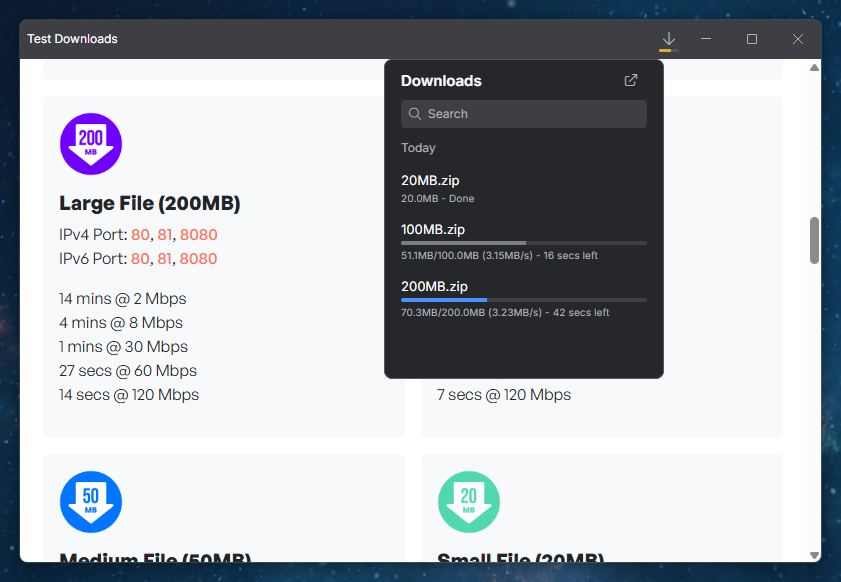
The download bar in web groups has been replaced with a "Download" button in the web group header that opens a download popup listing all downloads with controls for managing them. This provides a more compact and consistent visual experience for users when downloading files from windows participating in a web group.
⚠️ Note that the "Download" button is available only for web groups. If an io.Connect Window is inserted into a Workspace during an ongoing download, the "Download" button will disappear.
The "Download" button is enabled by default in the default platform mode and disabled by default in the advanced platform mode. It can be configured globally for all web apps via the
"enableDownloadButton"property of the"downloadSettings"object under the"windows"top-level key in thesystem.jsonsystem configuration file of io.Connect Desktop, and per app via the"enableDownloadButton"property of the"downloadSettings"object under the"details"top-level key in the app definition.The following example demonstrates enabling the "Download" button globally for all web apps:
{
    "windows": {
        "downloadSettings": {
            "enableDownloadButton": true
        }
    }
}
Platform Service Objects
The following io.Connect service objects injected in the global
windowobject of the io.Connect platform apps (e.g., dialogs, alerts, splash screen, and more) are now exposed with the following aliases:
Legacy Name New Alias glue42aboutioAboutglue42alertioAlertglue42basicAuthioBasicAuthglue42dialogioDialogglue42selectCertificateioSelectCertificateglue42splashioSplashThe legacy names have been preserved for backwards compatibility. It's highly recommended to use the new aliases in any custom platform apps you may have.
The following example demonstrates how to use the
ioDialogobject in a custom dialog app to retrieve the dialog options provided by the client app and return data back to it:// Retrieve the dialog options provided by the client app when it invokes the // `io.modals.dialogs.request()` or the `myWindow.showDialog()` methods. const { templateName, variables } = await ioDialog.getConfig(); // Apply the dialog options to the dialog UI. document.getElementById("dialog-title").textContent = variables.title; document.getElementById("dialog-message").textContent = variables.text; // Apply the current io.Connect theme. const currentTheme = ioDialog.getTheme(); document.documentElement.classList.add(currentTheme); // React to theme changes. const themeHandler = newTheme => document.documentElement.classList.replace(currentTheme, newTheme); ioDialog.onThemeChanged(themeHandler); // React to user interaction and return the result to the client app. const result = { buttonClicked: null, context: 42 }; // Determine the template of the requested dialog and react accordingly. if (templateName === "MyCustomDialog") { result.buttonClicked = { id: "confirm", text: "Confirm" }; } const clickHandler = () => ioDialog.setResult(result); document.getElementById("confirm-button").addEventListener("click", clickHandler);
Reusing Hidden App Instances
io.Connect apps can run as hidden instances (e.g., if the app is a service window, or if you want to have available instances of the app which to display later). By default, when the io.Connect platform starts an app instance, it won't look for existing hidden instances of the app to reuse.
To instruct io.Connect Desktop to reuse hidden app instances when starting apps, use the
"reuseHiddenInstances"top-level key in the app definition. When a hidden instance is reused, it will be made visible, will be focused, and its context will be updated accordingly:{ "reuseHiddenInstances": true }
Terminating Apps on Platform Shutdown
It's now possible to instruct io.Connect Desktop to preserve Node.js app processes on platform shutdown by setting the
"terminateOnShutdown"property of the"details"top-level key in the app definition totrue:{ "name": "node-server", "type": "node", "details": { "path": "%IO_CD_ROOT_DIR%/PathToMyServer/index.js", "terminateOnShutdown": false } }
Improvements & Bug Fixes
Upgraded to Electron 41.3.0 (Chromium 146).
As of
@interopio/desktop6.20, plain object validation has been made stricter across the platform which affects the app preferences data passed to the App Preferences API methods. It's no longer possible to pass anything other than a plain object as an argument to theupdate()andset()methods. This means that passing arrays, class instances, or other non-plain object values will be rejected. A newDataobject type withRecord<string, unknown> & { [n: number]: never }signature has been introduced in the App Preferences API types to reflect this change.Improved the algorithms for building Layouts on macOS by using a Chromium-style breadth-first search (BFS) algorithm to better match the display arrangement reported by the OS.
Improved the behavior of the
getIcon()andsetIcon()methods for managing window icons. ThegetIcon()method now returns the icon in the same format as it was set via thesetIcon()method (and not a processed image file as before), and thesetIcon()method has been hardened against invalid input.Improved the format in which the io.Connect Gateway exposes connection information (e.g., when queried by apps running outside the io.Connect environment).
Fixed an issue related to displaying the "Default" label in the Layouts section of theLaunchpad.
Fixed an issue related to saving changes in the Default Global Layout on exit when the Default Global Layout is empty.
Fixed an issue related to the
autoSavedownload setting and triggering the system save dialog.Fixed an issue related to io.Insights OpenTelemetry signals to avoid a possible infinite loop when publishing both trace and log signals is enabled.